
SBP Payment via API
General Description
Using the Payment Service, you can accept payments through SBP (System of Fast Payments) of the National Payment Card System (NSPK). With this payment method, instead of entering card details on the payment page in a browser, the client scans a dynamic QR code and makes the payment. If using a mobile application, the client clicks on the SBP payment button and follows a link, choosing the bank application for payment.
Payments via SBP can be routed to one or more target banks. Banks for SBP are specified in the partner settings in the Payment Service. Routing is supported in percentages (for example, 40% to bank A and 60% to bank B), as well as by some payment parameters (order amount, order features, etc.).
To enable SBP payment acceptance, change the target banks or configure routing criteria, contact technical support. To find out the current settings, use the /settings/getRouterParams.do request.
Integration Scheme
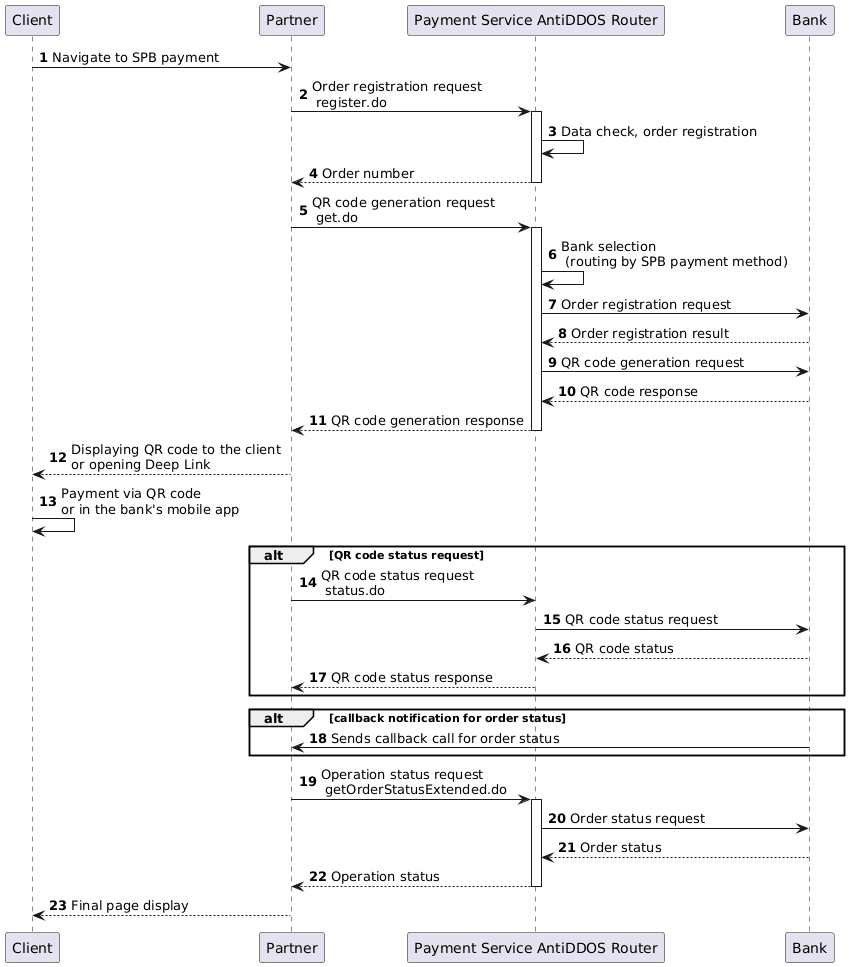
Order Registration
1. The client chooses SBP payment on the Partner's payment page or in the Partner's mobile app.
2. The Partner sends an order registration request to the Payment Service AntiDDOS Router: register.do for one-stage payment or registerPreAuth.do for two-stage payment. Peculiarities of two-phase payments via SBP are described in Two-phase payments with SBP.
Request example:
curl --request POST \
'https://api.uat.all2pay.net/v2/register.do' \
-H 'Content-Type: application/json' \
--data-raw \
'{
    "orderNumber": "order_123473",
    "amount": 1234,
    "currency": "643",
    "language": "ru",
    "returnUrl": "https://mybestmerchantreturnurl.com/success",
    "userName": "test_user",
    "password": "test_user_password",
    "clientId":"client_10001"
}'
curl --request POST \
'https://api.uat.all2pay.net/v1/register.do' \
-H 'Content-Type: application/json' \
--data-raw \
'{
"orderNumber": "order_123473",
"amount": 1234,
"currency": "643",
"language": "ru",
"returnUrl": "https://mybestmerchantreturnurl.com/success",
"userName": "test_user",
"password": "test_user_password",
"clientId":"client_10001"
}'3. The Payment Service AntiDDOS Router checks the request data and registers the order.
4. The Payment Service AntiDDOS Router returns the registered order number to the Partner.
Response example:
{
    "errorCode": "0",
    "formUrl": "https://router.rbsuat.com/wl/payment.html?mdOrder=2dc811e7-8d1c-407a-bd25-a4f41f96cc60&language=en",
    "orderId": "2dc811e7-8d1c-407a-bd25-a4f41f96cc60",
    "orderNumber": "order_123457"
}
QR Code or Deep Link Request
5. The Partner sends a QR code generation request to the Payment Service AntiDDOS Router get.do, providing the order number received in the previous step.
Request example:
curl --request POST \
'https://api.uat.all2pay.net/v2/sbp_c2b/get.do' \
-H 'Content-Type: application/json' \
--data-raw \
'{
    "userName": "test_user",
    "password": "test_user_password",
    "mdOrder": "2c04379b-03ef-7e25-b619-446807dc54c2",
    "qrFormat": "image",
    "qrHeight": 10,
    "qrWidth": 10
}'
curl --request POST \
'https://api.uat.all2pay.net/v1/sbp_c2b/get.do' \
-H 'Content-Type: application/json' \
--data-raw \
'{
"userName": "test_user",
"password": "test_user_password",
"mdOrder": "2c04379b-03ef-7e25-b619-446807dc54c2",
"qrFormat": "image",
"qrHeight": 10,
"qrWidth": 10
}'Here:
-
qrFormat— QR code format.imageindicates that a base64-encoded PNG image will be returned. Alternatively,matrixcan be specified to return a matrix as a string of 0s and 1s. -
qrHeightandqrWidth— QR code height and width in pixels, from 10 to 1000.
6. The Payment Service AntiDDOS Router selects the bank. Routing is based on the SBP payment method, not the card-issuing bank.
7-10. The Payment Service AntiDDOS Router sends bank requests for order registration and QR code generation. The bank registers the order and returns a response with the QR code.
11. The Payment Service AntiDDOS Router returns the QR code generation response to the Partner. If the order status qrStatus is STARTED, and the request included qrHeight and qrWidth, the renderedQr parameter will contain the QR code for display to the client.
Response example:
{
"payload": "https://qr.nspk.ru/7eeee1bf3c784d0a8e593ab073bcac4b",
"renderedQr": "iVBORw0K...",
"qrId": "7eeee1bf3c784d0a8e593ab073bcac4b",
"qrStatus": "STARTED"
}
Payment
12. Depending on where the payment is made, the action at this step may be one of the following:
-
On the Partner's payment page in a web browser: the Partner displays the QR code from the
renderedQrparameter to the Client.Example of embedding the QR code on a website:
<img src="data:image/png;base64,[renderedQr]"> In WebView with Partner payment page opened from mobile app: The Partner opens a link from the
payloadparameter in WebView. Whenpayloadis opened via WebView, the JS SBP widget is launched, which, when a bank is selected, forms a direct Deep Link. After that, the Deep Link should be followed.-
In the mobile app itself (the payment button is located in the Partner application, not on the payment page in WebView) there are several options:
- The Partner uses the SDK of the SBP widget so that the Client can select a bank. As a result of the selection, the SDK widget will generate a Deep Link to open.
- The Partner opens the link from the
payloadparameter in WebView. Just like when using the payment page via WebView, when openingpayloadvia WebView, the JS SBP widget is launched to form a direct Deep Link on bank selection. After that, the Deep Link should be followed.
13. The Client makes a payment using the QR code or in the selected bank's app.
Payment Status
Depending on the Partner's settings in banks, obtaining the payment status may require either a separate request or receiving a callback notification.
Requests for statuses and awaiting callbacks should be carried out during the order's validity period (30 minutes unless otherwise specified during registration). After this time, the QR code will be canceled.
The Partner can independently cancel the QR code before the specified expiration time using the reject.do method, for example, if the Client decides to choose another payment method or cancel the purchase.
Status Request
14. The Partner periodically sends a QR code status request to the Payment Service AntiDDOS Router status.do.
Request example:
curl --request POST \
'https://api.uat.all2pay.net/v2/sbp_c2b/status.do' \
-H 'Content-Type: application/json' \
--data-raw \
'{
    "userName": "test_user",
    "password": "test_user_password",
    "mdOrder": "2c04379b-03ef-7e25-b619-446807dc54c2",
}'
curl --request POST \
'https://api.uat.all2pay.net/v1/sbp_c2b/status.do' \
-H 'Content-Type: application/json' \
--data-raw \
'{
"userName": "test_user",
"password": "test_user_password",
"mdOrder": "2c04379b-03ef-7e25-b619-446807dc54c2",
}'15-16. The Payment Service AntiDDOS Router requests the QR code status from the Bank. The Bank returns the QR code status.
17. The Payment Service AntiDDOS Router returns the QR code status response to the Partner. If the order status transactionState indicates that payment has been made (DEPOSITED), proceed to step 19. If the status is CREATED, return to step 14.
Response example:
{
    "mdOrder": "f20a896f-07e8-492e-8c38-28c1ffe69124",
    "oldStatus": "STARTED",
    "payload": "https://qr.nspk.ru/106c2bfcbd904e0abd6197ac67dee2b6",
    "qrStatus": "STARTED",
    "qrType": "DYNAMIC",
    "transactionState": "CREATED",
    "transactionStateExtension": "SBP_C2B_STARTED"
}
Receiving Status via Callback Notification
18. The Bank sends a callback notification to the Partner for the order status. To use callback notifications, the Partner must have the corresponding permissions in the bank. Static notifications are sent to the address specified in the Partner’s bank settings. Dynamic notifications are sent to the address specified in the dynamicCallbackUrl during order registration. More details can be found on the Callback Notifications page.
Display Final Order Status
19. The Partner sends an operation status request to the Payment Service AntiDDOS Router getOrderStatusExtended.do.
20-22. The Payment Service AntiDDOS Router retrieves the final order status from the Bank and returns it to the Partner.
23. The Partner redirects the Client to the final page displaying the payment result.
Account Binding via SBP (Subscriptions)
SBP subscriptions are a mechanism that enables automatic regular payments for services or goods without the need to re-enter data. Subscriptions are used to simplify the payment process, especially for services with recurring payments, such as subscriptions to streaming platforms, utility bill payments, etc.
SBP subscriptions are functionally similar to regular stored credentials, but instead of card data, the bank and account identifiers returned by the payment system upon subscription creation are packed in the subscription. Payments via a subscription are routed differently depending on the payment way. Learn more below at Paying with SBP subscription.
The Payment Service AntiDDOS Router supports storing binding data in the following ways:
- On the bank's side. The subscriptions are saved in the bank's system on Partner's request.
- On the Partner's side. Partners save the subscriptions in their own system.
Creating an SBP Subscription
A subscription can be created via API in one of the following ways:
- When paying for an order. In this scenario, the subscription will only be created if the client agrees to it during the payment process.
- As a separate order without payment. This scenario is specifically designed for subscription creation.
Creating a Subscription for SBP with Payment
To create an SBP subscription with order payment:
1. The Partner sends a request to register an order using register.do or registerPreAuth.do. The request must include the following parameters:
- clientId — the identifier of the client for whom the subscription is being created.
- An additional parameter subscritionPurpose — this can be any non-empty value.
Example request:
curl -X POST 'https://api.uat.all2pay.net/v2/register.do'
-H 'Content-Type: application/json' \
--data-raw '{
    "orderNumber": "order_123508",
    "amount": 10000,
    "currency": "643",
    "language": "ru",
    "returnUrl": "https://mybestmerchantreturnurl.com/success",
    "failUrl": "https://mybestmerchantreturnurl.com/fail",
    "userName": "test_user",
    "password": "test_user_password",
    "clientId": "101023",
    "jsonParams": {
        "subscriptionPurpose": "test subscription"
    }
}'
curl -X POST 'https://api.uat.all2pay.net/v1/register.do'
-H 'Content-Type: application/json' \
--data-raw '{
"orderNumber": "order_123508",
"amount": 10000,
"currency": "643",
"language": "ru",
"returnUrl": "https://mybestmerchantreturnurl.com/success",
"failUrl": "https://mybestmerchantreturnurl.com/fail",
"userName": "test_user",
"password": "test_user_password",
"clientId": "101023",
"jsonParams": {
"subscriptionPurpose": "test subscription"
}
}'2. When the client selects SBP payment, the Partner must send a request to retrieve the QR code using get.do. The request must include the parameter createSubscription, indicating the need to create a subscription.
Example request:
curl -X POST 'https://api.uat.all2pay.net/v2/sbp_c2b/get.do' \
-H 'Content-Type: application/json'
--data-raw '{
    "mdOrder": "861bf60b-ac9d-423c-9a23-94b2c4cb57dc",
    "qrFormat": "image",
    "qrHeight": 10,
    "qrWidth": 10,
    "userName": "test_user",
    "password": "test_user_password",
    "createSubscription": "true"
}'
curl -X POST 'https://api.uat.all2pay.net/v1/sbp_c2b/get.do' \
-H 'Content-Type: application/json'
--data-raw '{
"mdOrder": "861bf60b-ac9d-423c-9a23-94b2c4cb57dc",
"qrFormat": "image",
"qrHeight": 10,
"qrWidth": 10,
"userName": "test_user",
"password": "test_user_password",
"createSubscription": "true"
}'The rest of the payment process is the same as for SBP payment via API.
Creating an SBP Subscription Without Payment
To create a subscription without payment:
1. Specify the following parameters in the order registration request:
- clientId — client identifier.
- "features": ["VERIFY"] — this parameter allows registering an order with a zero amount. The Partner must pre-approve the use of this value with the bank that will process SBP payments.
- subscritionPurpose — subscription purpose, any non-empty string.
Example request:
curl -X POST 'https://api.uat.all2pay.net/v2/register.do'
-H 'Content-Type: application/json' \
--data-raw '{
    "orderNumber": "order_123527",
    "amount": 0,
    "currency": "643",
    "language": "ru",
    "returnUrl": "https://mybestmerchantreturnurl.com/success",
    "failUrl": "https://mybestmerchantreturnurl.com/fail",
    "userName": "test_user",
    "password": "test_user_password",
    "clientId": "101023",
    "features": ["VERIFY"],
    "jsonParams": {
        "subscriptionPurpose": "test subscription"
    }
}'
curl -X POST 'https://api.uat.all2pay.net/v1/register.do'
-H 'Content-Type: application/json' \
--data-raw '{
"orderNumber": "order_123527",
"amount": 0,
"currency": "643",
"language": "ru",
"returnUrl": "https://mybestmerchantreturnurl.com/success",
"failUrl": "https://mybestmerchantreturnurl.com/fail",
"userName": "test_user",
"password": "test_user_password",
"clientId": "101023",
"features": ["VERIFY"],
"jsonParams": {
"subscriptionPurpose": "test subscription"
}
}'2. Add the createSubscription parameter in the QR code request sent to get.do.
Refer to the request example in the scenario for creating a subscription with payment above.
The rest of the process is the same as for SBP payment via API.
Retrieving the Identifier of the Created Subscription
The identifier of the subscription created on the bank's side is returned to the partner in the order status request getOrderStatusExtended.do in the bindingId parameter.
List of SBP Subscriptions
The Partner can request a list of all SBP subscriptions using the /sbp_c2b/getBindings.do method. It returns active SBP subscriptions of the client and information on them from all banks where the Partner has SBP payments configured. SBP subscriptions have the type "bindingType": "SBP_C2B".
Among the subscription parameters, not only bindingId is returned, but also the sbpSubscriptionToken and sbpMemberId parameters. These can be used to route payments with subscription to any of the Partner's SBP banks, and not just the one where the stored credential was created — see Paying with SBP subscription.
Request example:
curl -X POST 'https://api.uat.all2pay.net/v2/sbp_c2b/getBindings.do' -H 'Content-Type: application/json' \
--data-raw '{
    "userName": "test_user",
    "password": "test_user_password",
    "clientId": "101023"
}'
curl -X POST 'https://api.uat.all2pay.net/v1/sbp_c2b/getBindings.do' -H 'Content-Type: application/json' \
--data-raw '{
"userName": "test_user",
"password": "test_user_password",
"clientId": "101023"
}'Response example:
{
    "errorCode": "0",
    "bindings": [
     {
      "bankName": "Alfa Bank",
      "bindingId": "d8a8eeb8-67df-7fb8-9277-5b0d07dc54c2",
      "bindingType": "SBP_C2B",
      "clientId": "259753456",
      "createdDate": 1734521975150,
      "displayLabel": "Alfa Bank",
      "gwId": "BANKSOYUZ",
      "sbpMemberId": "100000000008",
      "sbpSubscriptionPurpose": "test sbp subscription",
      "sbpSubscriptionToken": "58c6ec02e3434130aeb7930a99a78552"
    }
    ]
}
Note that SBP subscriptions will not be returned in getBindings.do with other stored credentials.
Paying with SBP Subscription
Before calling a payment method, make sure to register an order by calling register.do or registerPreAuth.do with description parameter.
There are two ways to pay with SBP subscription:
Payment via bindingId
To make payment with the subscription's bindingId, call paymentOrderBinding.do just like when paying with stored credentials. This payment will be routed to the bank where the subscription is held.
You can find bindingId after creation or in the list of SBP subscriptions.
For an example of the request, see: ECom binding payment via API.
Payment via sbpSubscriptionToken
To make payment with sbpSubscriptionToken, call paymentOrder.do. This payment will be routed to one of the Partner's SBP banks according to the routing settings.
Make sure to pass both sbpSubscriptionToken and sbpMemberId parameters in the request. They can be found in the list of SBP subscriptions.
Request example:
curl --request POST --url 'https://api.uat.all2pay.net/v2/paymentOrder.do' \
--header 'Content-Type: application/json' \
--data-raw '{
    "userName": "test_user",
    "password": "test_user_password",
    "mdOrder": "ec52097f-f9c5-42bc-8676-910c4066f1c1",
    "sbpMemberId": "110000000005",
    "sbpSubscriptionToken": "58c6ec02e3434130aeb7930a99a78552"
}'
curl --request POST --url 'https://api.uat.all2pay.net/v1/paymentOrder.do' \
--header 'Content-Type: application/json' \
--data-raw '{
"userName": "test_user",
"password": "test_user_password",
"mdOrder": "ec52097f-f9c5-42bc-8676-910c4066f1c1",
"sbpMemberId": "110000000005",
"sbpSubscriptionToken": "58c6ec02e3434130aeb7930a99a78552"
}'Deleting the subscription
To delete the SBP subscription, use the /sbp_c2b/unBind.do method. The Payment service will automatically define the bank where the subscription is stored.
Storing SBP subscriptions on the Partner's side
The Partner can store the SBP subscription parameters sbpSubscriptionToken and sbpMemberId in their system. In this case, just use them for payment via sbpSubscriptionToken in the same way as if they were stored in the bank.
Two-phase payments with SBP
An order is considered a two-phase if it is registered with registerPreAuth.do method.
SBP does not support two-phase payments, but it is possible to pay for two-phase orders via the SBP through the Payment Service. This requires a specific permission in the banks to which you route SBP payments. This permission will not make the payment two-phase, it only allows you to pay for a two-phase order using the usual SBP payment, via redirect or via API.
A two-phase order paid via SBP is captured immediately after payment: its status becomes DEPOSITED (not APPROVED, as would be at a regular two-phase payment). In this case, the funds will be are immediately debited from the Client's account; you do not need to execute /deposit.do.
To cancel such orders, use the /refund.do method.
Example
A gas station uses a two-phase payment to pre-authorize funds on the customer's account and then capture the amount for the actual fuel dispensed (it may differ from the pre-authorized amount).
In the gas station's app, the customer can pay for orders by card or via SBP. It is not known in advance which payment method the customer will choose. Therefore, the order is registered as a two-phase order; after paying by card, the standard operations /deposit.do and /reverse.do are called. But if the customer decides to pay for the order via SBP, then the funds are immediately debited from the account (/deposit.do is not required), and /refund.do is used to adjust the amount.