
SBP Payment via Redirect
The payment service AntiDDOS Router supports SBP payments via the payment page.
Payments via SBP can be routed to one or more target banks. Banks for SBP are specified in the partner settings in the Payment Service. Routing is supported in percentages (for example, 40% to bank A and 60% to bank B), as well as by some payment parameters (order amount, order features, etc.).
To enable SBP payment acceptance, change the target banks or configure routing criteria, contact technical support. To find out the current settings, use the /settings/getRouterParams.do request.
Integration Diagram
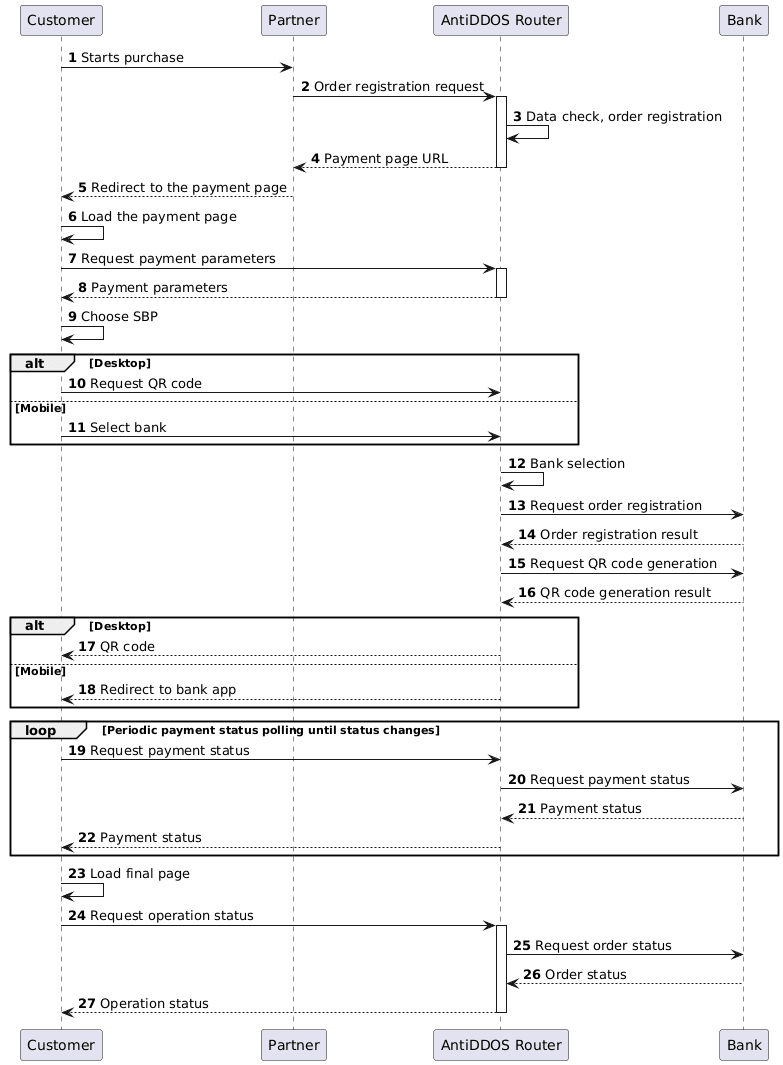
Enable SBP on the payment page
Specify "SBP_C2B" value in the "allowedPaymentWays" parameter of the registration request to make the SBP payment method available on the Payment service's payment page. Below is an example of such a request.
1. The customer initiates a purchase of goods or services on the Partner's website.
2. The Partner sends an order registration request to the Payment Service AntiDDOS Router: register.do for single-stage payment or registerPreAuth.do for two-stage payment. Peculiarities of two-phase payments via SBP are described in Two-phase payments with SBP.
To ensure the SBP payment method button appears on the payment page, the "SBP_C2B" payment method must be included in the allowedPaymentWays parameter when registering the order.
Example request:
curl -X POST 'https://api.uat.all2pay.net/v2/register.do'
-H 'Content-Type: application/json' \
--data-raw '{
    "orderNumber": "order_123508",
    "amount": 10000,
    "currency": "643",
    "language": "ru",
    "returnUrl": "https://mybestmerchantreturnurl.com/success",
    "failUrl": "https://mybestmerchantreturnurl.com/fail",
    "userName": "test_user",
    "password": "test_user_password",
    "allowedPaymentWays": [
        "SBP_C2B",
        "CARD_BINDING",
        "CARD"
    ]
}'
curl -X POST 'https://api.uat.all2pay.net/v1/register.do'
-H 'Content-Type: application/json' \
--data-raw '{
"orderNumber": "order_123508",
"amount": 10000,
"currency": "643",
"language": "ru",
"returnUrl": "https://mybestmerchantreturnurl.com/success",
"failUrl": "https://mybestmerchantreturnurl.com/fail",
"userName": "test_user",
"password": "test_user_password",
"allowedPaymentWays": [
"SBP_C2B",
"CARD_BINDING",
"CARD"
]
}'3. The Payment Service AntiDDOS Router verifies the Partner's data and registers the order.
Redirect to the payment page
4. The Payment Service AntiDDOS Router sends the Partner a link to the payment page.
Example response:
{
    "errorCode": "0",
    "formUrl": "https://router.rbsuat.com/wl/payment.html?mdOrder=f9584546-2613-4a0d-896f-0194d243865f&language=ru",
    "orderId": "f9584546-2613-4a0d-896f-0194d243865f",
    "orderNumber": "order_123508"
}
5. The Partner redirects the Customer to the payment page.
SBP payment
6. The Customer accesses the payment page.
7. The Customer (via the payment page) requests payment parameters from the Payment Service.
8. The Payment Service AntiDDOS Router provides the payment page with data on available payment methods.
9. The Customer selects the SBP payment method (QR code).

10. (Option) When paying from desktop, the Customer requests a QR code from the Payment Service.
11. (Option) When paying through the mobile application, the Customer selects the bank in which their account is held and from which they wish to make the payment.
- The bank app must be installed on the Client's device, otherwise the selection won't work until the Client selects a bank with app installed.
- Depending on the bank chosen by the Client, AntiDDOS Router can select the most suitable acquiring bank on its side. For example, if the Client's bank is among the Partner's acquiring banks, routing rules can be configured so that AntiDDOS Router selects the same acquiring bank that the client chose. This way, the SBP transfer takes place within the same bank, which reduces the transfer fee.
12. The Payment Service AntiDDOS Router selects the appropriate bank based on routing rules.
13-16. The Payment Service AntiDDOS Router sends an order registration and QR requests to the selected bank, then gets the responses to those requests.
16. (Option) When paying from desktop, the Payment Service AntiDDOS Router sends the QR code to the Customer's payment page.

18. (Option) When paying from a mobile device, the Payment service AntiDDOS Router redirects the Customer to the selected bank's application or to the webpage of the online bank (depending on the bank's settings in SBP).
19-22. The Customer (via the payment page) periodically requests the payment status from the Payment Service. If the status changes, proceed to step 21.
23. After the payment status changes, the Payment Service AntiDDOS Router redirects the Customer to the final page depending on the payment result: in case of an error, to failUrl; in case of successful payment, to returnUrl. A query parameter orderId=[order ID in the Payment Service] will be added to the URL.
Final status of the order
24. The Customer (via the final page) requests the final operation status from the Payment Service using the getOrderStatusExtended.do method.
25-27. The Payment Service AntiDDOS Router requests the order status from the bank and sends it to the Customer's final page.