
Payment via Alfa Pay API
The payment service AntiDDOS Router supports payments via Alfa Pay API. Until other acquiring banks support this payment method, Alfa Pay payments are possible only through Alfa-Bank.
The bank for Alfa Pay must be specified in the Partner's settings in the Payment service. To change the settings, contact support. To find out the current settings, use the /settings/getRouterParams.do request.
Integration Scheme
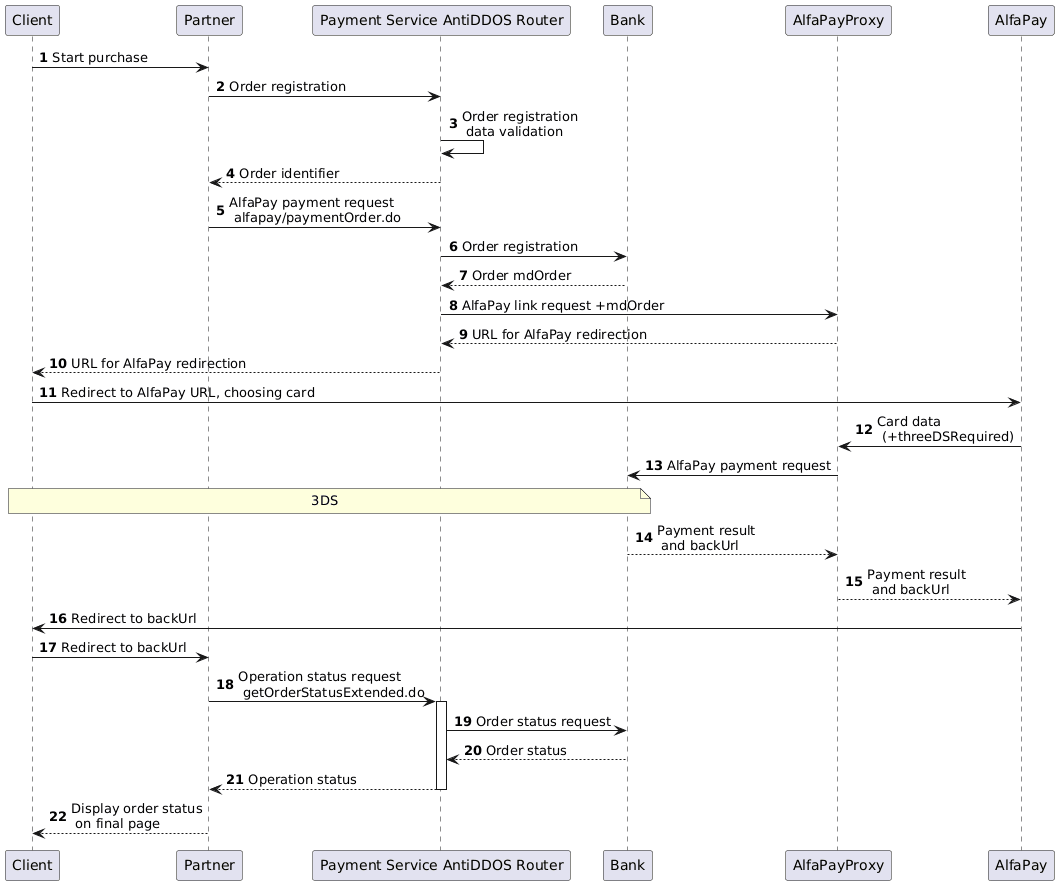
Order Registration
1. The client initiates the purchase of a product or service on the Partner’s website.
2. The Partner sends a request for order registration to the Payment service AntiDDOS Router: register.do for one-step payment or registerPreAuth.do for two-step payment. More details about these types of payments are available in the section Two-Phase Payments.
Example request:
curl --request POST \
'https://api.uat.all2pay.net/v2/register.do' \
-H 'Content-Type: application/json' \
--data-raw \
'{
    "orderNumber": "order_123473",
    "amount": 1234,
    "currency": "643",
    "language": "ru",
    "returnUrl": "https://mybestmerchantreturnurl.com/success",
    "userName": "test_user",
    "password": "test_user_password",
    "clientId":"client_10001"
}'
curl --request POST \
'https://api.uat.all2pay.net/v1/register.do' \
-H 'Content-Type: application/json' \
--data-raw \
'{
"orderNumber": "order_123473",
"amount": 1234,
"currency": "643",
"language": "ru",
"returnUrl": "https://mybestmerchantreturnurl.com/success",
"userName": "test_user",
"password": "test_user_password",
"clientId":"client_10001"
}'3. The Payment service AntiDDOS Router validates the data and registers the order.
4. The Payment service AntiDDOS Router sends the order identifier to the Partner.
Example response:
{
    "errorCode": "0",
    "formUrl": "https://router.rbsuat.com/wl/payment.html?mdOrder=2dc811e7-8d1c-407a-bd25-a4f41f96cc60&language=en",
    "orderId": "2dc811e7-8d1c-407a-bd25-a4f41f96cc60",
    "orderNumber": "order_123457"
}
Order Payment
5. The Partner sends a payment request to the Payment service AntiDDOS Router /alfapay/paymentOrder.do.
Example request:
curl --request POST \
'https://api.uat.all2pay.net/v2/alfapay/paymentOrder.do' \
--header 'Content-Type: application/json' \
--data '{
    "language": "ru",
    "orderId": "d02ea238-be2b-4ea8-b940-fd8833a7000f",
    "userName": "test_user",
    "password": "test_user_password",
}'
curl --request POST \
'https://api.uat.all2pay.net/v1/alfapay/paymentOrder.do' \
--header 'Content-Type: application/json' \
--data '{
"language": "ru",
"orderId": "d02ea238-be2b-4ea8-b940-fd8833a7000f",
"userName": "test_user",
"password": "test_user_password",
}'6. The Payment service AntiDDOS Router registers the order with the bank intended for Alfa Pay.
7. The bank provides the Payment service AntiDDOS Router with the order identifier at the bank.
8. The Payment service AntiDDOS Router requests the Alfa Pay link from the proxy.
9. The Alfa Pay proxy informs the bank about the start of the payment, obtains the Alfa Pay link, and returns it to the Payment service AntiDDOS Router.
10. The Payment service AntiDDOS Router forwards the Alfa Pay link to the payment page.
Example response:
{
    "data": {
    "orderId": "4c47056e-5ce7-4b62-989d-940a49e769f6",
    "redirect": "https://test-alfa-mobile.alfabank.ru/mobile/api/v1/goto-alfapay/alfapay?orderId=85af6430-9f86-7.....1hMzM5LWM2YzMwMTM2NjEwOA=="
    },
    "success": true
}
11. The client navigates to the Alfa Pay page and selects a card for payment.
12. The acquiring bank sends the card data to the Alfa Pay proxy. Additionally, it indicates whether 3DS authentication is required.
13. The Alfa Pay proxy processes the payment with the bank. If 3DS was required, the client goes through 3DS authentication — see steps for 3DS Authentication.
14. The bank returns the payment status to the Alfa Pay proxy.
15. The Alfa Pay proxy communicates the payment result to the Alfa Pay page.
16. The Alfa Pay page redirects the client to the payment result page. Depending on the payment result, this is either the failUrl or the returnUrl.
17. The client navigates to the specified address.
Final Payment Status Display
18. The Partner sends an operation status request to the Payment service AntiDDOS Router getOrderStatusExtended.do.
19-21. The Payment service AntiDDOS Router requests the order status from the bank and sends it to the Partner.
22. The Partner displays the operation status to the Client on the final page.