
Direct Payments via API
General Description
In this scenario, the payment page of the Payment Service is not used. Payment is made using API requests. The partner needs to implement their own payment page to collect card data via their website.
For the payment, it is possible to send card data, an encrypted token, or stored credential ID to the AntiDDOS Router Payment Service.
There are two integration options:
- Two requests — one for order registration, another for order payment. In this case, repeated attempts to pay for the order in case of failure are possible. For example, the client can choose another payment method or card/token.
- One request — registration and payment in a single request. In this case, repeated attempts to pay for the same order (with the same
orderNumber) are not supported.
Two-Request Integration Scheme
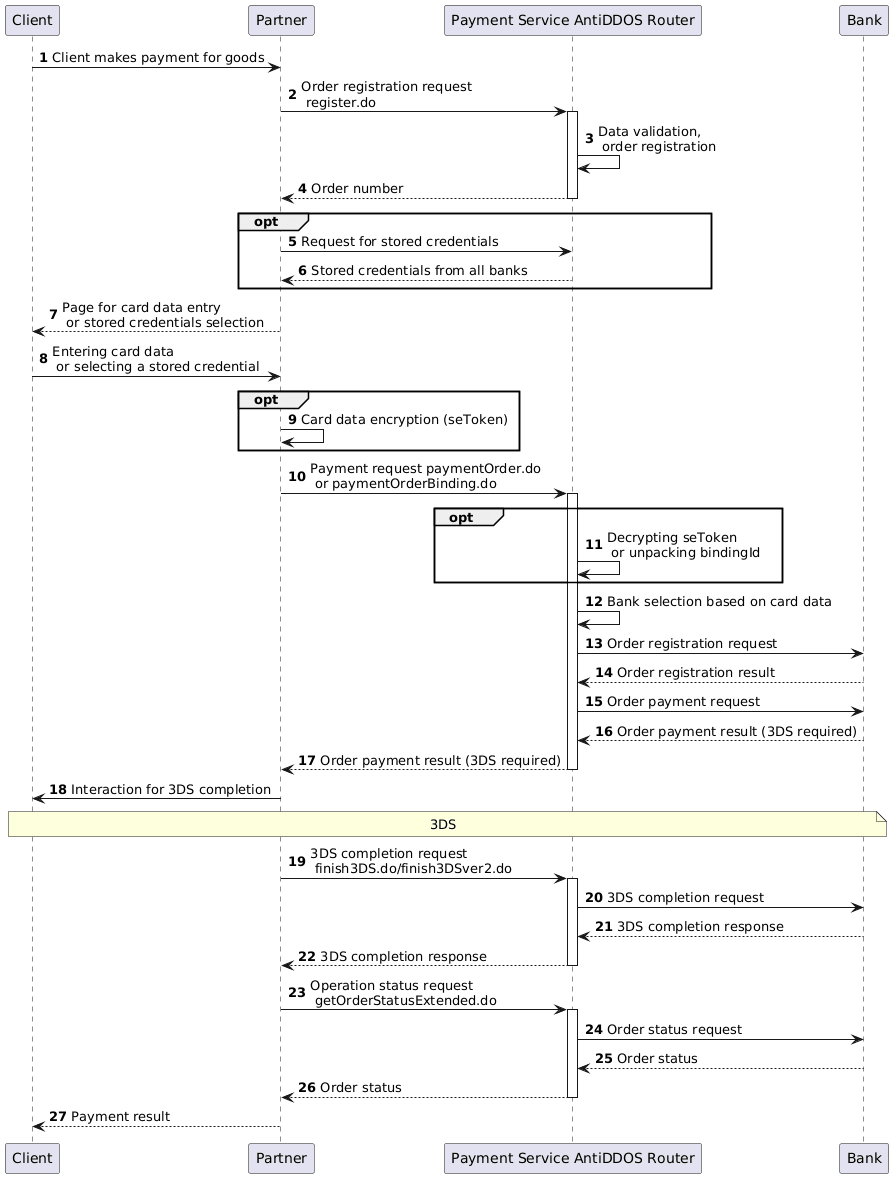
Order Registration
1. The client has selected a product (cart is formed, all additional confirmations on the Partner's side have been completed).
2. The Partner sends an order registration request to the AntiDDOS Router Payment Service: register.do for single-stage payment or registerPreAuth.do for two-stage payment. For more details on these types of payments, see Two-Stage Payments.
Request example:
curl --request POST \
    'https://api.uat.all2pay.net/v2/register.do' \
    -H 'Content-Type: application/json' \
    --data-raw \
    '{
    "orderNumber": "order_123473",
    "amount": 1234,
    "currency": "643",
    "language": "ru",
    "returnUrl": "https://mybestmerchantreturnurl.com/success",
    "userName": "test_user",
    "password": "test_user_password",
    "clientId":"client_10001"
}'
curl --request POST \
'https://api.uat.all2pay.net/v1/register.do' \
-H 'Content-Type: application/json' \
--data-raw \
'{
"orderNumber": "order_123473",
"amount": 1234,
"currency": "643",
"language": "ru",
"returnUrl": "https://mybestmerchantreturnurl.com/success",
"userName": "test_user",
"password": "test_user_password",
"clientId":"client_10001"
}'3. The AntiDDOS Router Payment Service validates the input data and registers the order.
4. The AntiDDOS Router Payment Service returns the registered order number orderId to the Partner.
Response example:
{
    "errorCode": "0",
    "formUrl": "https://router.rbsuat.com/wl/payment.html?mdOrder=2dc811e7-8d1c-407a-bd25-a4f41f96cc60&language=en",
    "orderId": "2dc811e7-8d1c-407a-bd25-a4f41f96cc60",
    "orderNumber": "order_123457"
}
(Optional) Obtaining Stored Credentials
5-6. (Optional) The Partner requests stored credentials from the AntiDDOS Router Payment Service via getBindings.do. The AntiDDOS Router Payment Service requests stored credentials from all banks and returns them to the Partner.
These steps are performed if the Partner uses stored credentials, and the payment data are stored on the bank's side. If the Partner stores credentials on their side, these steps should be skipped. More details on stored credentials, their storage methods, related limitations, and features for creating and paying orders can be found on the page Stored credentials.
Collecting and Sending Card Data
7. The Partner directs the client to a page for entering card details.
8. The client provides card details or selects a stored credential (if the Partner uses stored credentials, see steps 5-6).
9. If a stored credential was selected on the previous step, proceed to step 10. If the client provided card details, the Partner may generate a seToken as described in the section Generating seToken.
10. The Partner sends a payment request to the AntiDDOS Router Payment Service:
- For card payments paymentOrder.do. Either an encrypted seToken or card details are to be passed.
- For payments using payment data stored on the bank’s side paymentOrderBinding.do. The ID of the stored credential (
bindingId) is to be passed.
Request example using seToken:
curl --request POST --url 'https://api.uat.all2pay.net/v2/paymentOrder.do' \
    --header 'Content-Type: application/json' \
    --data-raw '{
    "userName": "test_user",
    "password": "test_user_password",
    "cardholderName": "TEST CARDHOLDER",
    "cvc": "123",
    "seToken": "RJ7Pzbt...",
    "mdOrder": "2dc811e7-8d1c-407a-bd25-a4f41f96cc60"
}'
curl --request POST --url 'https://api.uat.all2pay.net/v1/paymentOrder.do' \
--header 'Content-Type: application/json' \
--data-raw '{
"userName": "test_user",
"password": "test_user_password",
"cardholderName": "TEST CARDHOLDER",
"cvc": "123",
"seToken": "RJ7Pzbt...",
"mdOrder": "2dc811e7-8d1c-407a-bd25-a4f41f96cc60"
}'Request example using card details:
curl --request POST --url 'https://api.uat.all2pay.net/v2/paymentOrder.do'
--header 'Content-Type: application/json' \
--data-raw '{
    "userName": "test_user",
    "password": "test_user_password_",
    "mdOrder": "f44a15a2-765e-44b7-a223-489ee61359c1",
    "cardholderName": "TEST CARDHOLDER",
    "cvc": "123",
    "month": "12",
    "pan": "4343821200124342",
    "year": "2024"
}'
curl --request POST --url 'https://api.uat.all2pay.net/v1/paymentOrder.do'
--header 'Content-Type: application/json' \
--data-raw '{
"userName": "test_user",
"password": "test_user_password_",
"mdOrder": "f44a15a2-765e-44b7-a223-489ee61359c1",
"cardholderName": "TEST CARDHOLDER",
"cvc": "123",
"month": "12",
"pan": "4343821200124342",
"year": "2024"
}'11. (Optional) The AntiDDOS Router Payment Service decrypts the seToken using its private key.
12. Based on card data, the AntiDDOS Router Payment Service selects a bank according to its rules.
13-16. The AntiDDOS Router Payment Service sends requests to the bank for order registration and payment. The bank returns the results of registration and payment (in the diagram — 3DS required).
Response to Payment Request
17. The AntiDDOS Router Payment Service sends the response to the Partner for the payment request. If the payment is processed without 3DS, the response includes a link for redirecting the client: failUrl or returnUrl from the order registration request, and Steps 18-22 are skipped. Otherwise, proceed with Steps 18-22 for 3DS completion.
There can be three possible responses:
- Example of a response without 3DS (
is3DSVer2 == false, error code 0, noacsUrlorpaReq, transaction status is final):
{
    "errorCode": 0,
    "info": "Your payment has been processed, redirecting...",
    "is3DSVer2": false,
    "mdOrder": "2dc811e7-8d1c-407a-bd25-a4f41f96cc60",
    "redirect": "https://mybestmerchantreturnurl.com/success?orderId=2dc811e7-8d1c-407a-bd25-a4f41f96cc60&lang=ru",
    "transactionState": "DEPOSITED"
}- Example of a response with 3DSv1 (
is3DSVer2 == false,acsUrlandpaReqpresent, transaction status is initial):
{
    "acsUrl": "https://api.uat.all2pay.net/v2/start3DSv1.do",
    "errorCode": 0,
    "info": "Your payment has been processed, redirecting...",
    "is3DSVer2": false,
    "mdOrder": "81cc3e27-b313-46a1-8d5d-9836ff713050",
    "paReq": "eJxVUtty...",
    "termUrl": "https://api.uat.all2pay.net/v2/finish3DSv1.do",
    "transactionState": "CREATED"
}- Example of a response with 3DSv2 (
is3DSVer2 == true):
{
    "errorCode": 0,
    "is3DSVer2": true,
    "mdOrder": "ab39552e-f9cf-4fa4-9af7-b4266efd85f4",
    "threeDSMethodDataPacked": "eyJ0aHJlZURTTWV0aG9kTm90aWZpY2F0aW9uVVJMIjoiaHR0cHM6Ly9hY3F1aXJlci5jb20vM2Rzc2VydmVyL2FwaS92MS9hY3Mvbm90aWZpY2F0aW9uP3RocmVlRFNTZXJ2ZXJUcmFuc0lEPTNhZmMxNjhhLTk0YjQtNGViMy04ZTJlLTgwZjZjMTg2NjY5ZCIsInRocmVlRFNTZXJ2ZXJUcmFuc0lEIjoiM2FmYzE2OGEtOTRiNC00ZWIzLThlMmUtODBmNmMxODY2NjlkIn0=",
    "threeDSMethodURL": "https://web.rbsuat.com/acs2/acs/3dsMethod",
    "threeDSMethodURLServer": "https://web.rbsuat.com/3dsserver/api/v1/client/gather?threeDSServerTransID=03c0287a-f08f-4820-aa9e-2f985323588a",
    "threeDSServerTransId": "03c0287a-f08f-4820-aa9e-2f985323588a"
}
3DS Completion
3DS Not Required
If the payment response indicates that 3DS is not required, proceed to Step 23 for requesting and displaying the final order status.
3DS v1
18. The Partner interacts with the Client to complete 3DS. See Redirect to ACS.
19. The Partner sends a 3DS completion request to the AntiDDOS Router Payment Service finish3dsPayment.do.
Request example:
curl --request POST --url 'https://api.uat.all2pay.net/v2/finish3dsPayment.do' \
--header 'Content-Type: application/json' \
--data-raw '{
    "mdOrder": "ee70f9a2-cb36-4961-a13b-b3dc24a44649",
    "paRes": "eJydVtuSoN...",
    "userName": "test_user",
    "password": "test_user_password"
}'
curl --request POST --url 'https://api.uat.all2pay.net/v1/finish3dsPayment.do' \
--header 'Content-Type: application/json' \ \n--data-raw '{
"mdOrder": "ee70f9a2-cb36-4961-a13b-b3dc24a44649",
"paRes": "eJydVtuSoN...",
"userName": "test_user",
"password": "test_user_password"
}'Response example:
{
    "errorCode": 0
}
20-22 The payment service AntiDDOS Router receives a response from the Bank and returns it to the Partner regarding the request to complete 3DS.
3DS v2
18. The Partner interacts with the Client to pass 3DS v2:
18.1. If the parameter threeDSMethodURLServer was included in the response to the first payment request, the Partner should call this URL using the POST method in a separate frame. This allows the 3DS server to collect the client's browser data.
Example code:
<html>
<head><title>3DS Method</title></head>
<body>
    <script>
        // Replace with the actual URL received in the payment request response
        const threeDSMethodURLServer = 'https://example.com';

        const iframe = document.createElement('iframe');
        iframe.style.cssText = 'width: 0; height: 0; border: none;';

        const html = `
            <form
                id="threeDsMethodTo3DSServer"
                method="post"
                action="${threeDSMethodURLServer}">
            </form>
        `;

        document.body.append(iframe);

        if (iframe.contentWindow) {
            iframe.contentWindow.document.open();
            iframe.contentWindow.document.write(html);
            (iframe.contentWindow.document.forms['threeDsMethodTo3DSServer']).submit();
        }
    </script>
</body>
</html>
The expected response is HTTP 200 with no body.
18.2. If the parameters threeDSMethodURL and threeDSMethodDataPacked were included in the response to the first payment request, this means 3DS Method must be executed on the issuer's ACS server. For this, the Partner should call threeDSMethodURL using the POST method in a separate "iframe". In this method, the value of the threeDSMethodDataPacked parameter received in the payment request response needs to be passed. It should be sent in a parameter named threeDSMethodData.
Example code:
<html>
<head><title>3DS Method to ACS</title></head>
<body>
    <script>
        // Replace with the actual values received in the payment request response
        const threeDSMethodURL = 'https://example.com';
        const threeDSMethodDataPacked = 'your_data';

        const iframe = document.createElement('iframe');
        iframe.style.cssText = 'width: 0; height: 0; border: none;';

        const html = `
            <form id="threeDsMethodToACS"
                method="post"
                action="${threeDSMethodURL}">
                <input type="hidden" name="threeDSMethodData" value="${threeDSMethodDataPacked}">
            </form>
        `;

        document.body.append(iframe);

        if (iframe.contentWindow) {
            iframe.contentWindow.document.open();
            iframe.contentWindow.document.write(html);
            (iframe.contentWindow.document.forms['threeDsMethodToACS']).submit();
        }
    </script>
</body>
</html>
The expected response is HTTP 200 with no body.
18.3. The Partner makes a repeated payment request (in a two-step payment card scenario — paymentOrder.do, in other scenarios the request may be different) with the same data, adding an additional parameter threeDSServerTransId from the first request response. The minimum delay before sending the second request is 10 seconds after the first payment request. This time is required for the calls described in steps 16.1 and 16.2 to be processed on the 3DS and ACS servers. This ensures all necessary data for the repeated payment request response is prepared.
Request example:
curl --request POST --url 'https://api.uat.all2pay.net/v2/paymentOrder.do'
--header 'Content-Type: application/json' \
--data-raw '{
    "userName": "test_user",
    "password": "test_user_password_",
    "mdOrder": "f44a15a2-765e-44b7-a223-489ee61359c1",
    "cardholderName": "TEST CARDHOLDER",
    "cvc": "123",
    "month": "12",
    "pan": "4343821200124342",
    "year": "2024",
    "threeDSServerTransId":"c9f26542-6b31-4b1e-b9e6-019d4339a75f"
}'
curl --request POST --url 'https://api.uat.all2pay.net/v1/paymentOrder.do'
--header 'Content-Type: application/json' \
--data-raw '{
"userName": "test_user",
"password": "test_user_password_",
"mdOrder": "f44a15a2-765e-44b7-a223-489ee61359c1",
"cardholderName": "TEST CARDHOLDER",
"cvc": "123",
"month": "12",
"pan": "4343821200124342",
"year": "2024",
"threeDSServerTransId":"c9f26542-6b31-4b1e-b9e6-019d4339a75f"
}'Response example:
{
    "acsUrl": "https://web.rbsuat.com/acs2/acs/creq",
    "errorCode": 0,
    "info": "Your payment has been processed, redirecting...",
    "is3DSVer2": true,
    "mdOrder": "f44a15a2-765e-44b7-a223-489ee61359c1",
    "packedCReq": "eyJ0a...",
    "threeDSServerTransId": "7bba6753-7ff3-4241-ab58-f152f1399d65",
    "transactionState": "CREATED"
}
18.4. If the response contains acsUrl, a redirect to ACS is performed.
19. The Partner sends a completion request for 3DS v2 to the Payment Service AntiDDOS Router finish3dsVer2Payment.do.
Request example:
curl --request POST --url 'https://api.uat.all2pay.net/v2/finish3dsVer2Payment.do' \
--header 'Content-Type: application/json' \
--data-raw '{
    "mdOrder": "c5775866-6750-4428-ab07-52df52daa523",
    "threeDSServerTransId": "da5ac269-4faf-4f80-8645-0b73db313b66",
    "userName": "test_user",
    "password": "test_user_password"
}'
curl --request POST --url 'https://api.uat.all2pay.net/v1/finish3dsVer2Payment.do' \
--header 'Content-Type: application/json' \
--data-raw '{
"mdOrder": "c5775866-6750-4428-ab07-52df52daa523",
"threeDSServerTransId": "da5ac269-4faf-4f80-8645-0b73db313b66",
"userName": "test_user",
"password": "test_user_password"
}'Response example:
{
    "errorCode": 0
}
20-22 The Payment Service AntiDDOS Router receives a response from the Bank and returns it to the Partner for the completion request of 3DS v2.
Displaying the final order status
23. The Partner sends an operation status request to the Payment Service AntiDDOS Router getOrderStatusExtended.do.
24-27 The Payment Service AntiDDOS Router receives the order status from the Bank and provides it to the Partner for display to the Client.
One-request Integration Scheme
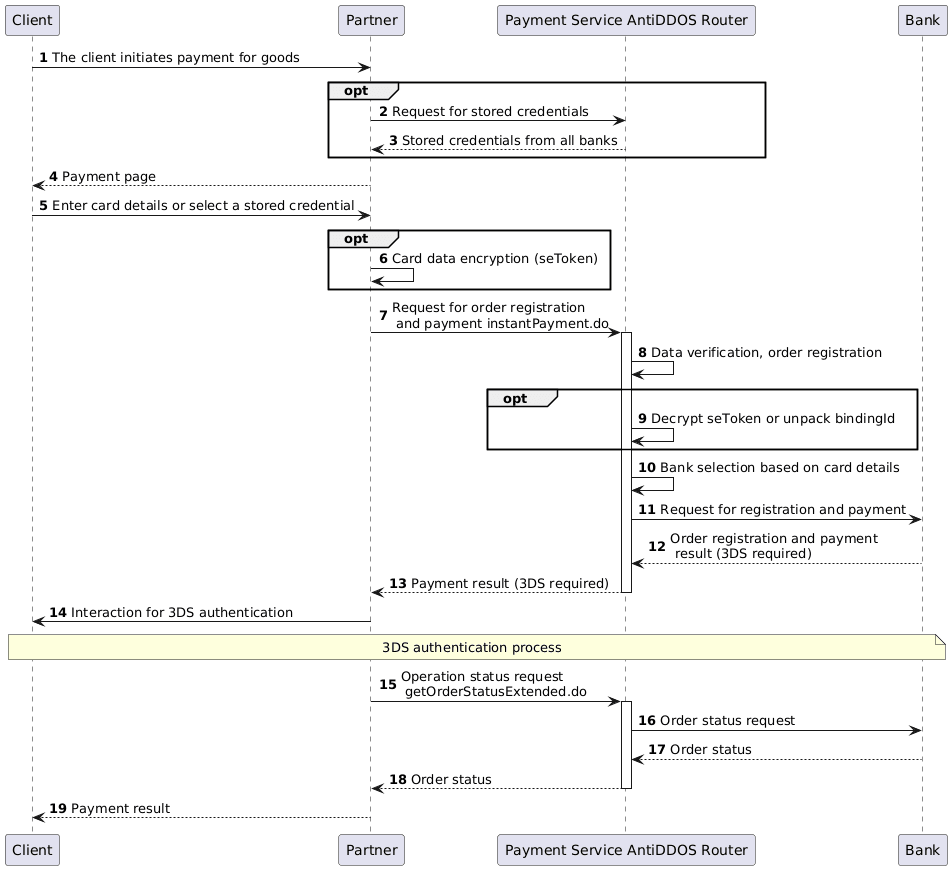
Order Registration and Payment Request
1. The client initiates order payment.
2-3. (Optional) The partner requests stored credentials from the Payment Service using the method getBindings.do. The Payment Service AntiDDOS Router requests stored credentials from all banks and returns them to the partner. These steps are executed if the payment are stored on the bank's side. If the partner stores the credentials on their side, these steps can be skipped. For more details on stored credentials, their storage methods, related restrictions, creation, and payment methods, see the page Stored credentials.
4. The partner displays a payment page to the client, where the client can select a stored credential or enter card details.
5. The client submits payment details.
6. If the client selected a stored credential in the previous step, proceed to step 5. If the client entered card details, the partner can encrypt them into a token for payment. The token generation procedure can be found here: seToken Generation.
7. The partner sends a request to the Payment Service AntiDDOS Router instantPayment.do.
This request can include one of the following payment methods:
- card data;
- encrypted token;
- stored credential identifier
bindingId, if payment data are stored on the bank's side.
The preAuth parameter specifies the payment type: false means a single-stage payment (similar to registering the order using register.do), and true means a two-stage payment (similar to registering with registerPreAuth.do). For more information about these payment types, see the section Two-stage Payments.
Example of a request with card data:
curl --location 'https://api.router.rbstest.ru/v1/instantPayment.do' \
--header 'Content-Type: application/json' \
--data-raw '{
    "orderNumber": "order_123566",
    "amount": 153700,
    "backUrl": "https://mybestmerchantreturnurl.com",
    "cardholderName": "TEST CARDHOLDER",
    "clientId": "259753456",
    "cvc": "123",
    "expiry": "203412",
    "pan": "4276550099363189",
    "language": "ru",
    "preAuth": false,
    "password": "test_user",
    "userName": "test_user_password",
}'
8-13. The Payment Service registers the order and performs routing, then returns the payment result to the partner (indicated in the diagram as 3DS required). Possible responses include:
- Payment successfully completed (typically after 3DS authentication). The response includes the order status. An example response can be seen on the page Payment Status.
- 3DS required — the request contains the parameter
is3DSVer2 == true, oris3DSVer2 == falsewithacsUrlandpaReq. A response example is provided above in the section Payment Response.
Completing 3DS Authentication
14. If 3DS authentication is required, the partner must follow the steps for completing 3DS.
It’s important to note that during 3DS v2 authentication, a repeat payment request instantPayment.do is made with the same parameters from step 5, adding the threeDSServerTransId from the response to the first request. Otherwise, the 3DS process is fully analogous to the two-request scenario.
Displaying the Final Order Status
15. The partner sends a request to the Payment Service AntiDDOS Router for the operation status getOrderStatusExtended.do.
16-19. The Payment Service AntiDDOS Router retrieves the order status from the bank and sends it to the partner to display to the client.
Redirect to ACS
3DS v1
If the payment is made using 3-D Secure ver.1, the partner must redirect their clients to the ACS at the acsUrl specified in the payment request response. The request body must include MD=mdorder&PaReq=paReq&TermUrl=termUrl, where:
-
MD- unique order identifier in the payment gateway; -
PaReq- thepaReqparameter received in the payment request response. This is the message that must be sent to the ACS along with the redirect and contains data required for authentication; -
TermUrl- thetermUrlparameter received in the payment request response. This is the URL to which the ACS redirects the cardholder after authentication.
This must be a POST request (not GET).
Example page for sending a POST request:
<head>
    <title>Payment confirmation</title>
</head>
<body>
    <h1>Payment confirmation</h1>
    <form name="form1" id="form1" action="" method="POST">
        acsUrl: <input name="acsUrl" id="acsUrl" /> <br><br>
        MD: <input name="MD" /> <br><br>
        PaReq: <input  name="PaReq" /> <br><br>
        TermUrl: <input  name="TermUrl" /> <br><br>
        <input type="button"  value="Send data to ACS" onClick="
            var form = document.getElementById('form1');
            form.action = document.getElementById('acsUrl').value;
            alert('Posting data to ' + form.action);
            form.submit()
        "/>
    </form>
</body>
</html>
Save this code as an HTML file on your computer and open it in a browser. Enter the data from the response to paymentOrder.do into the form and click the button.
PaRes for completing 3DS payment can be viewed in the finish3DSv1.do call body in Dev Tools (F12 in Chrome).
3DS v2
If the payment is made using 3-D Secure ver.2, the partner must redirect their clients to the ACS at the acsUrl specified in the payment request response. The request body must include creq, which passes the value of the packedCReq parameter.
This must be a POST request (not GET).
Example page for sending a POST request:
<html>
<head><title>ACS Redirect</title></head>
<body onload="document.forms['acs'].submit()">
ACS Redirect
<form id="acs" method="post" action="[acsUrl]">
    <input type="hidden" id="creq" name="creq" value="[packedCReq]"/></form>
</body>
</html>