
Payment with currency conversion
Payment service AntiDDOS Router supports payment with currency conversion. The order is registered in one currency, and the payment is converted to another currency at the Partner's choice. The conversion is performed at Central Bank exchange rate.
The Partner can choose to:
- Hide source order amount and currency from the bank
- Choose to display source or target amount and currency to the customer
- Configure additional commission for conversion
Currency conversion must be configured in the Partner settings in the Payment Service. To set this up, please contact support.
Integration scheme
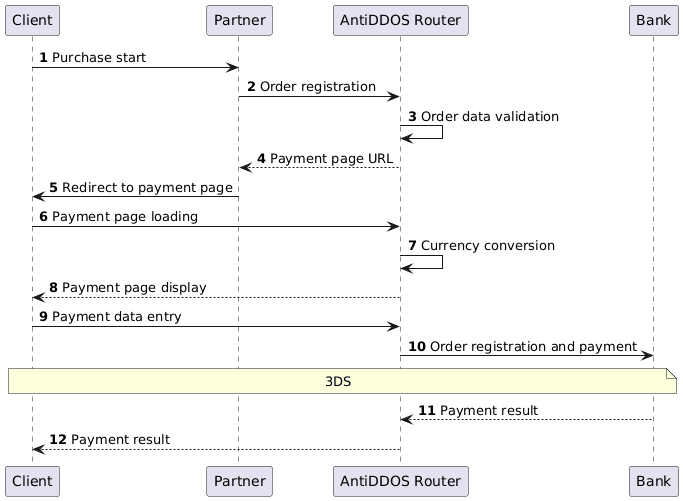
Order registration in source currency
1. Client initiates the purchase of goods or services on the Partner's website.
2. Partner sends to Payment service AntiDDOS Router an order registration request in the source currency:
- register.do for one-phase payment or
- registerPreAuth.do for two-phase payment.
For more details about these payment types, see section Two-phase payments.
Request example
:v2
curl --request POST \
'https://api.uat.all2pay.net/v2/register.do' \
-H 'Content-Type: application/json' \
--data-raw \
'{
    "orderNumber": "order_123456",
    "amount": 1234,
    "currency": "840",
    "returnUrl": "https://mybestmerchantreturnurl.com",
    "userName": "test_user",
    "password": "test_user_password"
}'
:v1
curl --request POST \
'https://api.uat.all2pay.net/v1/register.do' \
-H 'Content-Type: application/json' \
--data-raw \
'{
"orderNumber": "order_123456",
"amount": 1234,
"currency": "840",
"returnUrl": "https://mybestmerchantreturnurl.com",
"userName": "test_user",
"password": "test_user_password"
}'3. Payment service AntiDDOS Router validates the data and registers the order.
Redirect to payment page
4. Payment service AntiDDOS Router provides the Partner with a link to the payment page.
Response example
{
    "errorCode": "0",
    "formUrl": "https://router.rbsuat.com/wl/payment.html?mdOrder=2dc811e7-8d1c-407a-bd25-a4f41f96cc60&language=en",
    "orderId": "2dc811e7-8d1c-407a-bd25-a4f41f96cc60",
    "orderNumber": "order_123456"
}
5. Partner redirects the Client to the payment page.
Payment page loading
6. Client loads the payment page.
7. Payment service performs currency conversion.
8. Payment service transmits the final order amount to the payment page. Depending on Partner settings, the amount can be displayed in the original currency or in the target currency.

Payment in the target currency
9. Client enters payment data, then clicks Pay.
10. Payment service AntiDDOS Router registers and pays the order in the Bank in the target currency. At this stage, 3DS may be required.
11. Bank transmits the payment result to Payment service AntiDDOS Router.
12. Payment service AntiDDOS Router transmits the final status to the payment page. The order status contains amounts in the target currency.
If Partner's settings in the Payment service are not to hide the original amount and original currency information in the order, this information will also be available in the order status as additional parameters.
Cancellations, Refunds, Captures
Cancellations, refunds, and captures of the currency-converted payments can be performed with the same methods as the regular payments: see Cancellations, Refunds and Captures.
When capturing two-phase payments or performing refunds, the Partner must indicate the original currency. The Payment service converts the payment at the exchange rate on the day of purchase.