
Yandex Paybox payments via redirect
Payment service AntiDDOS Router enables Yandex Paybox payments via API. With the Yandex Paybox payment way, an order can be paid with Yandex Pay or Yandex Split. Payment is made on the Yandex payment page; the URL of that page is provided by the Yandex Paybox service.
Yandex Paybox is an up-to-date version of the Yandex Pay payment method. However, both of these payment methods can be used independently.
Payment via Yandex Paybox is always made to Yandex Bank. The bank must be specified in the partner settings in the Payment service (the same as for Yandex Pay). To find out the current settings, use the /settings/getRouterParams.do request.
Integration flow
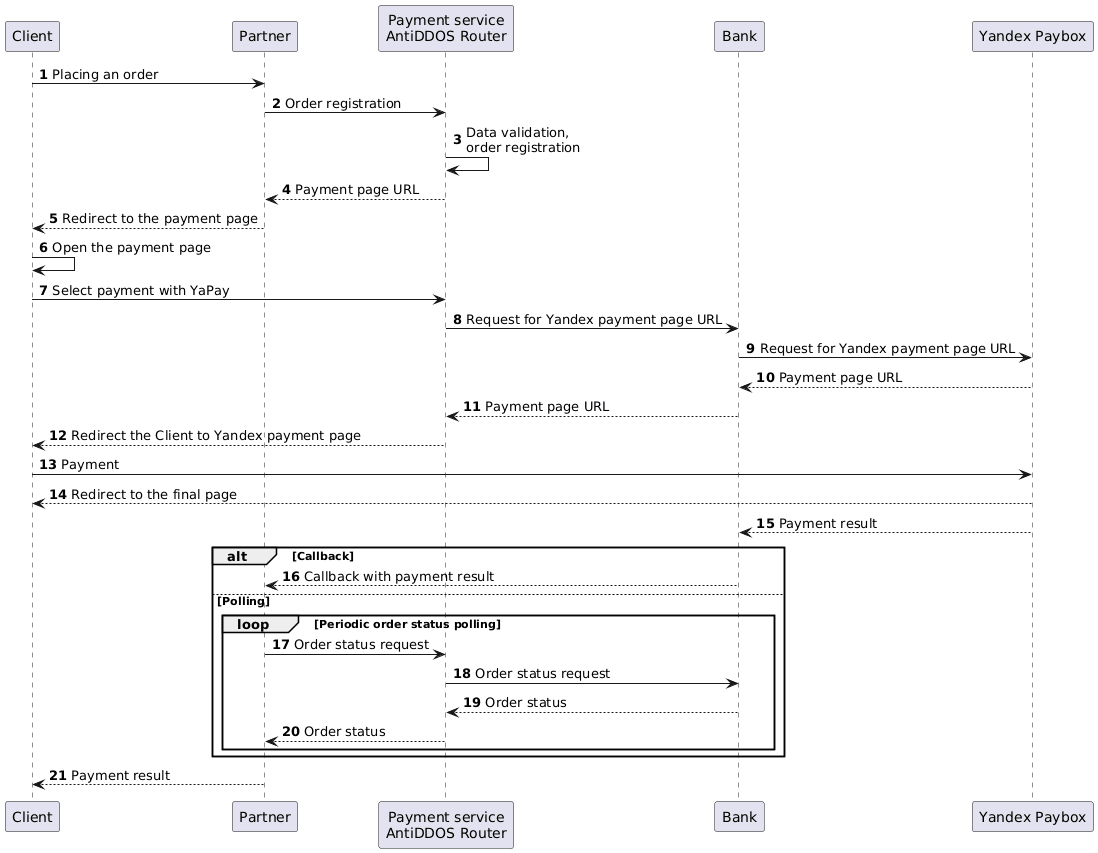
- The Client initiates the purchase of a product or service on the Partner's website.
-
The Partner sends an order registration request to the Payment Service AntiDDOS Router: register.do for a one-phase payment or registerPreAuth.do for a two-phase payment. For more details on these types of payments, see the section Two-phase payments.
To ensure the Yandex Paybox button appears on the payment page, the payment method
YANDEX_PAYBOXmust be included in theallowedPaymentWaysparameter when registering the order.When registering an order, the Partner can specify which Yandex Paybox payment methods shall be available to the Client: card and/or Split. For this, an additional parameter
yandex_paymentWayis passed. By default, if the parameter is not passed, only payment by card (CARD) is available. The use of certain Yandex Paybox payment methods must be agreed upon between the Partner and the Yandex Bank.Request example:
curl -X POST 'https://api.uat.all2pay.net/v2/register.do' -H 'Content-Type: application/json' \
--data-raw '{
    "orderNumber": "order_123508",
    "amount": 10000,
    "currency": "643",
    "language": "ru",
    "returnUrl": "https://mybestmerchantreturnurl.com/success",
    "failUrl": "https://mybestmerchantreturnurl.com/fail",
    "userName": "test_user",
    "password": "test_user_password",
    "allowedPaymentWays": [
        "YANDEX_PAYBOX",
        "CARD_BINDING",
        "CARD"
    ],
    "jsonParams": {
        "yandex_paymentWay": "CARD, SPLIT"
    }
}'
curl -X POST 'https://api.uat.all2pay.net/v1/register.do' -H 'Content-Type: application/json' \ --data-raw '{ "orderNumber": "order_123508", "amount": 10000, "currency": "643", "language": "ru", "returnUrl": "https://mybestmerchantreturnurl.com/success", "failUrl": "https://mybestmerchantreturnurl.com/fail", "userName": "test_user", "password": "test_user_password", "allowedPaymentWays": [ "YANDEX_PAYBOX", "CARD_BINDING", "CARD" ], "jsonParams": { "yandex_paymentWay": "CARD, SPLIT" } }' Payment Service AntiDDOS Router validates the input data and registers the order.
-
Payment Service AntiDDOS Router returns the payment page URL in the
formUrlparameter.Response example:
{
    "errorCode": "0",
    "formUrl": "https://router.rbsuat.com/wl/payment.html?mdOrder=f9584546-2613-4a0d-896f-0194d243865f&language=ru",
    "orderId": "f9584546-2613-4a0d-896f-0194d243865f",
    "orderNumber": "order_123508"
}
The Partner redirects the Client to the payment page.
The Client goes to the payment page of the Payment Service. Several payment methods may be available on the payment page.
-
The Client selects the payment instrument Yandex Pay.

Payment service AntiDDOS Router requests the URL of the payment page from the bank.
The Bank requests the URL of the payment page from the Yandex Paybox service. In this step, the return URL is also transmitted for the Yandex Paybox service to redirect the Client after the payment is completed.
The Yandex Paybox service communicates the URL of the payment page to the Bank.
The Bank communicates the URL of the payment page to the Payment Service.
-
Payment Service redirects the Client to the Yandex Paybox payment page.

The Client pays for the order on the Yandex Paybox page using any of the available methods (card or Split).
The Yandex Paybox service redirects the Client to the return URL.
The Yandex Paybox service communicates the payment result to the bank.
(Option) If the Partner has callbacks configured, the Bank sends the payment result callback to the Partner.
(Option) If the callback is not configured, the Partner periodically requests the Payment service AntiDDOS Router to get the final order status via getOrderStatusExtended.do with
orderIdquery parameter. The order status will bePENDINGuntil the payment result is known.
18-21. Payment AntiDDOS Router requests the order status in the bank and returns to the Partner. When the status changes, the Partner displays it on the final page.