
Yandex Pay payments via API
Payment service AntiDDOS Router enables Yandex Pay payments via API (including Yandex Split). Payment is made on the Yandex payment page; the URL of that page is provided by the Payment service.
Payment via Yandex Pay is always made to Yandex Bank. The bank must be specified in the partner settings in the Payment service. To find out the current settings, use the /settings/getRouterParams.do request.
The partner has to receive Yandex Pay API key(s) from Yandex Pay and provide those keys to the Payment service support team.
Integration flow
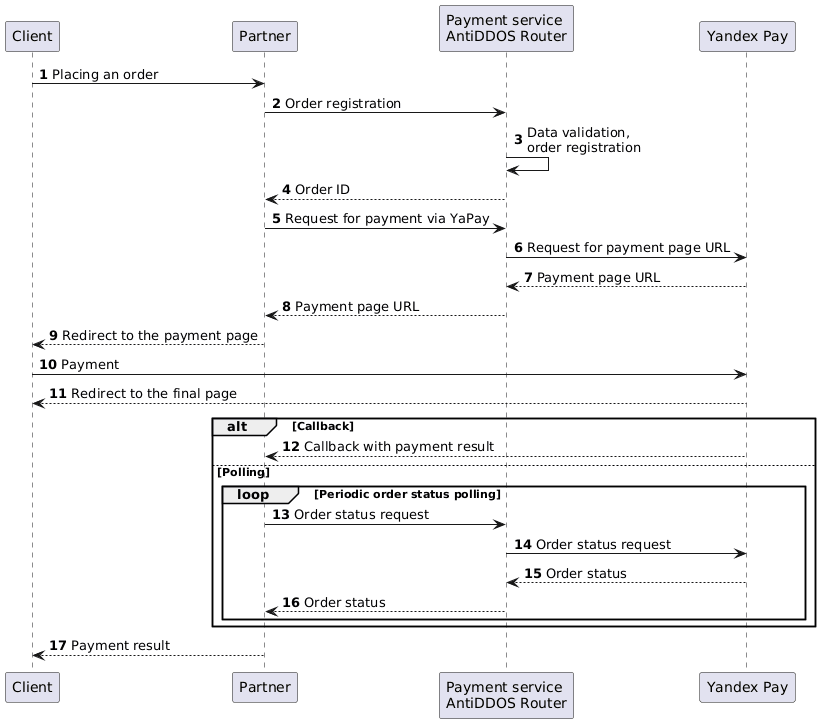
Register an order
1. The Client initiates the purchase of a product or service on the Partner's website.
2. The Partner sends one of the following order registration requests to the Payment Service AntiDDOS Router:
- register.do for a one-phase payment, or
- registerPreAuth.do for a two-phase payment.
For more details on these types of payments, see the section Two-phase payments.
On the Yandex Pay side, one API key allows you to use either one-phase or two-phase payments. However, the Partner can use both types of payment in the AntiDDOS Router Payment service. To do this, the Partner should obtain two API keys from Yandex Pay, one for each payment type, and provide them to the Payment Service support team.
Order registration features:
- When registering an order, the Partner can specify which Yandex Pay payment methods shall be available to the Client: only card, only Split, or both of them. For this, an additional parameter
yandex_paymentWayis passed. By default, if the parameter is not passed, only payment by card (CARD) is available. The use of certain Yandex Pay payment methods must be agreed upon between the Partner and Yandex Pay. - Make sure to pass cart items in the
orderBundleparameter when registering an order for payment. If the cart is not passed, butclientIdis, the request may be processed as creation of a stored credential, see Creating Yandex Pay stored credentials.
Request example:
curl -X POST 'https://api.uat.all2pay.net/v2/register.do' -H 'Content-Type: application/json' \
--data-raw '{
    "orderNumber": "order_123508",
    "jsonParams": {
        "yandex_paymentWay": "CARD, SPLIT"
    },
    "amount": 10000,
    "currency": "643",
    "language": "en",
    "returnUrl": "https://mybestmerchantreturnurl.com/success",
    "failUrl": "https://mybestmerchantreturnurl.com/fail",
    "userName": "test_user",
    "password": "test_user_password",
    "orderBundle": {
        "cartItems": {
        "items": [
            {
                "itemAmount": 10000,
                "itemCode": "123code",
                "itemCurrency": "643",
                "itemPrice": 10000,
                "name": "item 1",
                "positionId": "1",
                "quantity": {
                    "measure": "pcs",
                    "value": "1"
                }
            }
        ]
        }
    }
}'
curl -X POST 'https://api.uat.all2pay.net/v1/register.do' -H 'Content-Type: application/json' \
--data-raw '{
"orderNumber": "order_123508",
"jsonParams": {
"yandex_paymentWay": "CARD, SPLIT"
},
"amount": 10000,
"currency": "643",
"language": "en",
"returnUrl": "https://mybestmerchantreturnurl.com/success",
"failUrl": "https://mybestmerchantreturnurl.com/fail",
"userName": "test_user",
"password": "test_user_password",
"orderBundle": {
"cartItems": {
"items": [
{
"itemAmount": 10000,
"itemCode": "123code",
"itemCurrency": "643",
"itemPrice": 10000,
"name": "item 1",
"positionId": "1",
"quantity": {
"measure": "pcs",
"value": "1"
}
}
]
}
}
}'3. Payment Service AntiDDOS Router validates the input data and registers the order.
Request for payment via Yandex Pay
4. Payment Service AntiDDOS Router returns the registered order ID orderId to the Partner.
Response example:
{
    "errorCode": "0",
    "formUrl": "https://router.rbsuat.com/wl/payment.html?mdOrder=f9584546-2613-4a0d-896f-0194d243865f&language=ru",
    "orderId": "f9584546-2613-4a0d-896f-0194d243865f",
    "orderNumber": "order_123508"
}
5. Partner requests the Payment service AntiDDOS Router to pay the order via Yandex Pay /yandex-box/paymentOrder.do.
Request example:
curl -X POST 'https://api.uat.all2pay.net/v2/yandex-box/paymentOrder.do' \
-H 'Content-Type: application/json' \
--data-raw '{
    "orderId": "1f3224c9-cc80-4c2a-8ef7-ca4d198f6a2e",
    "password": "test_user_password",
    "userName": "test_user"
}'
curl -X POST 'https://api.uat.all2pay.net/v1/yandex-box/paymentOrder.do' \
-H 'Content-Type: application/json' \
--data-raw '{
"orderId": "1f3224c9-cc80-4c2a-8ef7-ca4d198f6a2e",
"password": "test_user_password",
"userName": "test_user"
}'6. Payment service AntiDDOS Router requests the URL of the payment page from Yandex Pay.
7. The Yandex Pay communicates the URL of the payment page to the Payment service.
Redirect to the Yandex page for payment
8. The Payment service communicates the URL of the payment page to the Partner.
Response example:
{
    "data": {
        "gwId": "YANDEX",
        "gwOrderId": "ffc65a85-1af5-7a4d-ab65-a29206c90f80",
        "orderId": "14f8b21d-46ab-11f0-8452-696e1279ae2c",
        "redirect": "https://sandbox.pay.ya.ru/l/k774SQ"
    },
    "success": true
}
9. The Partner redirects the Client to the Yandex Pay payment page (via URL from the redirect parameter).
10. The Client pays for the order on the Yandex Pay page using any of the available methods (card or Split).
11. The Yandex Pay service redirects the Client to the returned URL.
Final status of the order
12. (Option) If the Partner has callbacks configured, the Yandex Pay sends the payment result callback to the Partner.
13. (Option) If the callback is not configured, the Partner periodically requests the Payment service AntiDDOS Router to get the final order status via getOrderStatusExtended.do with orderId query parameter. The order status will be PENDING until the payment result is known.
14-17. Payment AntiDDOS Router requests the order status in Yandex Pay and returns to the Partner. When the status changes, the Partner displays it on the final page.
Stored credentials with Yandex Pay
Payment service AntiDDOS Router supports stored credentials with Yandex Pay. Payments made using Yandex Pay stored credentials are always directed to the Yandex Pay.
The use of stored credentials with Yandex Pay is possible if the partner has corresponding permission in the Yandex Pay. Please contact the Payment service support team to check or change such permissions and settings.
Creating Yandex Pay stored credentials
Creating a common eCom stored credential
To create a eCom stored credential, follow the above described process with some difference:
- add the
clientIdparameter in the order registration request at step 2. - Do not pass cart items in the
orderBundleparameter.
The amount value is ignored, no funds will be retrieved from the Client's account.
Request example:
curl -X POST 'https://api.uat.all2pay.net/v2/register.do' -H 'Content-Type: application/json' \
--data-raw '{
    "clientId": "12555",
    "orderNumber": "order_123508",
    "jsonParams": {
        "yandex_paymentWay": "CARD, SPLIT"
    },
    "amount": 10000,
    "currency": "643",
    "language": "ru",
    "returnUrl": "https://mybestmerchantreturnurl.com/success",
    "failUrl": "https://mybestmerchantreturnurl.com/fail",
    "userName": "test_user",
    "password": "test_user_password"
}'
curl -X POST 'https://api.uat.all2pay.net/v1/register.do' -H 'Content-Type: application/json' \
--data-raw '{
"clientId": "12555",
"orderNumber": "order_123508",
"jsonParams": {
"yandex_paymentWay": "CARD, SPLIT"
},
"amount": 10000,
"currency": "643",
"language": "ru",
"returnUrl": "https://mybestmerchantreturnurl.com/success",
"failUrl": "https://mybestmerchantreturnurl.com/fail",
"userName": "test_user",
"password": "test_user_password"
}'The partner must have permission for the use of stored credentials and corresponding settings in Yandex Pay.
Then, on step 12, the Client will confirm or decline the credentials saving (card binding).
To find out the bindingId identifier of the stored credential created after the payment is completed, the partner can configure callback or send getOrderStatusExtended.do request (steps 15-16).
Creating a recurring stored credential
To create a recurring stored credential, in the above described process, add the following parameters in the order registration request at step 2:
clientIdrecurringFrequency-
recurringExpiry
Request example:
curl -X POST 'https://api.uat.all2pay.net/v2/register.do' -H 'Content-Type: application/json' \
--data-raw '{
    "clientId": "12555",
    "jsonParams": {
        "yandex_paymentWay": "CARD, SPLIT",
        "recurringFrequency":12,
        "recurringExpiry":"20251225"
    },
    "orderNumber": "order_123508",
    "amount": 10000,
    "currency": "643",
    "language": "ru",
    "returnUrl": "https://mybestmerchantreturnurl.com/success",
    "failUrl": "https://mybestmerchantreturnurl.com/fail",
    "userName": "test_user",
    "password": "test_user_password",
    "orderBundle": {
        "cartItems": {
        "items": [
            {
                "itemAmount": 10000,
                "itemCode": "123code",
                "itemCurrency": "643",
                "itemPrice": 10000,
                "name": "item 1",
                "positionId": "1",
                "quantity": {
                    "measure": "pcs",
                    "value": "1"
                }
            }
        ]
        }
    }
}'
curl -X POST 'https://api.uat.all2pay.net/v1/register.do' -H 'Content-Type: application/json' \
--data-raw '{
"clientId": "12555",
"jsonParams": {
"yandex_paymentWay": "CARD, SPLIT",
"recurringFrequency":12,
"recurringExpiry":"20251225"
},
"orderNumber": "order_123508",
"amount": 10000,
"currency": "643",
"language": "ru",
"returnUrl": "https://mybestmerchantreturnurl.com/success",
"failUrl": "https://mybestmerchantreturnurl.com/fail",
"userName": "test_user",
"password": "test_user_password",
"orderBundle": {
"cartItems": {
"items": [
{
"itemAmount": 10000,
"itemCode": "123code",
"itemCurrency": "643",
"itemPrice": 10000,
"name": "item 1",
"positionId": "1",
"quantity": {
"measure": "pcs",
"value": "1"
}
}
]
}
}
}'The partner must have permission for the use of recurring stored credentials and corresponding settings in Yandex Pay.
Then, on step 12, the Client will have to confirm the credentials saving (subscription).
To find out the bindingId identifier of the stored credential created after the payment is completed, the partner can configure callback or send getOrderStatusExtended.do request (steps 15-16).
Paying with Yandex Pay Stored Credential
For payment with a stored credential, the following methods are used:
- paymentOrderBinding.do or instantPayment.do for payment with a regular eCom stored credential. See example request: Payment with eCom Stored Credentials via API.
- recurrentPayment.do for payment with a recurring stored credential. See example request: Payment with Recurring Stored Credential.