
T-Pay Payment via Redirect
The payment service AntiDDOS Router supports T-Pay payments through the payment page.
Until this payment method is supported by other acquiring banks, T-Pay payment is only possible in T-Bank. The bank for T-Pay must be set in the partner's settings in the Payment Service. To set it, contact support. To find out the current settings, use the /settings/getRouterParams.do request.
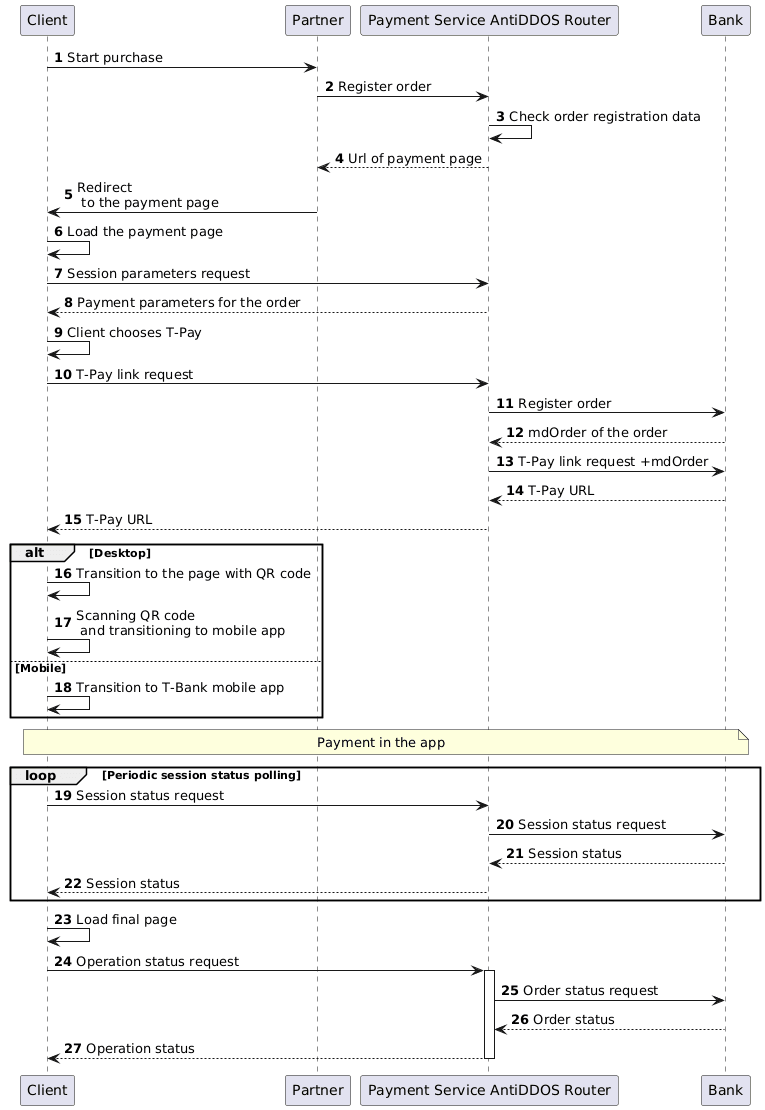
Enable T-Pay on the payment page
Specify "TCB_TPAY" value in the "allowedPaymentWays" parameter of the registration request to make the T-Pay payment method available on the Payment service's payment page. Below is an example of such a request.
1. The client initiates the purchase of goods or services on the Partner's site.
2. The Partner sends a request to the Payment Service AntiDDOS Router to register the order: register.do for one-stage payment or registerPreAuth.do for two-stage payment. More about these types of payment can be found in the section Two-Stage Payments.
In the request, it is necessary to specify that the T-Pay payment method should be available on the payment page. For this, include "TCB_TPAY" among other payment methods in the allowedPaymentWays parameter.
Example request
curl --request POST \
'https://api.uat.all2pay.net/v2/register.do' \
-H 'Content-Type: application/json' \
--data-raw \
'{
    "allowedPaymentWays": ["CARD_BINDING", "CARD", "TCB_TPAY"],
    "orderNumber": "order_123473",
    "amount": 1234,
    "currency": "643",
    "language": "en",
    "returnUrl": "https://mybestmerchantreturnurl.com/success",
    "userName": "test_user",
    "password": "test_user_password",
    "clientId":"client_10001"
}'
curl --request POST \
'https://api.uat.all2pay.net/v1/register.do' \
-H 'Content-Type: application/json' \
--data-raw \
'{
"allowedPaymentWays": ["CARD_BINDING", "CARD", "TCB_TPAY"],
"orderNumber": "order_123473",
"amount": 1234,
"currency": "643",
"language": "en",
"returnUrl": "https://mybestmerchantreturnurl.com/success",
"userName": "test_user",
"password": "test_user_password",
"clientId":"client_10001"
}'3. The Payment Service AntiDDOS Router verifies the data and registers the order.
Redirect to the payment page
4. The Payment Service AntiDDOS Router sends the Partner a link to the payment page.
Example response
{
    "errorCode": "0",
    "formUrl": "https://router.rbsuat.com/wl/payment.html?mdOrder=2dc811e7-8d1c-407a-bd25-a4f41f96cc60&language=en",
    "orderId": "2dc811e7-8d1c-407a-bd25-a4f41f96cc60",
    "orderNumber": "order_123457"
}
5. The Partner redirects the Client to the payment page.
Selecting T-Pay for payment
6. The Client goes to the payment page.
7. The Client (payment page) requests payment execution parameters from the Payment Service.
8. The Payment Service AntiDDOS Router sends payment parameters to the payment page. As a result, the payment page displays available payment methods.

9. The Client selects the T-Pay payment instrument.
T-Pay payment
10. The payment page requests the T-Pay transition address.
11. The Payment Service AntiDDOS Router registers the order in the bank.
12. The bank sends the order identifier to the Payment Service AntiDDOS Router.
13. The Payment Service AntiDDOS Router provides the bank’s order number and requests the T-Pay link.
14. The bank generates the T-Pay link based on the Client’s device information and returns it to the Payment Service.
- Desktop: URL for generating a QR code
- Mobile: URL for transitioning to the T-Bank mobile app.
15. The Payment Service AntiDDOS Router sends the T-Pay link to the payment page. Further steps vary slightly depending on the Client’s device.
16. (Desktop) The Client is redirected to the page with the QR code for transitioning to the mobile app.

17. (Desktop) The Client scans the QR code and transitions to the T-Bank mobile app to complete the payment.
18. (Mobile) The Client transitions directly from the Partner’s app to the T-Bank mobile app to make the payment.
19. While the Client makes the payment, the payment page periodically sends a request to the Payment Service AntiDDOS Router to obtain the session status.
20. The Payment Service AntiDDOS Router requests the session status from the bank.
21. The bank sends the session status to the Payment Service AntiDDOS Router.
22. The Payment Service AntiDDOS Router sends the session status to the Client’s payment page. If the session status contains no URL to redirect to the final page, return to step 19. If a URL is present, proceed to step 23.
23. After the session status changes, the Payment Service AntiDDOS Router redirects the Client to the final page depending on the payment outcome: in case of an error to failUrl, and in case of successful payment to returnUrl. A query parameter orderId=[order identifier in the Payment Service] will be added to the URL.
Final status of the order
24. The Client (final page) sends a request to the Payment Service AntiDDOS Router for the final operation status using the method getOrderStatusExtended.do.
25-27. The Payment Service AntiDDOS Router requests the order status from the bank and sends it to the Client’s final page.