
Sber's Pay in parts payments
On the payment page of the AntiDDOS Router Payment Service, you can make payments using the "Pay in parts" Buy Now Pay Later (BNPL) service from Sberbank.
Until support for this payment method by other acquiring banks appears, payment using Pay in parts is always routed to Sberbank. The bank for Pay in parts payment must be specified in the Partner settings in the Payment Service. To change the settings, please contact the support service. To find out current settings, send /settings/getRouterParams.do request.
Integration scheme
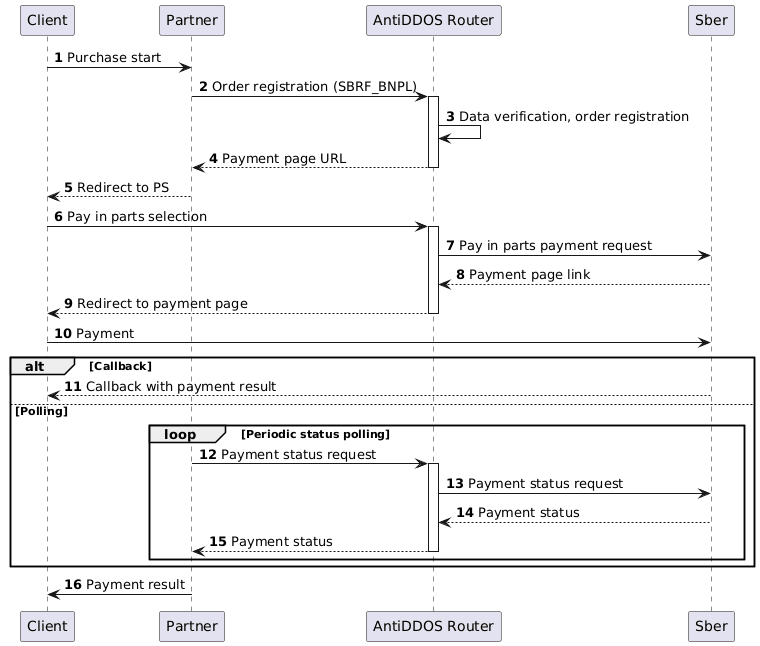
Enabling Pay in parts on payment page
For the Pay in parts payment method to be available on the Payment Service payment page, it is necessary to specify the value "SBRF_BNPL" among other payment methods in the allowedPaymentWays parameter in the order registration request. An example of the request is provided below.
1. Client initiates purchase of goods or services on Partner's website.
2. Partner sends one of the following order registration requests to the AntiDDOS Router Payment Service:
- register.do for single-stage payment, or
- registerPreAuth.do for two-stage payment.
For more details about these payment types, see section Two-phase payments.
For the Pay in parts payment button to appear on the payment page, the "SBRF_BNPL" payment method must be added among other payment methods in the allowedPaymentWays parameter during order registration.
Request example:
curl -X POST 'https://api.uat.all2pay.net/v2/register.do' -H 'Content-Type: application/json' \
--data-raw '{
    "orderNumber": "order_123508",
    "amount": 10000,
    "currency": "643",
    "language": "ru",
    "returnUrl": "https://mybestmerchantreturnurl.com/success",
    "failUrl": "https://mybestmerchantreturnurl.com/fail",
    "userName": "test_user",
    "password": "test_user_password",
    "allowedPaymentWays": [
        "SBRF_BNPL",
        "CARD_BINDING",
        "CARD"
    ]
}'
curl -X POST 'https://api.uat.all2pay.net/v1/register.do' -H 'Content-Type: application/json' \
--data-raw '{
"orderNumber": "order_123508",
"amount": 10000,
"currency": "643",
"language": "ru",
"returnUrl": "https://mybestmerchantreturnurl.com/success",
"failUrl": "https://mybestmerchantreturnurl.com/fail",
"userName": "test_user",
"password": "test_user_password",
"allowedPaymentWays": [
"SBRF_BNPL",
"CARD_BINDING",
"CARD"
]
}'3. The AntiDDOS Router Payment Service verifies Partner data and registers the order.
Redirect to payment page
4. The AntiDDOS Router Payment Service provides Partner with a link to the payment page.
Response example:
{
    "errorCode": "0",
    "formUrl": "https://router.rbsuat.com/wl/payment.html?mdOrder=f9584546-2613-4a0d-896f-0194d243865f&language=ru",
    "orderId": "f9584546-2613-4a0d-896f-0194d243865f",
    "orderNumber": "order_123508"
}
5. Partner redirects Client to the payment page.
Pay in parts payment
6. Client selects Pay in parts payment method on the payment page.
7-9. AntiDDOS Router sends a Pay in parts payment request to Sber and redirects Client to the payment page for this method.
10. The Client pays for the order using the Pay in parts service. This step will require authorization in SberId and selection of installment parameters. The Partner must agree on available installment plan options (products) with the bank's subsidiary and dependent organization (SDO) providing installment services.
Final order status
11. (Option) If callback notifications are configured, Sberbank notifies the Partner of the payment result.
12-15. (Option) The Partner polls the Payment service for payment status using the getOrderStatusExtended.do method. During this time, the Client performs Pay in parts payment on their device. When the order status changes, the Partner redirects the Client to the final page.
16. The Partner displays the order status to the Client on the Partner's own final page.