
SberPay Payment via API
The payment service AntiDDOS Router supports SberPay payment via API through app2app and back2app scenarios. Until this payment method is supported by other acquiring banks, SberPay payment is available only through Sberbank.
The bank for SberPay must be set in the partner's settings in the Payment Service. To set it, contact support. To find out the current settings, use the /settings/getRouterParams.do request.
app2app
This scenario is used for payments in the Partner's mobile application. The Sberbank Online (SBOL) mobile app opens for the payment, and after the payment confirmation, the Client is redirected back to the Partner's application.
Integration Scheme
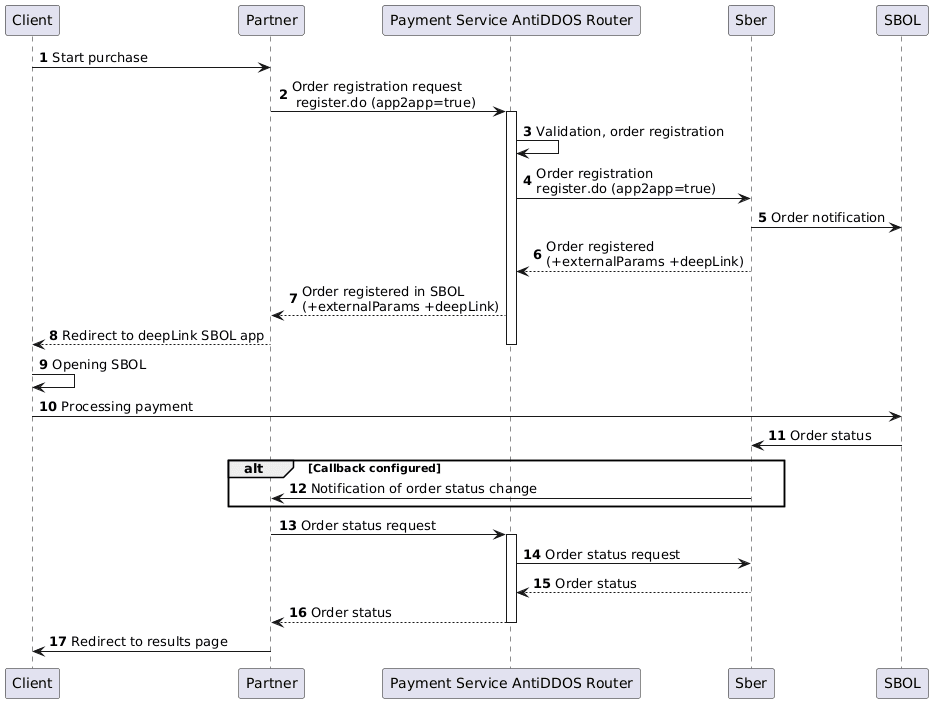
Order Registration
1. The client initiates the purchase of a product or service on the Partner's website.
2. The Partner sends an order registration request to the Payment Service AntiDDOS Router: register.do for single-stage payment or registerPreAuth.do for two-stage payment. For more information about these types of payments, see Two-stage payments.
In the order's jsonParams, the following parameters are specified:
-
app2app=true— flag defining the type of payment. -
app.osType— the operating system type of the user's mobile device (ios,android). -
app.deepLink— the link to the partner's app for return with a successful bank response.
Additionally, the client's phone number must be specified.
Example request:
curl --request POST
'https://api.uat.all2pay.net/v2/register.do'
-H 'Content-Type: application/json'
--data-raw
'{
    "orderNumber": "order_123473",
    "amount": 1234,
    "currency": "643",
    "language": "en",
    "returnUrl": "https://mybestmerchantreturnurl.com/success",
    "userName": "test_user",
    "password": "test_user_password",
    "clientId":"client_10001",
    "phone":"+79991234567",
    "jsonParams": {
        "app2app": true,
        "app.osType": "ios",
        "app.deepLink": "myapp://sberpay"
    }
}'
curl --request POST
'https://api.uat.all2pay.net/v1/register.do'
-H 'Content-Type: application/json'
--data-raw
'{
"orderNumber": "order_123473",
"amount": 1234,
"currency": "643",
"language": "en",
"returnUrl": "https://mybestmerchantreturnurl.com/success",
"userName": "test_user",
"password": "test_user_password",
"clientId":"client_10001",
"phone":"+79991234567",
"jsonParams": {
"app2app": true,
"app.osType": "ios",
"app.deepLink": "myapp://sberpay"
}
}'3. The Payment Service AntiDDOS Router validates the data and registers the order.
4. The Payment Service AntiDDOS Router sends an order registration request to the bank.
5. The bank registers the order. Necessary operations to create the order in SBOL are performed.
6. The bank returns the order data to the Payment Service AntiDDOS Router.
7. The Payment Service AntiDDOS Router returns the order registration result. If the registration in SBOL is successful, the response includes an externalParams block containing the deepLink to the SBOL app.
Example response:
{
    "errorCode": "0",
    "externalParams": {
        "sbolInactive": "false",
        "sbolBankInvoiceId": "XYpXsDoRiDYqvJlvkby8Cs0Lsk5mxF5h",
        "sbolDeepLink": "sberpay://invoicing/v2?bankInvoiceId=a67b0cedc9a44cfbbce3b9595afaafc1..."
    },
    "formUrl": "https://router.rbsuat.com/wl/payment.html?mdOrder=4ac083f4-91ea-11ef-a5e3-dff1b834a3a1&language=en",
    "orderId": "4ac083f4-91ea-11ef-a5e3-dff1b834a3a1",
    "orderNumber": "order_123540"
}
Order Payment
8. The Partner's mobile application opens the deepLink of SBER MP.
9. The client opens the SBER application.
10. The client pays for the order via SBER.
11. SBER informs the bank about the order status.
Displaying the Final Payment Status
12. If callbacks are configured (see Callback Notifications), the Partner waits for and receives a notification from the bank about the order status change.
13. The Partner requests the order status from the Payment Service using getOrderStatusExtended.do. At the same time, the Client completes the payment via SBOL on their device.
- If callbacks are configured, the status request is made once after receiving the notification about the order status change.
- If callbacks are not configured, status requests are made periodically.
14-16. The Payment Service AntiDDOS Router requests the status from the bank and returns it to the Partner.
17. The Partner displays the operation result to the client on the final page.
back2app
In this scenario, after a payment request, the Client will receive a push notification in the Sberbank Online app (SBOL), where they will need to confirm the payment.
Integration Scheme
Order Registration
1. The client initiates the purchase of a product or service on the Partner's website.
2. The Partner sends a request to the Payment service AntiDDOS Router to register the order register.do. Include the back2app=true flag in the order's jsonParams. Additionally, the client's phone number must be specified.
Request example:
curl --request POST
'https://api.uat.all2pay.net/v2/register.do'
-H 'Content-Type: application/json'
--data-raw
'{
    "orderNumber": "order_123473",
    "amount": 1234,
    "currency": "643",
    "language": "ru",
    "returnUrl": "https://mybestmerchantreturnurl.com/success",
    "userName": "test_user",
    "password": "test_user_password",
    "clientId":"client_10001",
    "phone":"+79991234567",
    "jsonParams": {
        "back2app": true
    }
}'
curl --request POST
'https://api.uat.all2pay.net/v1/register.do'
-H 'Content-Type: application/json'
--data-raw
'{
"orderNumber": "order_123473",
"amount": 1234,
"currency": "643",
"language": "ru",
"returnUrl": "https://mybestmerchantreturnurl.com/success",
"userName": "test_user",
"password": "test_user_password",
"clientId":"client_10001",
"phone":"+79991234567",
"jsonParams": {
"back2app": true
}
}'3. The Payment service AntiDDOS Router checks the data and registers the order.
4. The Payment service AntiDDOS Router sends a request to the bank for order registration.
5. The bank registers the order. Necessary operations for creating the order in SBOL are executed.
6. The bank returns the order data to the Payment service AntiDDOS Router.
7. The Payment service AntiDDOS Router returns the order registration result. If successfully registered in SBOL, the response includes the externalParams block.
Response example:
{
    "errorCode": "0",
    "externalParams": {
        "sbolInactive": "false",
        "sbolBankInvoiceId": "kZntGl5xObR0TOETSQUncJ26DAfoSHGY"
    },
    "formUrl": "https://router.rbstest.ru/wl/payment.html?mdOrder=84c7cac5-91ec-11ef-a5e3-3d9def5f2628&language=ru",
    "orderId": "84c7cac5-91ec-11ef-a5e3-3d9def5f2628",
    "orderNumber": "order_123541"
}
Payment and Display of Final Order Status
8. The Partner redirects the client to the payment instruction page and waits for payment results.
9-17. Subsequent steps are performed similarly to the app2app scenario; refer to Order Payment.
SberPay Stored Credentials
The Payment service AntiDDOS Router supports stored credentials with SberPay. Payments through SberPay stored credentials are always directed to Sberbank.
Using SberPay stored credentials is possible only for v1 stored credentials with the appropriate permission from Sberbank for the Partner.
Creating a SberPay Stored Credential
To create a stored credential, conduct a payment through SberPay as described above, but add the relevant parameters in the request to register the order register.do or registerPreAuth.do depending on the type of stored credential:
-
clientIdfor creating a standard eCom stored credential. Examples can be found in step 2 of the back2app and app2app scenarios. -
clientId,recurringFrequency, andrecurringExpiryfor creating a recurring stored credential. See examples below.
The order can be paid when creating the stored credential either via API or on the Payment service page by selecting the SberPay payment method. This integration scenario is described on the page SberPay Payment via Redirect. The parameters listed above must also be added to the order registration request, depending on the stored credential type.
Example of Order Registration for Creating a SberPay Recurring Stored Credential with API Payment:
curl -X POST 'https://api.uat.all2pay.net/v2/register.do'
-H 'Content-Type: application/json'
--data-raw '{
    "jsonParams": {
        "recurringFrequency": 15,
        "recurringExpiry": "20251018"
        "back2app": true
    },
    "orderNumber": "order_123463",
    "amount": 10000,
    "currency": "643",
    "language": "en",
    "returnUrl": "https://mybestmerchantreturnurl.com/",
    "userName": "test_user",
    "password": "test_user_password",
    "clientId": 1010123
}'
curl -X POST 'https://api.uat.all2pay.net/v1/register.do'
-H 'Content-Type: application/json'
--data-raw '{
"jsonParams": {
"recurringFrequency": 15,
"recurringExpiry": "20251018"
"back2app": true
},
"orderNumber": "order_123463",
"amount": 10000,
"currency": "643",
"language": "en",
"returnUrl": "https://mybestmerchantreturnurl.com/",
"userName": "test_user",
"password": "test_user_password",
"clientId": 1010123
}'After payment, the stored credential ID will be returned in the order status response at step 13.
Example of Order Registration for Creating a SberPay Recurring Stored Credential with Payment on the Payment Service Page:
curl --location 'https://api.uat.all2pay.net/v2/register.do'
--header 'Content-Type: application/json'
--data-raw '{
    "allowedPaymentWays": [
        "CARD_BINDING",
        "CARD",
        "SBRF_SBOL"
    ],
    "jsonParams": {
        "recurringFrequency": 15,
        "recurringExpiry": "20251018"
    },
    "amount": 843,
    "clientId": "259753456",
    "currency": "643",
    "orderNumber": "1735280326_2991",
    "password": "test_user_password",
    "phone": "89001234567",
    "returnUrl": "https://mybestmerchantreturnurl.com/",
    "userName": "test_user"
}'
curl --location 'https://api.uat.all2pay.net/v1/register.do'
--header 'Content-Type: application/json'
--data-raw '{
"allowedPaymentWays": [
"CARD_BINDING",
"CARD",
"SBRF_SBOL"
],
"jsonParams": {
"recurringFrequency": 15,
"recurringExpiry": "20251018"
},
"amount": 843,
"clientId": "259753456",
"currency": "643",
"orderNumber": "1735280326_2991",
"password": "test_user_password",
"phone": "89001234567",
"returnUrl": "https://mybestmerchantreturnurl.com/",
"userName": "test_user"
}'The created stored credential's identifier can be retrieved in the order status getOrderStatusExtended.do.
Payment with SberPay Stored Credential
For stored-credential transactions, corresponding methods are used:
- paymentOrderBinding.do or instantPayment.do for standard eCom stored-credential transactions. See request example here: Payment with eCom Stored Credentials via API.
- recurrentPayment.do for recurring stored-credential transactions. See request example here: Payment with Recurring Stored Credential.