
SberPay Payment via Redirect
The payment service AntiDDOS Router supports payments via SberPay from the payment page.
Until this method of payment is supported by other acquiring banks, payments using SberPay are always processed through Sberbank. The bank for SberPay must be set in the partner's settings in the Payment Service. To set it, contact support. To find out the current settings, use the /settings/getRouterParams.do request.
Integration Scheme
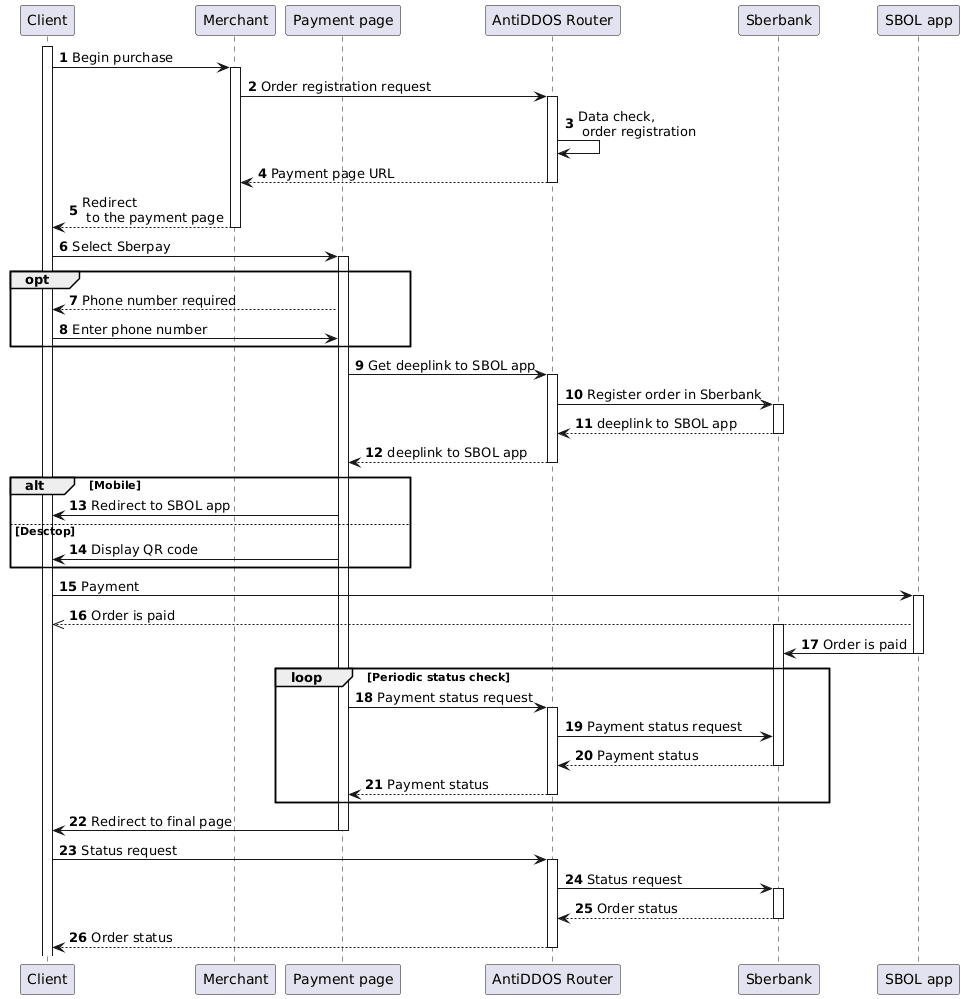
Enable SberPay on the payment page
Specify "SBERPAY" value in the "allowedPaymentWays" parameter of the registration request to make the SberPay payment method available on the Payment service's payment page. Below is an example of such a request.
1. The Client initiates the purchase of a product or service on the Merchant's website.
2. The Merchant sends one of the following order registration requests to the payment service AntiDDOS Router:
- register.do for one-step payment, or
- registerPreAuth.do for two-step payment.
For more information about these types of payments, see the section Two-step payments.
To ensure the payment page displays the SberPay payment button, the "SBERPAY" payment method must be included in the allowedPaymentWays parameter when registering the order.
Example request:
curl -X POST 'https://api.uat.all2pay.net/v2/register.do'
-H 'Content-Type: application/json' \
--data-raw '{
    "orderNumber": "order_123508",
    "amount": 10000,
    "allowedPaymentWays": [
        "SBERPAY",
        "CARD_BINDING",
        "CARD"
    ],
    "phone": "+79991234567",
    "currency": "643",
    "language": "ru",
    "returnUrl": "https://mybestmerchantreturnurl.com/success",
    "failUrl": "https://mybestmerchantreturnurl.com/fail",
    "userName": "test_user",
    "password": "test_user_password"
}'
curl -X POST 'https://api.uat.all2pay.net/v1/register.do'
-H 'Content-Type: application/json' \
--data-raw '{
"orderNumber": "order_123508",
"amount": 10000,
"allowedPaymentWays": [
"SBERPAY",
"CARD_BINDING",
"CARD"
],
"phone": "+79991234567",
"currency": "643",
"language": "ru",
"returnUrl": "https://mybestmerchantreturnurl.com/success",
"failUrl": "https://mybestmerchantreturnurl.com/fail",
"userName": "test_user",
"password": "test_user_password"
}'3. The payment service AntiDDOS Router checks the Merchant’s data and registers the order.
Redirect to the payment page
4. The payment service AntiDDOS Router provides the Merchant with a link to the payment page.
Example response:
{
    "errorCode": "0",
    "formUrl": "https://router.rbsuat.com/wl/payment.html?mdOrder=f9584546-2613-4a0d-896f-0194d243865f&language=ru",
    "orderId": "f9584546-2613-4a0d-896f-0194d243865f",
    "orderNumber": "order_123508"
}
5. The Merchant redirects the Client to the payment page.

6. The Client selects the SberPay payment method.
7-8. If the Client's phone number (parameter phone) was not provided during the order registration, the payment page requests the Client to enter their phone number.

SberPay payment
9-12. The payment page gets deepLink to Sberbank Online mobile app.
13. (Option) If the Client opens the payment page on a mobile device, a button to go to the Sberbank Online application is displayed.

14. (Option) When paying from a desktop, the Client can choose to pay using a QR code or receive a push notification on their phone (a phone number may be required).

15-16. The Client completes the payment through Sberbank Online.
17. Sberbank Online app notifies Sberbank of the payment.
18-22. The payment page periodically requests the payment status from the payment service while the Client makes a payment through Sberbank Online on their device. When the payment status changes, the payment page redirects the Client to the final page. Depending on the payment result, this is either the failUrl or the returnUrl.
Final status of the order
23. The Client (final page) sends a request to the payment service AntiDDOS Router to get the final order status getOrderStatusExtended.do.
24-26. The payment service AntiDDOS Router requests the order status from the Bank and returns the order status to the final page.