
Mobile SDK Core
It is more of a library than an SDK. It is used for encrypting the card data into seToken, which can be safely transmitted and stored in any system (e.g., on the merchant's server). It is a great solution for merchants who want maximum flexibility or do not wish to handle card data on their servers.
Web View for 3DS
The diagram below illustrates the process of Mobile SDK Core payment with 3DS redirection through Web View.
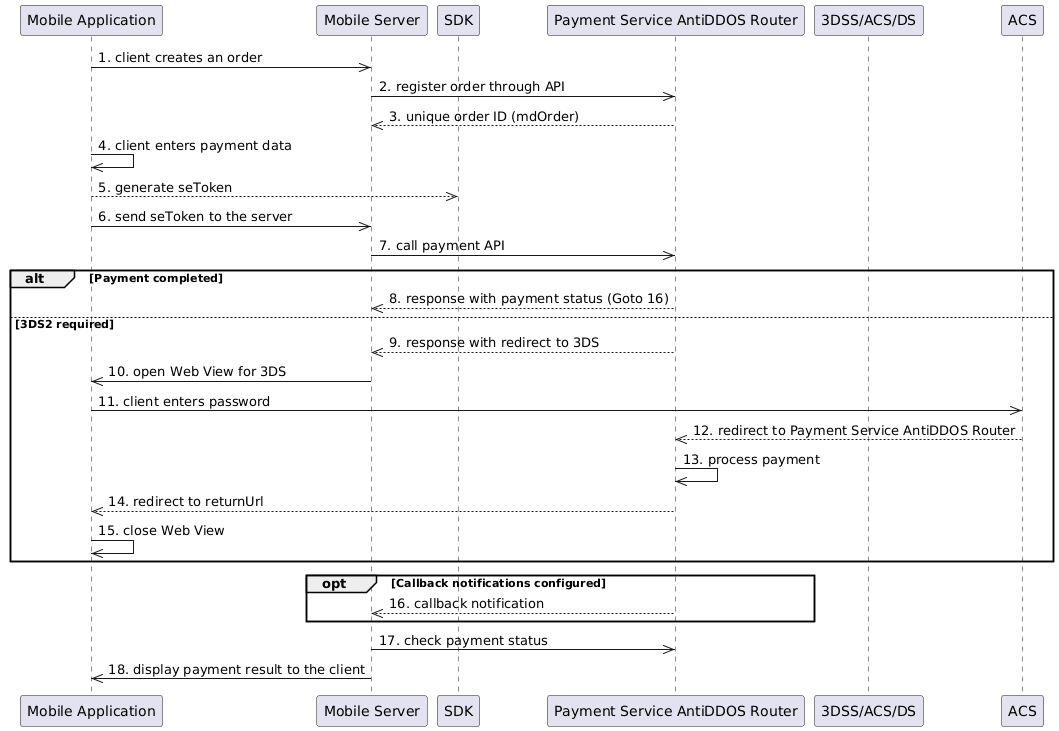
- The client creates an order.
- The mobile server registers the order in the Payment Service via register.do. Use the
returnUrlparameter as a marker to close Web View after being redirected from ACS at Step 14. - The mobile server receives a unique order ID
mdOrderin the response. - The client fills in the payment data in the mobile application.
-
The mobile application calls the SDK to create seToken. (Android: sdkCore.generateWithCard; iOS: CKCToken.generateWithCard).
See the list of values required to generate seToken in the section Parameters included in seToken composition.
The public key can be obtained by calling the Payment Service methods https://api.uat.all2pay.net/v2/se/keys.do or https://api.uat.all2pay.net/v2/se/keys2.do.
/se/keys.doreturns keys for RSA-2048 encryption, and/se/keys2.doreturns keys for RSA-4096 encryption. We recommend using RSA-4096.Both methods may return multiple keys. It is recommended to use the freshest key with the latest expiration date. You can cache public keys of the Payment Service for a duration not exceeding the key's expiration time.
Keys for testing and production environments differ.
The mobile application sends the seToken to the mobile server.
-
The mobile server uses the seToken to process the payment through paymentOrder.do.
- Use the seToken instead of pan, cvc, and expiration date.
The mobile server receives a response without a redirect to ACS, indicating that the payment is completed. Proceed to Step 14.
The mobile server receives a response with a redirect to ACS.
The mobile application opens Web View with data for ACS redirection.
The client enters their one-time password in the ACS form.
ACS redirects the client to the Payment Service AntiDDOS Router.
The Payment Service AntiDDOS Router processes the payment.
The Payment Service AntiDDOS Router redirects the client to the
returnUrl, which can be used as a marker to close the Web View.The mobile application closes the Web View.
The Payment Service AntiDDOS Router sends a callback notification to the merchant server if it is configured for the merchant.
The mobile server checks the final payment status via getOrderStatusExtended.do.
The mobile application displays the payment result to the client.
Mobile SDK Source
iOS
Requirements: iOS 10.0 or later
Android
Source code for Android on GitHub
Releases for Android on GitHub
Requirements: Android 5.0 or later
IOS
iOS Integration
SDKCore.framework integration
You can integrate SDKCore.framework by adding it manually.
SDKCore.framework
Download the latest version of the framework here.
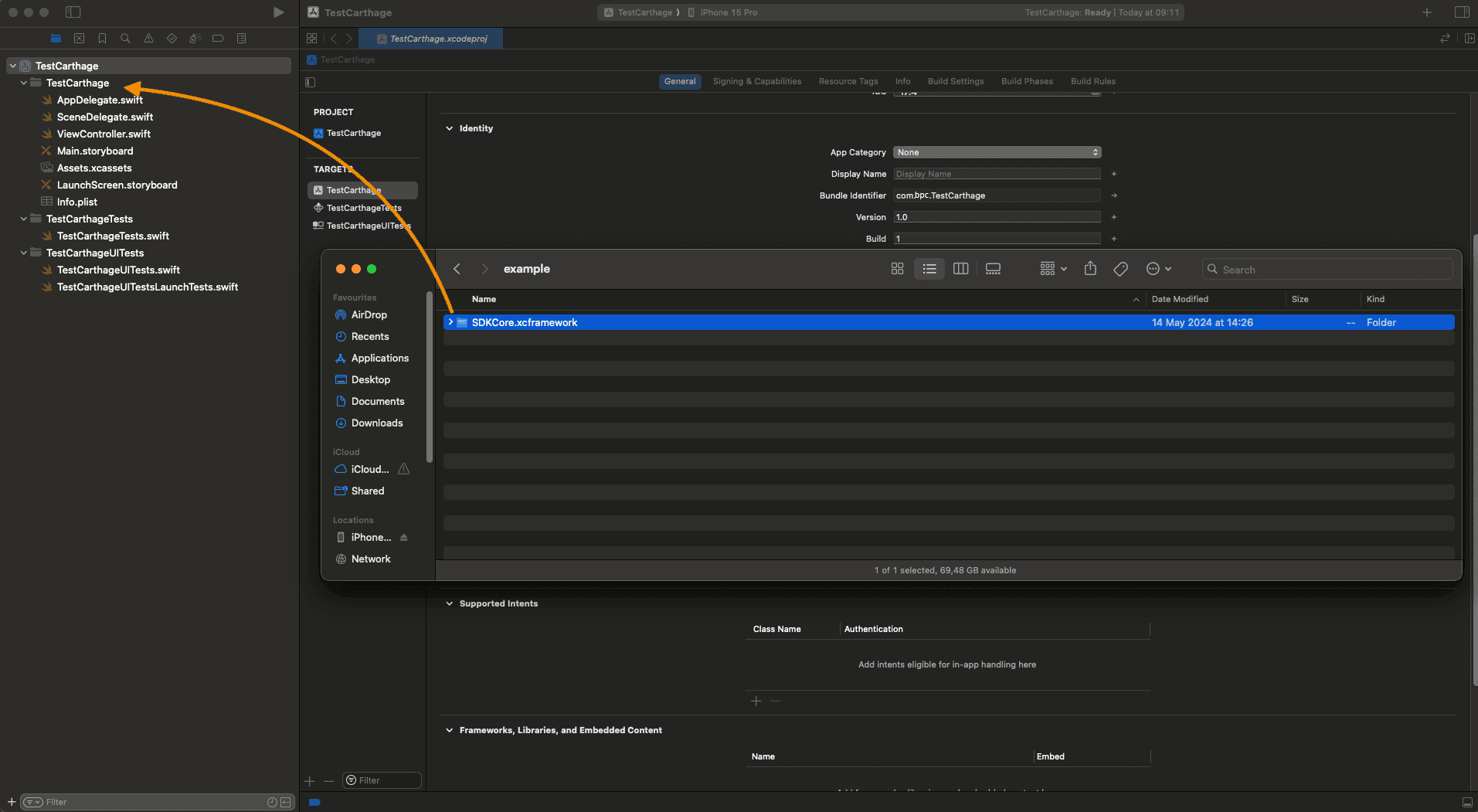
Take the
SDKCore.frameworkfile and add it to the project folder.
- Open Targets -> General -> Frameworks, Libraries, and Embedded Content. For
SDKCore.framework, in the Embed column, changeDo not EmbedtoEmbed & Sign.
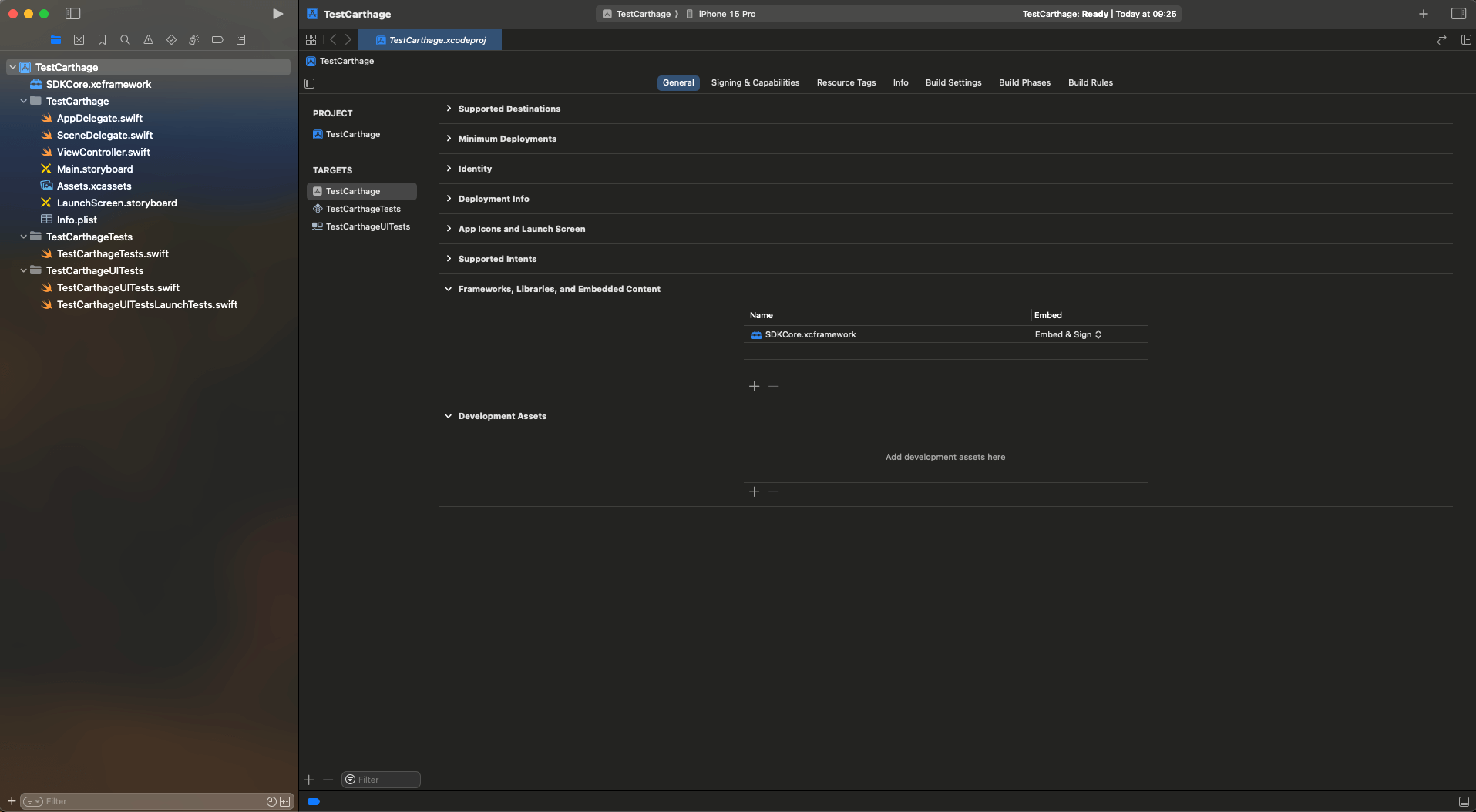
Once done, import the framework in the ViewController.swift file.
//ViewController.swift
...
import SDKCore
...
How to work with API V1
External dependencies
For generation of the token, it is necessary to set the public key.
let publicKey: String =
      "-----BEGIN PUBLIC KEY-----MIIBIjANBgkqhkiG9w0BAQEFAAOCAQ8AMIIBCgKCAQEAoIITqh9xlGx4tWA+aucb0V0YuFC9aXzJb0epdioSkq3qzNdRSZIxe/dHqcbMN2SyhzvN6MRVl3xyjGAV+lwk8poD4BRW3VwPUkT8xG/P/YLzi5N8lY6ILlfw6WCtRPK5bKGGnERcX5dqL60LhOPRDSYT5NHbbp/J2eFWyLigdU9Sq7jvz9ixOLh6xD7pgNgHtnOJ3Cw0Gqy03r3+m3+CBZwrzcp7ZFs41bit7/t1nIqgx78BCTPugap88Gs+8ZjdfDvuDM+/3EwwK0UVTj0SQOv0E5KcEHENL9QQg3ujmEi+zAavulPqXH5907q21lwQeemzkTJH4o2RCCVeYO+YrQIDAQAB-----END PUBLIC KEY-----"
Token generation method
let sdkCore = SdkCore()

let cardParams = CardParams(
     pan: "4111111111111111",
     cvc: "123",
     expiryMMYY: "12/28",
     cardholder: "TEST CARDHOLDER",
     mdOrder: "mdOrder",
     pubKey: publicKey
)

let cardParamsConfig = SDKCoreConfig(
    paymentMethodParams: .cardParams(params: cardParams)
)
let tokenResult = sdkCore.generateWithConfig(config: cardParamsConfig)

let bindignParams = BindingParams(
    pubKey: publicKey,
    bindingId: "das",
    cvc: "123",
    mdOrder: "mdOrder"
)
let bindingParamsConfig = SDKCoreConfig(
    paymentMethodParams: .bindingParams(params: bindignParams)
)
let tokenResult = sdkCore.generateWithConfig(config: bindingParamsConfig)
Models
CardParams
| Property name | Data type | Default value | Optional | Description |
|---|---|---|---|---|
| mdOrder | String | - | No | order number |
| pan | String | - | No | card number |
| cvc | String | - | No | secret card code |
| expiryMMYY | String | - | No | expiry date for the card |
| cardHolder | String | - | Yes | first and last name of cardholder |
| pubKey | String | - | No | public key |
BindingParams
| Property name | Data type | Default value | Optional | Description |
|---|---|---|---|---|
| mdOrder | String | - | No | order number |
| bindingId | String | - | No | number of a stored credential for the card |
| cvc | String | - | Yes | secret code for the card |
| pubKey | String | - | No | public key |
Field validation errors
| ParamField | Error | Description |
|---|---|---|
| UNKNOWN | - | Unknown error |
| PAN | required | An empty field is specified |
| invalid | Invalid value | |
| invalid-format | Invalid characters are used. Only numbers are available. | |
| CVC | required | An empty field is specified |
| invalid | Invalid value | |
| EXPIRY | required | An empty field is specified |
| invalid | Invalid value | |
| invalid-format | The format does not match the template MM/YY | |
| CARDHOLDER | required | An empty field is specified |
| invalid | Invalid value | |
| invalid-format | Invalid characters are used. Only characters and spaces are available. | |
| BINDING_ID | required | An empty field is specified |
| invalid | Invalid value | |
| MD_ORDER | required | An empty field is specified |
| invalid | Invalid value | |
| PUB_KEY | required | An empty field is specified |
Android
Android Integration
Connecting to a Gradle project by adding .aar library files
You must add the sdk_core-release.aar library file to the libs folder, then specify the
dependency of the added library.
build.gradle.kts
allprojects {
    repositories {
        // ...
        flatDir {
            dirs("libs")
        }
    }
}

dependencies {
    // dependency is mandatory to add
    implementation(group = "", name = "sdk_core-release", ext = "aar")
}
build.gradle
allprojects {
    repositories {
        // ...
        flatDir {
            dirs 'libs'
        }
    }
}

dependencies {
    // dependency is mandatory to add
    implementation(group: '', name: 'sdk_core-release', ext: 'aar')
}
Android Configuration
Logging
Internal processes are logged with the SDK-Core tag.
You can also log your processes.
Logging is available through the Logger object.
-
To add log- interfaces, you should call the
Logger-methodaddLogInterface().Example of logging into LogCat:
...
    Logger.addLogInterface(object : LogInterface {
        override fun log(classMethod: Class<Any>, tag: String, message: String, exception: Exception?) {
                Log.i(tag, "$classMethod: $message", exception)
            }
        })
...
The default tag is SDK-Core. You can set your own one if you like.
-
To log your own events, you should call
Logger-methodlog().Example:
...
     Logger.log(this.javaClass, "MyTag", "My process...", null)
...
Example Kotlin_core (no GUI)
Example of cryptogram formation
import net.payrdr.mobile.payment.sdk.core.SDKCore
import net.payrdr.mobile.payment.sdk.core.TokenResult
import net.payrdr.mobile.payment.sdk.core.model.BindingParams
import net.payrdr.mobile.payment.sdk.core.model.CardParams
import net.payrdr.mobile.payment.sdk.core.validation.BaseValidator
import net.payrdr.mobile.payment.sdk.core.validation.CardCodeValidator
import net.payrdr.mobile.payment.sdk.core.validation.CardExpiryValidator
import net.payrdr.mobile.payment.sdk.core.validation.CardHolderValidator
import net.payrdr.mobile.payment.sdk.core.validation.CardNumberValidator
import net.payrdr.mobile.payment.sdk.core.validation.OrderNumberValidator

class MainActivity : AppCompatActivity() {
    // initialization of validators for card information entry fields
    private val cardNumberValidator by lazy { CardNumberValidator(this) }
    private val cardExpiryValidator by lazy { CardExpiryValidator(this) }
    private val cardCodeValidator by lazy { CardCodeValidator(this) }
    private val cardHolderValidator by lazy { CardHolderValidator(this) }
    private val orderNumberValidator by lazy { OrderNumberValidator(this) }
    private val sdkCore by lazy { SDKCore(context = this) }

    override fun onCreate(savedInstanceState: Bundle?) {
        // installation of validators on the card information entry fields
        cardNumberInput.setupValidator(cardNumberValidator)
        cardExpiryInput.setupValidator(cardExpiryValidator)
        cardCodeInput.setupValidator(cardCodeValidator)
        cardHolderInput.setupValidator(cardHolderValidator)
        mdOrderInput.setupValidator(orderNumberValidator)

        // creation of an object and initialization of fields for a new card
        val params = NewPaymentMethodCardParams(
            pan = cardNumberInput.text.toString(),
            cvc = cardCodeInput.text.toString(),
            expiryMMYY = cardExpiryInput.text.toString(),
            cardHolder = cardHolderInput.text.toString(),
            pubKey = pubKeyInput.text.toString()
        )
        // method call to get the cryptogram for a new card
        sdkCore.generateWithConfig(SDKCoreConfig(params))

        // Creation of an object and initialization of fields for the linked card
        val params = NewPaymentMethodStoredCardParams(
            storedPaymentId = "storedPaymentMethodId",
            cvc = "123",
            pubKey = pubKeyInput.text.toString()
        )
        // method call to get the cryptogram for the linked card
        sdkCore.generateWithConfig(SDKCoreConfig(params))
    }
}
Models
NewPaymentMethodCardParams
| Property name | Data type | Default value | Optional | Description |
|---|---|---|---|---|
| pan | String | - | No | card number |
| cvc | String | - | No | secret card code |
| expiryMMYY | String | - | No | expiry date for the card |
| cardHolder | String | - | No | first and last name of the cardholder |
| pubKey | String | - | No | public key |
NewPaymentMethodStoredCardParams
| Property name | Data type | Default value | Optional | Description |
|---|---|---|---|---|
| storedPaymentId | String | - | No | number of a stored credential for the card |
| cvc | String | - | No | secret code for the card |
| pubKey | String | - | No | public key |
TokenResult
| Property name | Data type | Default value | Optional | Description |
|---|---|---|---|---|
| token | String | - | No | token as string |
| errors | Map |
- | No | error while generating token |
Field validation errors
| ParamField | Error | Description |
|---|---|---|
| PAN | required | An empty field is specified |
| invalid | Invalid value | |
| invalid-format | Invalid characters are used. Only numbers are available. | |
| CVC | required | An empty field is specified |
| invalid | Invalid value | |
| EXPIRY | required | An empty field is specified |
| invalid | Invalid value | |
| invalid-format | The format does not match the template MM/YY. | |
| CARDHOLDER | required | An empty field is specified |
| invalid | Invalid value | |
| invalid-format | Invalid characters are used. Only characters and spaces are available. | |
| PUB_KEY | required | An empty field is specified |
| STORED_PAYMENT_ID | requrired | An empty field is specified |
| invalid | Invalid value |
How to work with API V1
External dependencies
For generation of the token, it is necessary to set the public key.
val publicKey: String =
    "-----BEGIN PUBLIC KEY-----MIIBIjANBgkqhkiG9w0BAQEFAAOCAQ8AMIIBCgKCAQEAoIITqh9xlGx4tWA+aucb0V0YuFC9aXzJb0epdioSkq3qzNdRSZIxe/dHqcbMN2SyhzvN6MRVl3xyjGAV+lwk8poD4BRW3VwPUkT8xG/P/YLzi5N8lY6ILlfw6WCtRPK5bKGGnERcX5dqL60LhOPRDSYT5NHbbp/J2eFWyLigdU9Sq7jvz9ixOLh6xD7pgNgHtnOJ3Cw0Gqy03r3+m3+CBZwrzcp7ZFs41bit7/t1nIqgx78BCTPugap88Gs+8ZjdfDvuDM+/3EwwK0UVTj0SQOv0E5KcEHENL9QQg3ujmEi+zAavulPqXH5907q21lwQeemzkTJH4o2RCCVeYO+YrQIDAQAB-----END PUBLIC KEY-----"
Token generation method
// TokenResult with CardParams
val cardParams: CardParams = CardParams(
    mdOrder = "mdOrder",
    pan = "4111111111111111",
    cvc = "123",
    expiryMMYY = "12/28",
    cardHolder = "TEST CARDHOLDER",
    pubKey = "publicKey"
)
val tokenResult = sdkCore.generationWithConfig(paymentCardParams = cardParams)

// TokenResult with BindingParams
val bindingParams: BindingParams = BindingParams(
    mdOrder = "mdOrder",
    bindingID = "das",
    cvc = "123",
    pubKey = "publicKey"
)

val tokenResult = sdkCore.generationWithConfig(paymentCardParams = bindingParams)