
Digital Ruble Payment via Redirect
The payment service AntiDDOS Router supports payment via Digital Ruble through a payment page.
Payment with Digital Ruble is always made to a specific (target) bank. Payments using Digital Ruble are conducted via the universal QR code of the Faster Payments System (FPS) network. Thus, for Digital Ruble payments and FPS payments, the partner's settings in the Payment Service must indicate the same bank. To change this bank, you need to contact technical support. To find out the current settings, use the /settings/getRouterParams.do request.
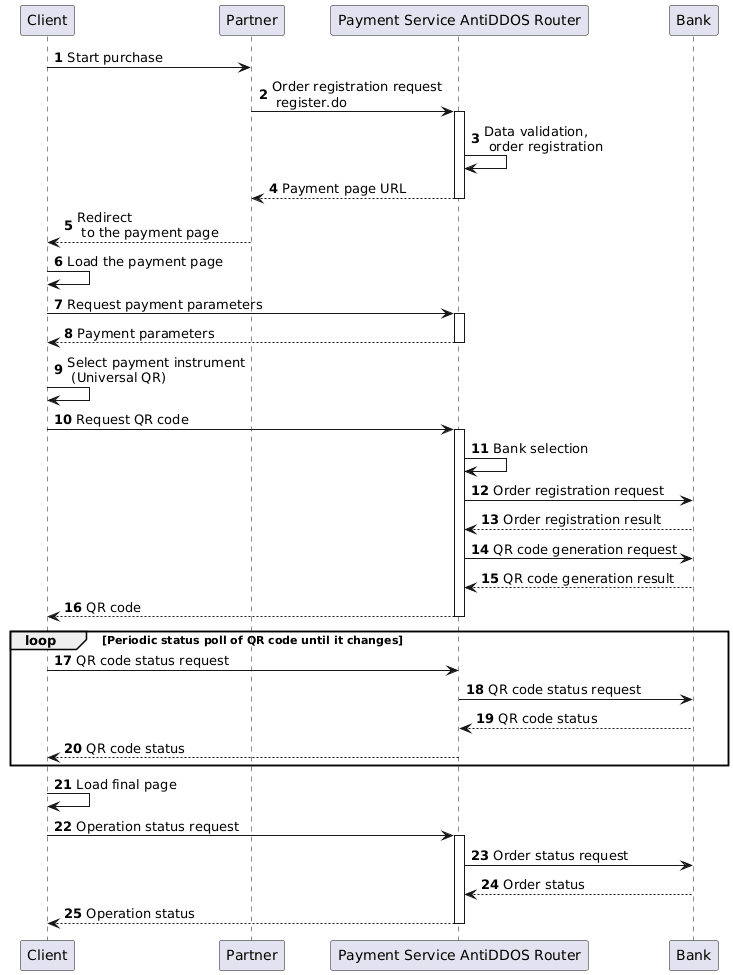
Integration Schema
Enable Digital ruble on the payment page
Specify "UNIQR_C2B" value in the "allowedPaymentWays" parameter of the registration request to make the Digital ruble payment method available on the Payment service's payment page. Below is an example of such a request.
1. The client initiates the purchase of goods or services on the Partner's website.
2. The Partner sends an order registration request to the Payment Service AntiDDOS Router: register.do for single-stage payment or registerPreAuth.do for two-stage payment. For more details about these payment types, see Two-Stage Payments.
To ensure that the Digital Ruble payment button appears on the payment page, the payment method "UNIQR_C2B" must be added to the allowedPaymentWays parameter during order registration, among other payment methods.
Example request:
curl -X POST 'https://api.uat.all2pay.net/v2/register.do'
-H 'Content-Type: application/json'
--data-raw '{
    "orderNumber": "order_123508",
    "amount": 10000,
    "currency": "643",
    "language": "ru",
    "returnUrl": "https://mybestmerchantreturnurl.com/success",
    "failUrl": "https://mybestmerchantreturnurl.com/fail",
    "userName": "test_user",
    "password": "test_user_password",
    "allowedPaymentWays": [
        "UNIQR_C2B",
        "CARD_BINDING",
        "CARD"
    ]
}'
curl -X POST 'https://api.uat.all2pay.net/v1/register.do'
-H 'Content-Type: application/json'
--data-raw '{
"orderNumber": "order_123508",
"amount": 10000,
"currency": "643",
"language": "ru",
"returnUrl": "https://mybestmerchantreturnurl.com/success",
"failUrl": "https://mybestmerchantreturnurl.com/fail",
"userName": "test_user",
"password": "test_user_password",
"allowedPaymentWays": [
"UNIQR_C2B",
"CARD_BINDING",
"CARD"
]
}'3. The Payment Service AntiDDOS Router validates the Partner's data and registers the order.
Redirect to the payment page
4. The Payment Service AntiDDOS Router sends the Partner a link to the payment page.
Example response:
{
    "errorCode": "0",
    "formUrl": "https://router.rbsuat.com/wl/payment.html?mdOrder=f9584546-2613-4a0d-896f-0194d243865f&language=ru",
    "orderId": "f9584546-2613-4a0d-896f-0194d243865f",
    "orderNumber": "order_123508"
}
5. The Partner redirects the Client to the payment page.
Selecting Digital ruble for payment
6. The client accesses the payment page.
7. The client (payment page) requests payment parameters from the Payment Service.
8. The Payment Service AntiDDOS Router provides the payment page with information about available payment methods.
9. The client selects the payment instrument FPS - Universal QR.

Payment with Digital ruble
10. The client requests a QR code from the Payment Service.
11. The Payment Service AntiDDOS Router selects the bank where the Partner has configured FPS payment acceptance.
12. The Payment Service AntiDDOS Router sends a request to the selected bank to register the order.
13. The bank sends the order registration result to the Payment Service AntiDDOS Router.
14. The Payment Service AntiDDOS Router sends a QR code generation request to the selected bank.
15. The selected bank generates a one-time dynamic QR code and sends the result to the Payment Service AntiDDOS Router.
16. The Payment Service AntiDDOS Router provides the QR code to the Client on the payment page.

17. The client (payment page) periodically requests the QR code status in the Payment Service.
18. The Payment Service AntiDDOS Router requests the QR code status from the bank.
19. The bank returns the QR code status to the Payment Service AntiDDOS Router.
20. The Payment Service AntiDDOS Router sends the QR code status to the Client on the payment page. If the status remains unchanged, return to step 18. If the status changes — proceed to step 21.
21. After the QR code status changes, the Payment Service AntiDDOS Router redirects the client to the final page depending on the payment result: in case of an error, to failUrl, and in case of successful payment, to returnUrl. A query parameter orderId=[order identifier in Payment Service] will be added to the URL.
Final status of the order
22. The client (final page) requests the final operation status from the Payment Service via the method getOrderStatusExtended.do.
23-25. The Payment Service AntiDDOS Router requests the order status from the bank and provides it to the Client on the final page.