
Alfa Pay payment via redirect
The payment service AntiDDOS Router supports Alfa Pay payments from the payment page.
Until this payment method is supported by other acquiring banks, Alfa Pay payments are only available with Alfa-Bank. The bank for Alfa Pay must be specified in the Partner's settings in the Payment service. To change the settings, contact support. To find out the current settings, use the /settings/getRouterParams.do request.
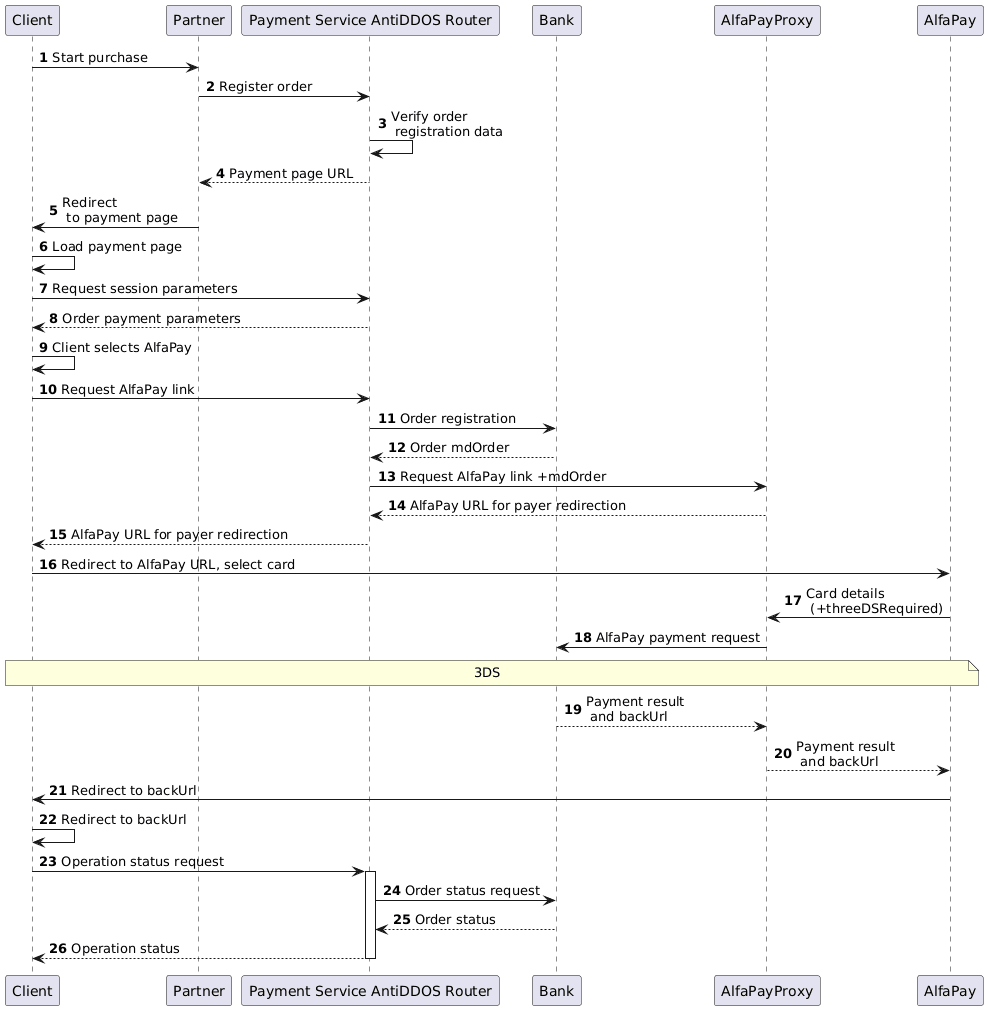
Enable Alfa Pay on the payment page
Specify "ALFAPAY" value in the "allowedPaymentWays" parameter of the registration request to make the Alfa Pay payment method available on the Payment service's payment page. Below is an example of such a request.
1. The client initiates the purchase of goods or services on the Partner's website.
2. The Partner sends a request to the Payment Service AntiDDOS Router to register the order: register.do for a single-stage payment or registerPreAuth.do for a two-stage payment. Read more about these payment types in the section Two-stage payments.
The request must specify that the Alfa Pay payment method should be available on the payment page. To do this, include "ALFAPAY" among other payment methods in the allowedPaymentWays parameter.
Request example
curl --request POST \
    'https://api.uat.all2pay.net/v2/register.do' \
    -H 'Content-Type: application/json' \
    --data-raw \
    '{
    "orderNumber": "order_123473",
    "amount": 1234,
    "currency": "643",
    "language": "en",
    "returnUrl": "https://mybestmerchantreturnurl.com/success",
    "userName": "test_user",
    "password": "test_user_password",
    "clientId":"client_10001",
    "allowedPaymentWays": ["CARD_BINDING", "CARD", "ALFAPAY"]
    }'
curl --request POST \
'https://api.uat.all2pay.net/v1/register.do' \
-H 'Content-Type: application/json' \
--data-raw \
'{
"orderNumber": "order_123473",
"amount": 1234,
"currency": "643",
"language": "en",
"returnUrl": "https://mybestmerchantreturnurl.com/success",
"userName": "test_user",
"password": "test_user_password",
"clientId":"client_10001",
"allowedPaymentWays": ["CARD_BINDING", "CARD", "ALFAPAY"]
}'3. The Payment Service AntiDDOS Router verifies the data and registers the order.
Redirect to the payment page
4. The Payment Service AntiDDOS Router provides the Partner with a link to the payment page.
Response example
{
    "errorCode": "0",
    "formUrl": "https://router.rbsuat.com/wl/payment.html?mdOrder=2dc811e7-8d1c-407a-bd25-a4f41f96cc60&language=en",
    "orderId": "2dc811e7-8d1c-407a-bd25-a4f41f96cc60",
    "orderNumber": "order_123457"
}
5. The Partner redirects the Client to the payment page.
Selecting Alfa Pay payment method
6. The Client accesses the payment page.
7. The Client (payment page) requests payment parameters from the Payment Service.
8. The Payment Service AntiDDOS Router provides payment parameters to the payment page. As a result, available payment methods are displayed on the payment page.

9. The Client selects the Alfa Pay payment method.
Alfa Pay payment
10. The payment page requests the Alfa Pay redirect URL.
11. The Payment Service AntiDDOS Router registers the order with the bank.
12. The bank provides the order identifier to the Payment Service AntiDDOS Router.
13. The Payment Service AntiDDOS Router informs the bank's order number and requests the Alfa Pay link.
14. The Alfa Pay proxy informs the bank about the beginning of the payment, receives the Alfa Pay link, and returns it to the Payment Service AntiDDOS Router.
15. The Payment Service AntiDDOS Router provides the Alfa Pay link to the payment page.
16. The Client follows the Alfa Pay link. Depending on whether the payment is made from a phone or a computer, the mobile application or mobile bank will open. There, the Client selects a card for payment.

17. The Alfa Pay page transfers the card data to the Alfa Pay proxy. Additionally, the need for payment confirmation via 3DS is indicated.
18. The Alfa Pay proxy processes the order payment with the bank. If 3DS was requested, the client additionally undergoes 3DS authentication. A verification code must be entered on the confirmation page.

19. The bank returns the payment status to the Alfa Pay proxy.
20. The Alfa Pay proxy transmits the payment result to the Alfa Pay page.
Отображение финального статуса оплаты
21. The Alfa Pay page redirects the client to the payment result page. Depending on the payment result, this is either a link to failUrl or returnUrl.
22. The Client navigates to the specified address.
23. The Client (final page) sends a request to the Payment Service AntiDDOS Router to obtain the final order status getOrderStatusExtended.do.
24-26. The Payment Service AntiDDOS Router requests the order status from the selected bank and provides the order status to the final page.