
General description of the Payouts module
The payouts functionality allows Partners (legal entities) who have non-banking software (accounting system, cash solution, other proprietary system) to make payout to the Recipients. The following payout ways are supported:
- By the Recipient's card number.
- To a Recipient's saved card (stored credentials).
- By the Recipient's phone number via SBP (System of Fast Payments).
The ability to make payouts is available upon request to the support service.
The following parties are involved in the payout process:
- Recipient - an individual receiving the transfer
- Payer - legal entity making the transfer (a.k.a. Partner)
- Partner's Service - Partner's application that records and initiates payouts to individuals
- Payout Module - automatic system that provides the Merchant with the opportunity to make payouts via the Internet to bank cards
General process of interaction using only API calls (PCI DSS certification may be required to work with the recipient's details):
- The Recipient applies to the Partner's Operator or directly to Partner's Service to receive a Payout;
- On receiving the request, the Partner's Service collects the Recipient's payout details;
- The Partner's Service initiates the Payout in the Payout Module;
- The Payout is made and the result of the Payout is returned;
- The Partner's Service can request the status of the Payout at any time.
General process of interaction using API calls and bank's pages (recipient details collection page, final page):
- The Recipient applies to the Partner's Operator or directly to Partner's Service to receive a Payout;
- On receiving the request, the Partner's Service registers the Payout;
- The Partner’s Service receives the address of the payout page for entering the Recipient’s payout details for display to the Operator or Recipient;
- The payout page collects the Recipient’s payout details and confirms the Payout;
- The Payout is made and the result of the Payout is returned;
- The Partner's Service can request the status of the Payout at any time.
To perform Payout of funds from the Partner’s transit account, you need to support the following payout scripts:
- script to get payouts balance via API
- payout script from a transit account via API with only the
targetobject being transferred - payout script from a transit account via API and payout page
- script for request of payout status
Implementation features and limitations
- Reverse and refunds of payouts are not supported;
- Payouts are supported only with currency code 643 (RUB);
- Payouts are made only to cards of Russian banks.
Payouts in the Merchant Portal
Payouts list
The Payouts section in your Personal Account allows you to view a list of payments, as well as make payments to a card and via the SBP. To go to the section, click the  icon in the menu on the left. The page that opens shows a list of payments already made, if any.
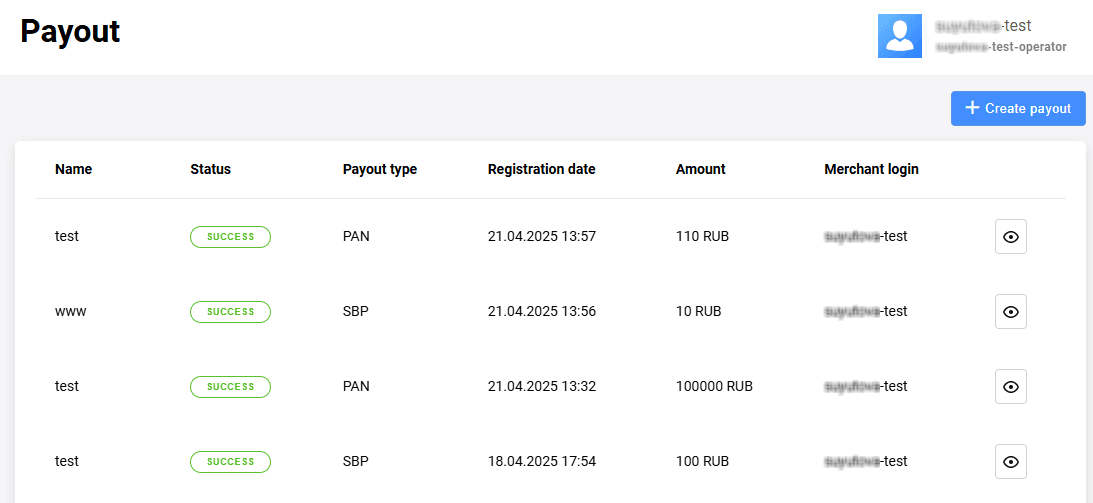
The following columns are provided:
- Name of the payout as specified when it was created.
- Status of the payout indicates if the payout completed successfully or with an error.
- Payout type shows the way payout was made, for example to a new or saved card, or in some other way supported by the bank.
- Registration date of the payout.
- Amount of the payout.
- Merchant login is the login with whose permissions and settings the payout was made. When using the parent-child merchant login scheme, the Partner can log in under the parent merchant's login and make the payout on behalf of the child merchant.
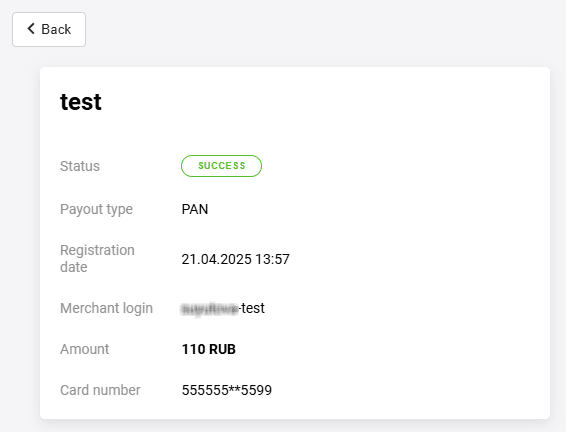
You can also view payout information in this list by clicking on the icon.
icon.
Making a payout
To make a payout, click the Create payout button and set the transaction parameters.
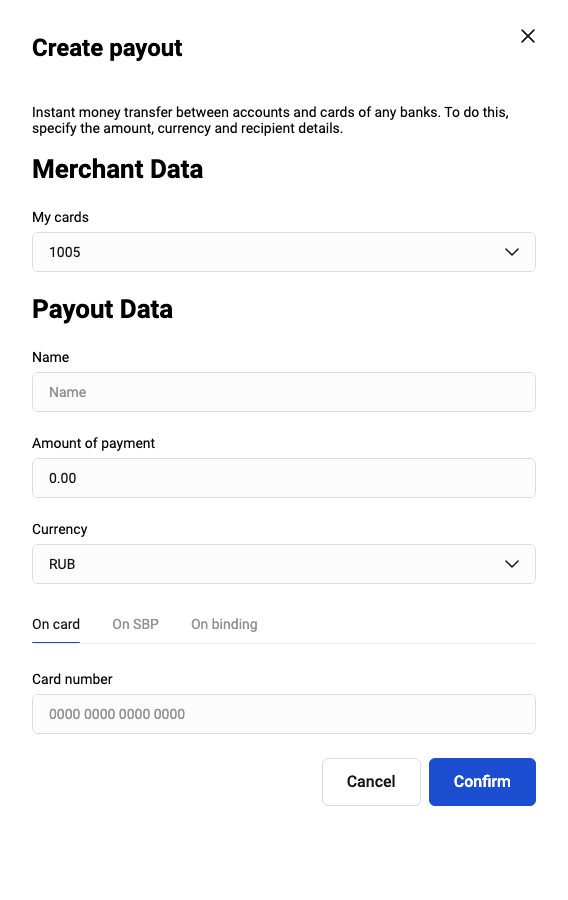
General parameters for all payout methods:
- Name of the payout will be displayed in the payouts list.
-
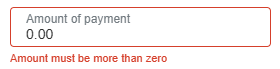
Amount of payment may be subject both to a minimum and maximum limit depending on the Partner's settings in the payment gateway. If you enter an amount outside the allowed range, an error message will be displayed.
Currency of the payout.
Available payout ways:
Card — payout to a card number;
SBP — payout to a phone number;
Binding — payout to a previously saved card.
Depending on the payout method, set the parameters described below.
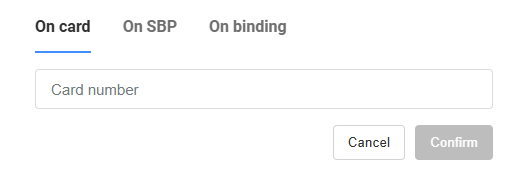
Payout on card
To make a payout to a card, specify the client's card number to which the payment will be sent.
Payout on SBP
For payout on the SBP, the following parameters are specified:
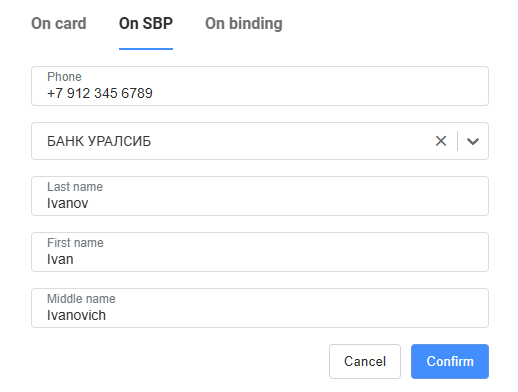
- Phone number of the client to make the SBP payment
- Bank in system of SBP
- Last name of the client
- First name of the client
- Middle name of the client
Payout on a saved card
To make a payout to a saved card, select one of the previously saved cards from the list.
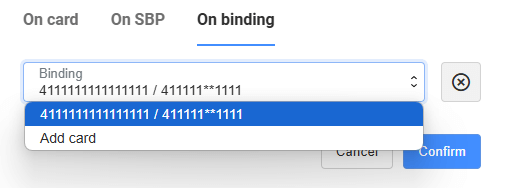
Learn how to manage the cards in that list at Recipient's stored credentials.
Confirm the payout
Every payout requires two-factor authentication, like when logging into the Merchant Portal. Therefore, after clicking the Confirm button, you will be asked for a confirmation code.
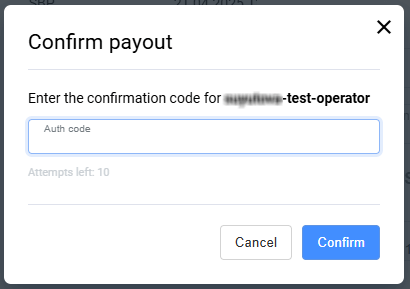
When the payout is successfully completed, a message about the success of the operation is shown.
Batch payouts
The Merchant Portal supports batch payouts. To make payouts this way, the Partner can upload a file (registry) listing the payouts in the csv or xlsx format to the Merchant Portal, and then make payouts according to the data in these files. File templates indicating the required fields are available in the Personal Account when making a payout.
The Partner must have permission to make batch (registry) payouts.
To make a batch payout:
-
Go to the Batch payouts tab on the Payout page.
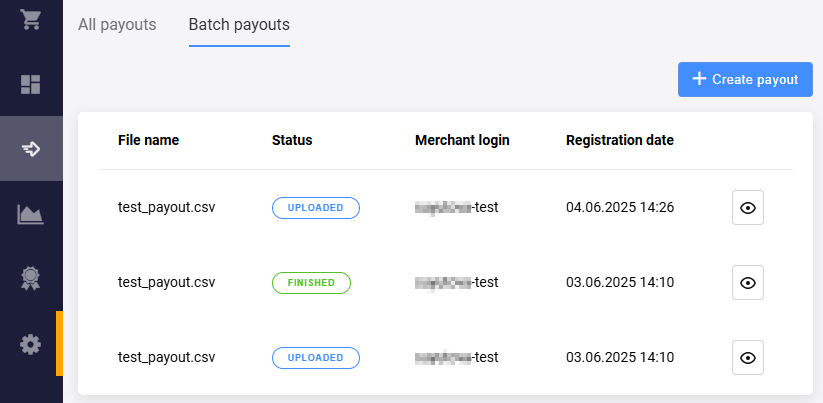
This page lists previously added files, if any, and provides the following information about the files:
- File name
- Status (for example, Uploaded for newly added files or Finished for processed files)
- Merchant login — the Partner's login in the bank (may not be the same as in the Merchant Portal).
- Registration date — date of file upload to the Merchant Portal.
-
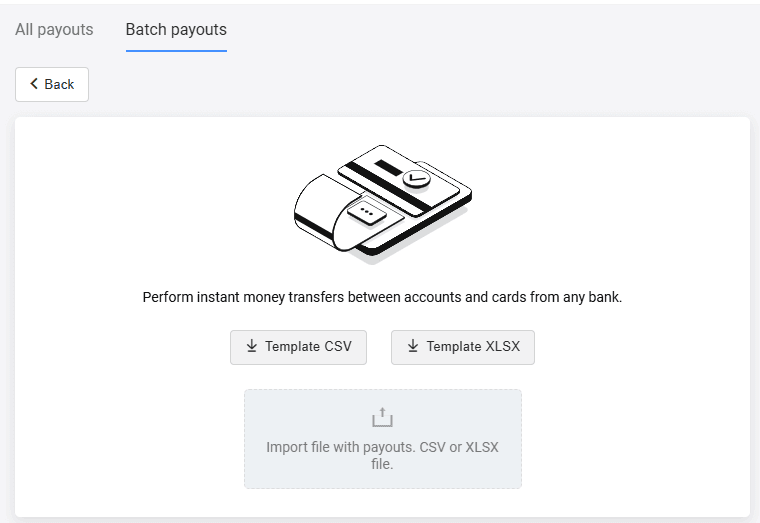
Click Create payout. A page for adding the file opens.
-
Add a file with the payout list. To create it, download the template in CSV or XLSX format and add lines with data. Please note that the currency code is specified in Alpha-3 ISO 3166-1 format (three-letter code). The payout amount is specified in the minimum currency units, for example, 1000 is 10 euros 00 cents. Example of CSV file contents:
creditPan,currency,amount,name "4111111111111111",EUR,"1000","test 1" "4111111111111111",USD,"234500","test 2" -
The file appears in the list on the Batch payouts tab. Click
 next to the name of the uploaded file to display a page with information about the batch payout.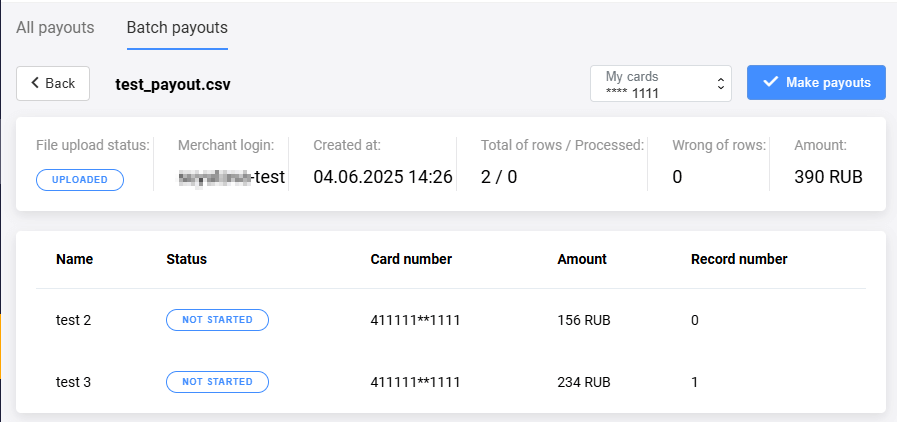
-
Make sure the data is correct. The following information about the batch payout is available:
- File upload status (for example, Uploaded or Finished)
- Merchant login — the Partner's login in the bank (may not be the same as in the Merchant Portal).
- Registration date — date of file upload to the Merchant Portal.
- Total of rows / Processed — total number of records and number of records processed.
- Wrong of rows — the number of errors occurred while processing the payouts from the file.
-
Amount — total amount of all payouts recorded in the file.
There is also data on each separate payout:
- Name of the payout
- Status of the specific payout, for example, Not started, Finished or Error.
- Card number — masked PAN of the target card.
- Amount of the specific payout
- Record number — the sequential number of the data row in the registry file.
Click Make payouts.
Use cases involving API
Payout of funds via API
This scenario describes the sequence of payout from a partner’s service using the API. The collection of the recipient's details is carried out on the Partner's side (PCI DSS certification may be required to work with the recipient's details).
(performPayout.do) activate PM PM->>PM: Technical verification,
execution of registration
and paymout operations PM-->>PS: Response with the result of the payout deactivate PM PS-->>O: Payout status deactivate PS deactivate O
- Operator (or Recipient) decides to initiate a payout and performs the necessary actions on the Partner's Service side.
- Partner's Service sends a request to perform payout
performPayout.doto Payout Module and transfers all necessary parameters of payout. Depending on the parameters transferred to this method in thetargetblock, the payout will be made by card number, or by recipient's stored credential identifier, or by the phone number via the SBP. - Payout Module performs data verification, registration and payout operations.
- The Payout Module returns the final status to the Partner Service.
- Partner's Service notifies the Operator (or Recipient) of the payout status.
Payout of funds via API and the Bank's payout pages
This scenario describes the sequence of payout from the partner’s service using the API and the Bank’s payout pages. The collection of the Recipient's card data is carried out using a page on the Bank's side (this does not require PCI DSS certification).
(registerPayout.do) PM->PM: Payout registration PM-->>-PS: URL of the page for specifying
Recipient's details PS-->>-O: URL of the page for specifying
Recipient's details O->>+PM: Opens the page
Fills out the Recipient's details
Confirms the payout PM->PM: Execute payout PM-->>-O: Redirect to finishing page O->>+PM: Opens final page,
request for payout's status activate PM PM->>PM: Preparation of the status PM-->>O: Result of payout deactivate PM deactivate O
- Operator (or Recipient) decides to make payouts and performs the necessary actions on the Partner's Service side;
- Partner Service sends a request to register a payout (
registerPayout.do) and sends all the necessary parameters for registration; - Payouts module registers the payout;
- Payouts module returns the page URL (the link contains a unique payout identifier);
- Partner's Service redirects the Operator (or Recipient) to the page URL;
- Operator (or Recipient) opens to the page, fills in the Recipient’s details and confirms the payout;
- Payout module performs the payout;
- Payout module returns the page URL (the link contains a unique payout identifier);
- Operator (or Recipient) goes to the page and initiates receiving the status;
- Payout module generates the status;
- Payout module shows the status on the page.
Payout status request
This scenario describes the sequence of requesting payout status using the API. You can request the status of a payout at any stage and receive an up-to-date status.
(getPayoutStatus.do) activate PM PM->>PM: Order status check PM-->>PS: Payout result response deactivate PM PS-->>O: Payout result deactivate PS deactivate O
- Operator (or Recipient) needs to find out the status of the payout;
- Partner's service sends a request for payout status (
getPayoutStatus.do) to Payout Module; - Payout Module checks the data and prepares the status of the payout;
- Payout Module returns the final payout status to the Partner Service;
- Partner Service notifies the Operator (or Recipient) of the payout status.
Stored credentials for Payouts
Stored credentials are saved payment data. The stored credential is useful to avoid entering card details every time a payout is performed.
Payouts module provides the following credential types:
- Recipient's stored credentials (target stored credential).
Recipient's stored credentials
A recipient's stored credential is created in one of the following ways:
Via the createTargetBindingId.do API method. On their payout page, the Partner can implement saving the recipient's card number. If the recipient confirms saving the card, the Partner calls the method for creating a stored credential. The returned identifier
bindingIdcan be passed in thetargetblock of the performPayout.do method at future payouts.In the Merchant Portal when performing a payout as shown in Payout on a saved card. When created, an operator can select the saved card for subsequent payments in the Merchant Portal.
To create the recipient's stored credential in the Merchant Portal:
- Go to Payout section in the navigation bar to the left.
- Click Create payout.
- Go to the On binding tab.
-
Select Add card in the card list.
-
In the window that opens, specify the card number and the name of the stored credential.
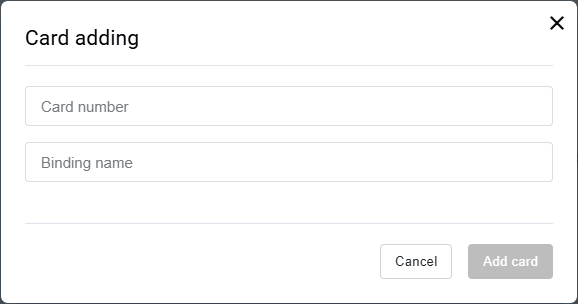
You can also delete previously saved cards on the Create payout - On binding tab. The Partner must have a special permission in the bank in order to be able to delete cards.
To delete a saved card, select it in the list and click the  icon. A window will open to confirm the deletion. After clicking the Delete button, the stored credential is deactivated.
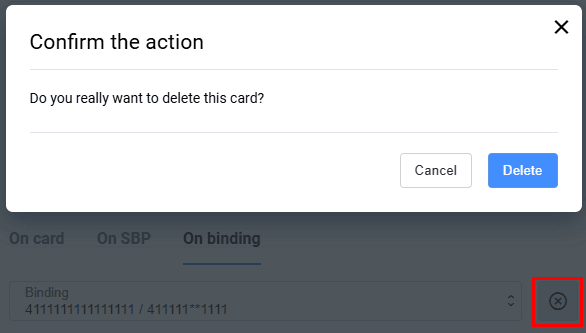
Payouts API
Requests are made using the HTTP 1.1 protocol over SSL (HTTPS), to the specified address:
TEST: https://payouts.uat.all2pay.net/payouts/api/{api_version}/{api_method}
PROD: https://payouts.all2pay.net/payouts/api/{api_version}/{api_method}
HTTPS POST API requests must meet the following requirements:
- Authorization of requests is performed using login and password combination, which is transmitted in the request body.
- Request body is passed in
application/jsonformat. - The response body is returned in
application/jsonformat.
HTTPS POST API requests must contain the headers:
- Content-Type: application/json; charset=UTF-8
- Accept: application/json; version=2.0
Current API version to use in requets context ({api_version}): v2
Security Requirements
- All network communications are done over HTTPS only.
- The application must verify the correctness of the server's SSL certificate. If the SSL certificate fails, the session must be terminated immediately to prevent authorization data leakage.
Request to check the availability of the Payout Module
To check the functionality of the Payout Module, you must use the HTTPS GET API request /payouts/api/v2/echo
Request parameters
No parameters required.
Response parameters
The response is provided in text/plain format.
The response indicates the current version of the payout module and the name of the node separated by a hyphen; the name of instance is indicated in square brackets.
Request example
curl --location 'https://payouts.all2pay.net/payouts/api/v2/echo'Response example
Payout v2.3 is online in channel Payout_APIserver - svip01[instance:svipUAT]Register a payout
To register a payout, use the HTTPS POST API request to /payouts/api/v2/registerPayout.do.
This request registers the payout and returns URL of payout page.
The collection of the Recipient's details is carried out on the Banks's payout page (PCI DSS certification is not required to work with the Recipient's details).
Request parameters
| Required | Name | Type | Description |
|---|---|---|---|
| Mandatory | userName |
String [30] | The Partner login received upon registration |
| Mandatory | password |
String [30] | The Partner password received upon registration |
| Mandatory | orderNumber |
String[32] | Unique order number (identifier) in the Partner's System. |
| Mandatory | amount |
Integer [12] | Payout amount in minor currency units |
| Mandatory | currency |
String | Currency code according to ISO 4217 |
| Optional | description |
String [598] | Payout description |
| Optional | language |
String [2] | Language in ISO 639-1. If not specified, the default language will be used |
| Optional | sessionTimeoutSecs |
Integer | Amount of time in seconds to process a Payout order. Default value - 1200 seconds |
| Optional | merchantLogin |
String | Login of the child merchant. Used in case of parent-child merchant scheme (ask Support to activate it) |
| Conditional | client |
Object | Object for transferring information about the Recipient |
| Conditional | client.clientId |
String [30] | Client's number (identifier) in the Partner's system. Required to be transferred to use the functionality of bindings |
| Optional | client.email |
String [30] | Recipient's email |
| Optional | client.phone |
String [10] | The Recipient's telephone number. The number must include exactly ten digits, for example 9991234567
|
| Optional | client.name |
String [24] | The Recipient's name |
| Conditional | source |
Object | Object for transmitting the details of the source of funds. Use in the following cases:
|
| Conditional | source.bindingId |
String | Identifier of a stored credential. |
| Conditional | urls |
Object | Object for transmitting information about the URLs used |
| Mandatory | urls.returnUrl |
String | The address to which the Operator (or Recipient) needs to be redirected in the event of a successful Payment. The address must be specified in full, including the protocol |
| Optional | urls.failUrl |
String | The address to which the Operator (or Recipient) needs to be redirected in the event of an unsuccessful Payment. The address must be specified in full, including the protocol |
| Optional | jsonParams |
Object | An object for passing additional information on a payout for later storage. Passed in the form of: {"paramname1":"paramvalue1", ... ,"paramnameN":"paramvalueN"}
|
| Optional | jsonParams.$name |
String | Additional parameters with any name and any value |
Response parameters
| Required | Name | Type | Description |
|---|---|---|---|
| Mandatory | errorCode |
String | Payout error code (0 - no error) |
| Conditional | errorMessage |
String [512] | Payout error description |
| Conditional | formUrl |
String | URL of payout page, where you should redirect browser of the Operator (or Recipient). Absent if registration of the order for Payout failed due to the error specified in errorCode |
| Conditional | orderId |
String | Unique order number in the Payouts module. Absent if registration of the order for Payout failed due to the error specified in errorCode |
| Conditional | orderNumber |
String | Unique order number in the Partner's System. Value copied from the Request |
Request example
curl --location 'https://payouts.uat.all2pay.net/payouts/api/v2/registerPayout.do' \
--header 'Content-Type: application/json' \
--data-raw '{
    "userName": "payout_api_username",
    "password": "payout_api_password",
    "orderNumber": "1645458818047",
    "amount": 1234,
    "currency": "398",
    "description": "Decent payout",
    "language": "EN",
    "sessionTimeoutSecs": 300,
    "client": {
        "name": "John Doe",
        "clientId": "12345abc-d67e-8901-23fg-h45i67jk8901",
        "email": "payee@mail.com",
        "phone": "9991234567"
    },
    "urls": {
        "returnUrl": "https://partnerdomain.com/&result=ok",
        "failUrl": "https://partnerdomain.com/&result=ok",
    },
    "jsonParams": {
        "paramname1": "paramvalue1",
        "paramname2": "paramvalue2"
    }
}'
Response example
{
    "errorCode": "0",
    "orderNumber": "1645458818047",
    "orderId": "da42b8d9-328b-45e6-aa35-235e348268bf",
    "formUrl": "https://payoutdomain.com/payment/merchants/svip_payout_ab/payment_ru.html?mdOrder=da42b8d9-328b-45e6-aa35-235e348268bf"
}
Perform a payout
To perform a payout, use the HTTPS POST API request to /payouts/api/v2/performPayout.do.
This request performs the associated payout processing and returns the status.
The collection of the Recipient's details is carried out on the Partner's side (PCI DSS certification is required to work with the Recipient's details).
Request parameters
| Required | Name | Type | Description |
|---|---|---|---|
| Mandatory | userName |
String [30] | The Partner login received upon registration |
| Mandatory | password |
String [30] | The Partner password received upon registration |
| Mandatory | orderNumber |
String[32] | Unique order number (identifier) in the Partner's System. |
| Mandatory | amount |
Integer [12] | Payout amount in minor currency units |
| Mandatory | currency |
String | Currency code according to ISO 4217 |
| Optional | description |
String [598] | Payout description |
| Optional | language |
String [2] | Language in ISO 639-1. If not specified, the default language will be used |
| Optional | merchantLogin |
String | Login of the child merchant. Used in case of parent-child merchant scheme (ask Support to activate it) |
| Conditional | client |
Object | Object for transferring information about the Recipient |
| Conditional | client.clientId |
String [30] | Client's number (identifier) in the Partner's system. Required to be transferred to use the functionality of bindings |
| Optional | client.email |
String [30] | Recipient's email |
| Optional | client.phone |
String [10] | The Recipient's telephone number. The number must include exactly ten digits, for example 9991234567
|
| Optional | client.name |
String [24] | The Recipient's name |
| Conditional | source |
Object | Object for transmitting the details of the source of funds. Use in the following cases:
|
| Conditional | source.bindingId |
String | Identifier of a stored credential. |
| Conditional | target |
Object | Object for transferring information about the details of the recipient of funds. This block may be excluded upon agreement |
| Conditional | target.bindingId |
String | Identifier of a recipient's stored credential. Funds should be deposited to the details of this identifier. You should use either target.pan, or target.bindingId, or target.seToken, or the data for SBP payout (target.phone, target.bankId, target.lastName, target.firstName, target.middleName). See Creating client's stored credentials to learn how to get this value. |
| Conditional | target.card.pan |
String | The number of the card to be debited. You should use either target.pan, or target.bindingId, or target.seToken, or the data for SBP payout (target.phone, target.bankId, target.lastName, target.firstName, target.middleName) |
| Conditional | target.seToken |
String | Encrypted value of payment data. You should use either target.pan, or target.bindingId, or target.seToken, or the data for SBP payout (target.phone, target.bankId, target.lastName, target.firstName, target.middleName). See Request for public key to learn how to generate seToken
|
| Conditional | target.phone |
String | The recipient's phone number. Transmitted in the following format:
Examples with Russian phone numbers: 0079261214249 - with leading zeros; 79261214249 - without leading zeros. You should use either target.pan, or target.bindingId, or target.seToken, or the data for SBP payout (target.phone, target.bankId, target.lastName, target.firstName, target.middleName). |
| Conditional | target.bankId |
String | Bank number in the SBP system. Specified for payment via the SBP. |
| Conditional | target.lastName |
String | Recipient's last name. Cyrillic symbols. Specified for payment via the SBP. |
| Conditional | target.firstName |
String | Recipient's first name. Cyrillic symbols. Specified for payment via the SBP. |
| Conditional | target.middleName |
String | Recipient's patronymic. Cyrillic symbols. Specified if an individual has this part of name. Specified for payment via the SBP. |
| Optional | jsonParams |
Object | An object for passing additional information on a payout for later storage. Passed in the form of: {"paramname1":"paramvalue1", ... ,"paramnameN":"paramvalueN"}
|
| Optional | jsonParams.$name |
String | Additional parameters with any name and any value |
Response parameters
| Required | Name | Type | Description |
|---|---|---|---|
| Mandatory | amount |
Integer [12] | Payout amount in minor currency units |
| Optional | fee |
Integer [12] | Fee amount in minor currency units |
| Mandatory | currency |
String | Currency code according to ISO 4217 |
| Conditional | creationDate |
Integer | Date and time of creation (registration) of payout in timestamp format |
| Optional | description |
String [598] | Payout description |
| Mandatory | errorCode |
String | Payout error code (0 - no error) |
| Conditional | errorMessage |
String [512] | Payout error description |
| Conditional | orderId |
String [36] | Unique order number in the Payouts module |
| Mandatory | orderNumber |
String [32] | Unique order number in the Partner's System. Value copied from the Request |
| Mandatory | orderStatus |
String | The value of this parameter specifies the status of the order in the payment gateway. It is missing if the order has not been found. Below is the list of available values:
-1 - the order is registered only in the Payouts module, but not in the bank; |
| Conditional | orderParams |
Object | Additional payout parameters passed in payout |
| Optional | orderParams.$name |
String | Additional parameters with any name and any value |
| Optional | operationList |
Array of objects | Object containing information on the transactions completed in the order |
| Optional | operationList.amount |
Integer [12] | Operation amount in minor currency units |
| Optional | operationList.cardholderName |
String [26] | Cardholder's name (if available) |
| Optional | operationList.currency |
Integer [3] | Currency code according to ISO 4217 |
| Optional | operationList.operationDate |
Integer | Date and time of transaction in timestamp format |
| Optional | operationList.operationType |
String | Transaction type. The following values are available:
|
| Optional | operationList.orderId |
String | Unique order identifier in the Payout module |
| Optional | operationList.orderNumber |
String | Unique order number in the Payment gateway |
| Optional | operationList.refNum |
String [12] | Reference number assigned to the operation on its completion |
| Optional | operationList.resultCode |
Integer | Error code on the request execution. Available values:
|
| Optional | operationList.resultCodeDescription |
String [512] | Description of the transaction error code |
| Conditional | source |
Object | Object for transmitting the details of the source of funds. Use in the following cases:
|
| Conditional | source.bindingId |
String | Identifier of a stored credential. |
| Conditional | target |
Object | Object for transmitting information about the details of the recipient of funds |
| Optional | target.bindingId |
String [255] | Identifier of a recipient's stored credential used for payout |
| Optional | target.clientId |
String [255] | Customer identifier in the Partners's system used for payout |
| Optional | target.maskedPan |
String [19] | Masked target card number used for payout |
| Optional | target.maskedPhone |
String | Masked phone number of the Recipient (for payouts via SBP) |
| Conditional | acsUrl |
String | URL for redirect to ACS (in case when 3DS authentication is mandatory) |
| Conditional | info |
String | Information message (in case when 3DS authentication is mandatory) |
| Conditional | is3DSVer2 |
Boolean | If true - 3DS2 authentication is mandatory (in case when 3DS 2 authentication is mandatory) |
| Conditional | mdOrder |
String | Order ID in the Payouts module (in case when 3DS authentication is mandatory) |
| Conditional | paReq |
String | paReq value to be sent to ACS (in case when 3DS authentication is mandatory) |
| Conditional | termUrl |
String | URL to return from ACS (in case when 3DS authentication is mandatory) |
| Conditional | shortUrl |
String | Short URL to pass 3DS authentication using our whitepage (in case when 3DS 2 authentication is mandatory) |
Request example - funding type “Payout of funds from the Partner’s transit account”
curl --location 'https://payouts.uat.all2pay.net/payouts/api/v2/performPayout.do' \
--header 'Content-Type: application/json' \
--data-raw '{
    "username": "payout_api_username",
    "password": "payout_api_password",
    "orderNumber": "payout_1",
    "amount": 1234,
    "currency": "398",
    "client": {
        "name": "John Doe",
        "clientId": "12345abc-d67e-8901-23fg-h45i67jk8901",
        "email": "payee@mail.com",
        "phone": "9991234567"
    },
    "target": {
        "pan": "4111111111111111"
    },
    "jsonParams": {
        "paramname1": "paramvalue1",
        "paramname2": "paramvalue2"
    }
}'
Response example
{
    "errorCode": "0",
    "errorMessage": "Success",
    "amount": 1234,
    "fee": 0,
    "currency": "398",
    "orderNumber": "1645458818059_12",
    "description": "Decent payout",
    "orderStatus": "2",
    "operationList": [
        {
            "operationDate": 1665414462047,
            "operationType": "P2P_CREDIT",
            "amount": 1234,
            "currency": "398",
            "resultCode": 0,
            "resultCodeDescription": "Payout completed",
            "refNum": "948498232196",
            "pan": "411111XXXXXX1111",
            "cardholderName": "CARDHOLDER NAME"
        }
    ],
    "target": {
        "bindingId": "83309cde-a56d-7409-88dd-c02e00ab3428",
        "clientId": "12345abc-d67e-8901-23fg-h45i67jk8901",
        "maskedPan": "411111XXXXXX1111"
    },
    "orderParams": {
        "paramname1": "paramvalue1",
        "paramname2": "paramvalue2"
    }
}
Payout status request
To get the status of Payouts use HTTPS POST API request to /payouts/api/v2/getPayoutStatus.do.
Request parameters
| Required | Name | Type | Description |
|---|---|---|---|
| Mandatory | userName |
String [30] | The Partner login received upon registration |
| Mandatory | password |
String [30] | The Partner password received upon registration |
| Condition | orderNumber |
String | Unique order number in the Partner's system. Either orderId or orderNumber must be passed in the request. |
| Condition | orderId |
String | Unique identifier of the Payout order within the Payout module. Either orderId or orderNumber must be passed in the request. |
| Optional | language |
String | Language in ISO 639-1. If not specified, the default language will be used |
Response parameters
| Required | Name | Type | Description |
|---|---|---|---|
| Mandatory | errorCode |
String | Payout error code (0 - no error) |
| Conditional | errorMessage |
String [512] | Payout error description |
| Mandatory | amount |
Integer [12] | Payout amount in minor currency units |
| Optional | fee |
Integer [12] | Fee amount in minor currency units |
| Mandatory | currency |
String [3] | ISO 4217 encoded currency key. If not specified, the default value is used. Only digits are allowed. |
| Mandatory | orderNumber |
String [32] | Unique order number in the Partner's System |
| Conditional | orderId |
String [36] | Unique order number in the Payouts module |
| Optional | description |
String [598] | Order description |
| Mandatory | orderStatus |
String | The value of this parameter specifies the status of the order in the payment gateway. It is missing if the order has not been found. Below is the list of available values:
-1 - the order is registered only in the Payouts module, but not in the bank; |
| Optional | actionCode |
Integer | The response code returned by the payment gateway based on the processing code or its internal transaction status. See the list of response codes here. Currently, this parameter is only required for payouts debited from a transit account. However, it may also be present for other payout types. |
| Optional | actionCodeDescription |
String [1..512] | Описание actionCode, возвращаемое платежным шлюзом. |
| Optional | operationList |
Array of objects | Object containing information on the transactions completed in the order |
| Optional | operationList.amount |
Integer [12] | Operation amount in minor currency units |
| Optional | operationList.cardholderName |
String [26] | Cardholder's name (if available) |
| Optional | operationList.currency |
Integer [3] | Currency code according to ISO 4217 |
| Optional | operationList.operationDate |
Integer | Date and time of transaction in timestamp format |
| Optional | operationList.operationType |
String | Transaction type. The following values are available:
|
| Conditional | orderNumber |
String | Unique order number in the Partner's System. Either orderId or orderNumber must be present in the request |
| Conditional | operationList.orderId |
String [1..36] | Unique order identifier in the Payment gateway. Present only if the Partner uses payouts with separate debit and credit transactions. You can find out or change the type of payouts by contacting technical support. |
| Optional | operationList.panMaskedTo |
String [19] | The masked number of the card to be credited |
| Optional | operationList.refNum |
String [12] | Reference number assigned to the operation on its completion |
| Optional | operationList.resultCode |
Integer | Error code on the request execution. Available values:
|
| Optional | operationList.resultCodeDescription |
String [512] | Description of the transaction error code |
| Conditional | source |
Object | Object for transmitting the details of the source of funds. Use in the following cases:
|
| Conditional | source.bindingId |
String | Identifier of a stored credential, the details of which were used to attempt to write off funds |
| Conditional | target |
Object | Object for transferring information about the details of the recipient of funds |
| Optional | target.bindingId |
String [255] | Identifier of a recipient's stored credential used for payout |
| Optional | target.clientId |
String [255] | Customer identifier in the Partners's system used for payout |
| Optional | target.maskedPan |
String [19] | Masked target card number used for payout |
| Optional | target.maskedPhone |
String | Masked phone number of the Recipient (for payouts via SBP) |
| Conditional | orderParams |
Object | Additional payout parameters passed in payout |
| Optional | orderParams.$name |
String | Additional parameters with any name and any value |
Request example
curl --location 'https://payouts.uat.all2pay.net/payouts/api/v2/getPayoutStatus.do' \
--header 'Content-Type: application/json' \
--data-raw '{
    "username": "payout_api_username",
    "password": "payout_api_password",
    "orderNumber": "payout_1"
}'
Response example
{
    "amount": 214,
    "fee": 2,
    "currency": "398",
    "creationDate": 1764146589800,
    "description": "Test payout",
    "errorCode": "0",
    "errorMessage": "Success",
    "orderId": "0c3a16da-2835-7c75-b867-191207508f12",
    "orderNumber": "1764146589_3620",
    "orderStatus": "2",
    "orderParams": {
        "mdOrder_svip": "1d16836b-e747-4e9f-913c-17b8ce8b5eec",
        "useCustomExternalSystem": "1",
        "param2": "456"
    },
    "actionCode": 0,
    "actionCodeDescription": "Request is processed successfully",
    "operationList": [
        {
            "amount": 214,
            "currency": "398",
            "operationDate": 1764146590137,
            "operationType": "P2P_VERIFY",
            "resultCode": 0,
            "resultCodeDescription": "Request is processed successfully"
        },
        {
            "amount": 214,
            "currency": "398",
            "operationDate": 1764146590846,
            "operationType": "P2P_CREDIT",
            "refNum": "533089444221",
            "resultCode": 0,
            "resultCodeDescription": "Request is processed successfully"
        }
    ],
    "target": {
        "maskedPan": "4402XXXXXXXX2639"
    }
}
Creating recipient's stored credential
To create stored credentials for the recipient of funds, use the /payouts/api/v2/createTargetBindingId.do API request. This request saves the payout data with the specified client ID and returns the stored credential parameters.
Request parameters
| Required | Name | Type | Description |
|---|---|---|---|
| Required | username |
String | Partner's login received upon registration |
| Required | password |
String | Partner's password received upon registration |
| Required | orderNumber |
String | Unique order identifier in the Partner's system. You can later use this identifier in the getPayoutStatus.do request to request the result of saving payment data. |
| Required | clientId |
String | Client number (identifier) in the Partner's system |
| Required | pan |
String | Card number for which the stored credential is to be created |
| Optional | month |
String | Month the card expires |
| Optional | year |
String | Year the card expires |
| Optional | cardholderName |
String | Name of the cardholder |
Response parameters
| Required | Name | Type | Description |
|---|---|---|---|
| Required | errorCode |
String | Error code (0 for no error) |
| Condition | errorMessage |
String | Description of the error. Present only if an error occurred. |
| Required | orderNumber |
String | Unique order number in the Partner's system. Value copied from the Request |
| Required | orderId |
String | Unique identifier of the Payout order within the Payout module |
| Condition | bindingId |
String | Stored credential ID. If an error occurs during the method execution and the stored credential is not created as a result, the stored credential parameters are be returned in the response. |
| Condition | clientId |
String | Client ID |
| Condition | maskedPan |
String | Masked card number |
| Condition | orderType |
String | The type of order depending on the method called. Available values:
|
Request example
curl --location 'https://payouts.uat.all2pay.net/payouts/api/v2/createTargetBindingId.do' \
--header 'Content-Type: application/json' \
--data-raw '{
    "pan": "4111111111111111",
    "orderNumber": "1728285261_2111",
    "clientId": "TestClientID",
    "userName": "payout-api",
    "password": "payout-api"
}'
Response example
{
    "errorCode": "0",
    "errorMessage": "SUCCESS",
    "bindingId": "bff03edd-66ee-7f1d-ac01-936e088ae411",
    "clientId": "TestClientID",
    "maskedPan": "4111XXXXXXXX1111",
    "orderNumber": "1728285261_2111"
}
Creating payer's stored credential
To create source stored credentials, use the /payouts/api/v2/createSourceBindingId.do API request. This request creates a stored credential with the specified client ID and returns it.
After receiving the first answer, complete 3DS as described at Redirect to ACS. As a result, a second response will be received with the parameters of the created connection.
Request parameters
| Required | Name | Type | Description |
|---|---|---|---|
| Required | username |
String | Partner's login received upon registration. |
| Required | password |
String | Partner's password received upon registration. |
| Optional | merchantLogin |
String | Child merchant login to create the stored credential for. |
| Required | pan |
String | Card number to save as stored credential. |
| Optional | month |
String | Month the card expires |
| Optional | year |
String | Year the card expires |
| Required | cvv |
String | CVV code of the card. |
| Optional | cardholderName |
String | Name of the cardholder |
| Required | clientId |
String | Number (identifier) of the client in the Partner's system. |
Response parameters
First response with parameters for 3DS:
| Required | Name | Type | Description |
|---|---|---|---|
| Optional | redirect | String | URL for redirection when all payment attempts are completed (successfully or unsuccessfully). |
| Condition | acsUrl | String | URL for redirection to ACS. Returned on successful response if the card is involved in 3DS. |
| Optional | info | String | Info message. |
| Required | is3DSVer2 | Boolean | 3DS2 is required if the value is true. |
| Optional | mdOrder | String | Order ID in the payment gateway. |
| Condition | paReq | String | paReq to send to ACS. Returned on successful response if the card is involved in 3DS. |
| Condition | termUrl | String | URL to return from ACS. Returned on successful response if the card is involved in 3DS. |
| Condition | shortUrl | String | Short link for passing 3DS. Only present for 3DS ver.2. Returned on successful response if the card is involved in 3DS. |
| Required | orderNumber | String | Identifier of the order in the Partner's system. |
Second response with the stored credential data:
| Required | Name | Type | Description |
|---|---|---|---|
| Required | errorCode | String | Error code (0 for no error). |
| Condition | errorMessage | String | Error description. Returned in case of an error. |
| Required | orderNumber | String | Identifier of the order in the Partner's system. |
| Required | orderId | String | Identifier of the order in the payment gateway. |
| Required | bindingId | String | Stored credential ID. |
| Required | merchantLogin | String | Login of the child merchant for which the stored credential is created. |
| Optional | maskedPan | String | Masked card number. |
| Optional | orderType | String | The order type depending on the method the user applied for. Acceptable values:
|
| Required | clientId | String | Client number (identifier) in the Partner system. |
Request example
curl --location 'https://payouts.uat.all2pay.net/payouts/api/v2/createSourceBindingId.do' \
--header 'Content-Type: application/json' \
--data-raw '{
    "pan": "4111111111111111",
    "clientId": "ClientId",
    "orderNumber": "1234567890",
    "cvc": "123",
    "year": "2034",
    "month": "12",
    "cardholderName": "Test Name",
    "userName": "test_user",
    "password": "test_user_password"
}
Response example
Example of the response with data for 3DS:
{
"acsUrl": "https://tst.rbstest.ru/payment/rest/getwhitepageurl.do?mdOrder=7bfa0573-b798-4a3e-9380-da1438f23f47&threeDsServerTransId=019eccbe-2b19-49d0-86aa-b6124b27e81a",
"errorCode": "0",
"info": "Your payment has been processed, redirecting...",
"is3DSVer2": false,
"mdOrder": "7bfa0573-b798-4a3e-9380-da1438f23f47",
"paReq": "White page paReq",
"shortUrl": "https://tst.rbstest.ru/payment/acsRedirect.do?orderId=7bfa0573-b798-4a3e-9380-da1438f23f47",
"termUrl": "https://tst.rbstest.ru/payouts/api/v2/finish3DSv2.do"
"orderNumber": "1234567890",
}Example of the resulting response:
{
  "errorCode": "0",
  "errorMessage": "Success",
  "bindingId": "08bc10f3-67b3-705b-a8af-bf0407752e00",
  "clientId": "ClientId",
  "maskedPan": "4111XXXXXXXX1111",
  "merchantLogin": "testUser",
  "orderId": "7bfa0573-b798-4a3e-9380-da1438f23f47",
  "orderType": "createSourceBindingId",
  "orderNumber": "1234567890"
}
Request for public key
The /payouts/api/v2/keys.do request returns the public key of the Payouts module.
To obtain seToken, which can be passed in the performPayout.do method, you need to encrypt the string timestamp/uuid/pan///////orderNumber with this key using the RSA encryption algorithm "RSA/None/PKCS1Padding" with a key length of 2048.
Request parameters
The request is sent to the Payouts module using the GET method. There are no parameters.
Response parameters
| Required | Name | Type | Description |
|---|---|---|---|
| Required | keys |
Array[object] | List of valid public keys of the Payouts module |
| Required | keys.keyValue |
String | The public key body, including the start and end key markers |
| Required | keys.keyExpiration |
Number | Key expiration date in UNIX time format |
| Optional | keys.protocolVersion |
String | Encryption algorithm version |
Request example
Open this URL in your web browser https://payouts.uat.all2pay.net/payouts/api/v2/keys.do or execute in the terminal:
curl 'https://payouts.uat.all2pay.net/payouts/api/v2/keys.do'Response example
{
    "keys": [
    {
        "keyValue":"MIIBIjANBgkqhkiG9w0BAQEFAAOCAQ8AMIIBCgKCAQEAvnLlDQH6gu+6d7DT9EGa65QX7MgokW74S1gYIYTg3C6bf6z69Sg4EtXewCsp7txrCLBAkvns3Xf6tutYfVoFAIiZ45THXt7NNXTZw522AqfOVwDYUENwZgDqwh5LlAQv5H7Xb1gSF2H1vLPo4maZiuKiY64WzkHnDQJ6IzsHAArvXIA6f6QbRTqaI0GHUI7WHDRxNKh0p6z1HFLQxjj0yswR8eYTU2M0Zov7/4bMqB1Bgs4ByCi3AUeG2jtia04ycod2EROkddJcdPF23+G1JH0k2f3Y1XwKDuQI38oVY8HIaS1uriBrLWtCfw7sbtiowE4+cB7GOZsxtB9edKLygQIDAQAB",
        "keyExpiration":1758189688460,
        "protocolVersion":"RSA-2048"
    }]
}
Signing API requests
The Payouts module supports signature for the following API requests:
The signing is done in the same way as for API requests to the payment gateway, with the difference that the body of the Payouts module API requests is transmitted only in JSON format. The Payouts module uses the same certificate as the payment gateway to sign requests. If you have not yet generated and uploaded a certificate, do so by following documentation.
Below is the procedure for implementing the signature of API requests to the Payouts module with examples of the request body, its hash and signature.
Calculating a hash and a signature
-
Calculate SHA256 hash of the request body as follows:
-
Use request body as a string. Every space, line break, and tabulation must be included into the string exactly as they are going to be passed in the request. For example:
{"amount":953,"currency":"643","source":{"bindingId":"6e8eb975-e1ba-7072-9f7a-5b7848ca5a88"},"target":{"pan":"4111111111111111"},"client":{"name":"client_name"},"orderNumber":"1744367939_0689","description":"test","userName":"test_user","password":"test_user_password"} Calculate SHA256 hash from this string, in raw bytes
-
Convert raw bytes to base64 encoding. Result for the string from the above example would be:
Hash Base64: hpMyyXfesrC9Z5lcRP5NiC81InQx9HRIDUHZKJg709A=
-
-
For the calculated SHA256 hash (base64 encoded), generate a signature using the RSA algorithm with your private key.
In the below example, the following key with "123456" password is used:
-----BEGIN ENCRYPTED PRIVATE KEY-----

MIIFJDBWBgkqhkiG9w0BBQ0wSTAxBgkqhkiG9w0BBQwwJAQQl1SCKeYxJARFpK4+
vpuKWAICCAAwDAYIKoZIhvcNAgkFADAUBggqhkiG9w0DBwQIKpe1cwjenNkEggTI
RMyPX7K5zOVqxxWepI3SA3craSsdbxuWCc+Aa2Zgr4ZsVRgFBb+kbv1ydjD86N9y
YkZAkI5J45BVPscu9TQpCN41GkprwnWCs1NFiF1ba4yYcnPUOJW1kuyh1T2B692s
A+SxWY+BZX9ffZ48LAvFwAhvIdVJaDEdtMfDpuUZXExA5aEu5Pn004ObmDHB/S3n
F12c7D/gPG7hNu1Bs+0XHHVvKLzk5NFwqghFa3nms5yRQ/MeF4oElnv91KK+oxMR
ceoOOq0dXAJ7Go1LsIrY9k2lhaKpQHkgIxZjHh4dPBdyY8OIppVvwx1q1WE8qtbi
OK4t0MiMNBJCXcRebbYuBQhG5h0ppqGHmX+HpJ5bFEo5K+fHmu91nQbhM/uAaTio
M8qABkPfl7Q3bG63r54PwQag2bMRgf4HNY9kZRvQgKoqp3/cTh25I1Fy86lGKKQH
KZOOIQHtAGU0xlNRO9FK154M8Pa99qJ74R96gQE08+hBWHNKf3CLnU4jsJlLnqwz
IKLGZ4plZgUD8VegG1HLINi1ahnkTvlSJFZy5ygZKn3kRmtBmhL+Ns4kr6+Bu/ra
EMJsVwqQCenA0IuzL/0Boq+hMY9+tsD5JpMB3x7EJxzr7/3rk+4LMWpNpxTyY1M3
Dx/KNS7+zWT1pnFwHLTz4Vqt3npEEDJFTZuPUB2J9A/mXveE6Tr+pkLVFW3Pz4xm
IuRoz4I1Ag494kUivV6XqW9eVIPmJP1X4zi/BXwM9JTFQNMDsbEyP2Wp+0yKs7J6
s7Rzd71/Y5xlO1iL++oW8QdhcoX46Pr0vqgu8aItl8irFtEItrp9qGd/SS8+HvAO
POC8fzwzaK/qPP1ywSidv8wys7f1V9bE/9Me9rReqR8iA5VWG2ZqJG/4peszI9i9
IQ4NsidwhtjcqMv/sYvNpSlyckMZQrZy1oTU2IDPFakV/uhxC7nhkFW7wMrS5CMs
Mxzrj7zbt19MVpfvjW+DrHDHgPz+qteki86p7dEwgbe8Sirg5D57HM3XLFki9yPu
eLa1TUJXknPFgcnKWRVEJaNMefQPbt6yE0lEjsSobRXlqfueHqMycPqU3KJmwkaw
2xTCtNQmrulba5BOgNX68yiUNxPLeajg7I2SRN8DO7ZNCqbsmd3v9+hh63oYuMGK
Un/QQlYLpz1+ZLo7pLwBfWpaPIMm5Zdzof2W+uQB6KHKV3r0c5vYh4RVG5gufrjn
zRRdp1CmdllUqepsruvhSqPo79sNYwyavbI3/8J9BCIg2kUnYEPuXmubtw7/4/+c
wMtW9xrsw52rBuB288H6kcDSOKp7hCFvNShSK+hFz5uOh8DFi+8DFLMxstDS1+Or
wBPXMSytHAQ0WlF1TvQvgY0L6ZPcsWp0WF3BBbMuvFx3qF6TI/k4YFbCvfi+5Ei+
99cefeMYEkudCGvQbWqy9W4HDsNNMPHVNZ8BCDm8+dD0QPLXPx7dKGErk8W7VSjm
51WAqtwruLNolrrQL2AgKCp1Q5SQwas1Q9h7QOBTmDlU5ewbgogKMkUmTSzwZzYU
S7nOt9PODRH5xOfYbgVdgJPfqDqK3hLKwl0zGRbs4vUFnlOe9uMK7mvDtQrmxndX
o02fBHS9SFyMj6wfXjV+cH3INGpvsenO

-----END ENCRYPTED PRIVATE KEY-----
Resulting signature:
gEU2NarCF478VyMYG7/wqjHDP4Ok08zCaRshUocko872j3AHi91G6S/xyRYK4gYykK+F2mXb7vZJdb3WzvL+If7MlPnDl7oC7hDFp8iR75ZfqT2k4znnqOQfuNa0mBTkUG3d+4YXtyTdY0f9rZCnWU+ANWQGXmTWxHhFf1vmsYQAD3q4aMEuoksXnhi32e14N/GUx26+8MiFvLVjb7Rgynwriv5xFlQ1HjFDQXokAbIwWZ0HrulGZvBkxQs0HIKxZJPegpJt2UODcqfhvBwmTYeXdTaqNUqvcVG041XjH3aEx3AJUwLZLEnCJpPWwcXxJ++EL3L7lEz2kRtoBOKYMQ== Now you should pass the generated hash (
X-Hash) and the signature value (X-Signature) in the request header. The request shall look like this:
curl 'https://sb02.tst.rbstest.ru/payouts/api/v2/performPayout.do' \
-H 'X-hash: hpMyyXfesrC9Z5lcRP5NiC81InQx9HRIDUHZKJg709A=' \
-H 'X-signature: gEU2NarCF478VyMYG7/wqjHDP4Ok08zCaRshUocko872j3AHi91G6S/xyRYK4gYykK+F2mXb7vZJdb3WzvL+If7MlPnDl7oC7hDFp8iR75ZfqT2k4znnqOQfuNa0mBTkUG3d+4YXtyTdY0f9rZCnWU+ANWQGXmTWxHhFf1vmsYQAD3q4aMEuoksXnhi32e14N/GUx26+8MiFvLVjb7Rgynwriv5xFlQ1HjFDQXokAbIwWZ0HrulGZvBkxQs0HIKxZJPegpJt2UODcqfhvBwmTYeXdTaqNUqvcVG041XjH3aEx3AJUwLZLEnCJpPWwcXxJ++EL3L7lEz2kRtoBOKYMQ== -H 'Content-Type: application/json' \
-d '{"amount":953,"currency":"643","source":{"bindingId":"6e8eb975-e1ba-7072-9f7a-5b7848ca5a88"},"target":{"pan":"4111111111111111"},"client":{"name":"client_name"},"orderNumber":"1744367939_0689","description":"test","userName":"test_user","password":"test_user_password"}'
For a request to be fulfilled, the following requirements must be met:
- All the request parameters are included into the request body (not into the URL).
- As the request parameters are in JSON format, then the following header should be used:
--header 'content-type: application/json' - The request contains correct login and password of the API user.
- The
X-Hashheader contains SHA256 hash of the request body (calculated at step 1). - The
X-Signatureheader contains the signature for the calculated SHA256 hash with RSA algorithm using the private key (generated at step 2).
Example in Python to generate the signature
import base64
import hashlib
from cryptography.hazmat.primitives import serialization, hashes
from cryptography.hazmat.primitives.asymmetric import padding
from cryptography.hazmat.backends import default_backend
data = """{"amount":953,"currency":"643","source":{"bindingId":"6e8eb975-e1ba-7072-9f7a-5b7848ca5a88"},"target":{"pan":"4111111111111111"},"client":{"name":"client_name"},"orderNumber":"1744367939_0689","description":"test","userName":"test_user","password":"test_user_password"}"""
priv_key_pem = """
-----BEGIN ENCRYPTED PRIVATE KEY-----
MIIFJDBWBgkqhkiG9w0BBQ0wSTAxBgkqhkiG9w0BBQwwJAQQl1SCKeYxJARFpK4+
vpuKWAICCAAwDAYIKoZIhvcNAgkFADAUBggqhkiG9w0DBwQIKpe1cwjenNkEggTI
RMyPX7K5zOVqxxWepI3SA3craSsdbxuWCc+Aa2Zgr4ZsVRgFBb+kbv1ydjD86N9y
YkZAkI5J45BVPscu9TQpCN41GkprwnWCs1NFiF1ba4yYcnPUOJW1kuyh1T2B692s
A+SxWY+BZX9ffZ48LAvFwAhvIdVJaDEdtMfDpuUZXExA5aEu5Pn004ObmDHB/S3n
F12c7D/gPG7hNu1Bs+0XHHVvKLzk5NFwqghFa3nms5yRQ/MeF4oElnv91KK+oxMR
ceoOOq0dXAJ7Go1LsIrY9k2lhaKpQHkgIxZjHh4dPBdyY8OIppVvwx1q1WE8qtbi
OK4t0MiMNBJCXcRebbYuBQhG5h0ppqGHmX+HpJ5bFEo5K+fHmu91nQbhM/uAaTio
M8qABkPfl7Q3bG63r54PwQag2bMRgf4HNY9kZRvQgKoqp3/cTh25I1Fy86lGKKQH
KZOOIQHtAGU0xlNRO9FK154M8Pa99qJ74R96gQE08+hBWHNKf3CLnU4jsJlLnqwz
IKLGZ4plZgUD8VegG1HLINi1ahnkTvlSJFZy5ygZKn3kRmtBmhL+Ns4kr6+Bu/ra
EMJsVwqQCenA0IuzL/0Boq+hMY9+tsD5JpMB3x7EJxzr7/3rk+4LMWpNpxTyY1M3
Dx/KNS7+zWT1pnFwHLTz4Vqt3npEEDJFTZuPUB2J9A/mXveE6Tr+pkLVFW3Pz4xm
IuRoz4I1Ag494kUivV6XqW9eVIPmJP1X4zi/BXwM9JTFQNMDsbEyP2Wp+0yKs7J6
s7Rzd71/Y5xlO1iL++oW8QdhcoX46Pr0vqgu8aItl8irFtEItrp9qGd/SS8+HvAO
POC8fzwzaK/qPP1ywSidv8wys7f1V9bE/9Me9rReqR8iA5VWG2ZqJG/4peszI9i9
IQ4NsidwhtjcqMv/sYvNpSlyckMZQrZy1oTU2IDPFakV/uhxC7nhkFW7wMrS5CMs
Mxzrj7zbt19MVpfvjW+DrHDHgPz+qteki86p7dEwgbe8Sirg5D57HM3XLFki9yPu
eLa1TUJXknPFgcnKWRVEJaNMefQPbt6yE0lEjsSobRXlqfueHqMycPqU3KJmwkaw
2xTCtNQmrulba5BOgNX68yiUNxPLeajg7I2SRN8DO7ZNCqbsmd3v9+hh63oYuMGK
Un/QQlYLpz1+ZLo7pLwBfWpaPIMm5Zdzof2W+uQB6KHKV3r0c5vYh4RVG5gufrjn
zRRdp1CmdllUqepsruvhSqPo79sNYwyavbI3/8J9BCIg2kUnYEPuXmubtw7/4/+c
wMtW9xrsw52rBuB288H6kcDSOKp7hCFvNShSK+hFz5uOh8DFi+8DFLMxstDS1+Or
wBPXMSytHAQ0WlF1TvQvgY0L6ZPcsWp0WF3BBbMuvFx3qF6TI/k4YFbCvfi+5Ei+
99cefeMYEkudCGvQbWqy9W4HDsNNMPHVNZ8BCDm8+dD0QPLXPx7dKGErk8W7VSjm
51WAqtwruLNolrrQL2AgKCp1Q5SQwas1Q9h7QOBTmDlU5ewbgogKMkUmTSzwZzYU
S7nOt9PODRH5xOfYbgVdgJPfqDqK3hLKwl0zGRbs4vUFnlOe9uMK7mvDtQrmxndX
o02fBHS9SFyMj6wfXjV+cH3INGpvsenO
-----END ENCRYPTED PRIVATE KEY-----
"""
HASH base64
hash_bytes = hashlib.sha256(data.encode('utf-8')).digest()
hash_base64 = base64.b64encode(hash_bytes).decode('utf-8')
print("Hash base64: ", hash_base64)
Signature
private_key = serialization.load_pem_private_key(
    priv_key_pem.encode('utf-8'),
    password=b'123456',  # Password for key decryption
    backend=default_backend()
)
signature = private_key.sign(
    hash_base64.encode("utf-8"),
    padding.PKCS1v15(),
    hashes.SHA256()
)
signature_base64 = base64.b64encode(signature).decode('utf-8')
print("Signature: ", signature_base64)
Note that PEM key format (with BEGIN and END elements) is used in the Python example.
Errors
| HTTP code | errorCode | errorMessage | Description |
|---|---|---|---|
| 200 OK | 116 | Insufficient funds | Balance is insufficient forransaction amount |
| 200 OK | 121 | Limit is depleted | Limit amount is not enough to perform transaction |
| 200 OK | 902 | Card is restricted | Card is restricted (Cardholder is trying to perform transaction restricted for the card) |
| 400 Bad request | 98 | [paramName] is a required parameter | A mandatory parameter is not specified in the request to the payouts module |
| 400 Bad request | 98 | [paramName] does not match required pattern [pattern] | The specified parameter does not match the specified regular expression |
| 400 Bad request | 98 | Errors while parsing incoming request: [requestMessage] is not set for method [api_method] | When parsing an incoming message, it is impossible to find the method specified in the request |
| 400 Bad request | 98 | Invalid request | An error was detected while parsing an incoming message |
| 400 Bad request | 98 | No order identification provided to find order in database | Order ID is not specified |
| 400 Bad request | 98 | Order not found in payout proxy. Check orderId or orderNumber | The specified order number is not found on request in the payout module |
| 400 Bad request | 98 | Currency does not match required pattern | Incorrect currency is selected on request to the payout module |
| 400 Bad request | 98 | Card affiliation does not match required pattern | A card not authorized on request to the payout module |
| 400 Bad request | 98 | userName and password are mandatory fields | no username or password on request to the payout module |
| 400 Bad request | 98 | Payout config error: debit method is incorrect for specified payout type | A debit method must be defined for this payout type |
| 400 Bad request | 98 | Source is not specified or is incorrect compared to configured debit tools | Source is not specified or is incorrect |
| 400 Bad request | 98 | Invalid request. client.name is empty | The required parameter client.name is missing. |
| 400 Bad request | 98 | The order[orderNumber] is not registered in the gateway and contains errors. Please register a new order. | Order registration failed during the verification stage, before registering in the gateway. Check the data and register a new order. |
| 401 Not authorized | 90 | User not authenticated | Customer (merchant) authorization in the gateway failed |
| 404 Not Found | - | - | Request not found |
| 500 Server error | 99 | Order was not processed correctly. Please check order status manually | Internal SVIP error. The received order status did not return "success". Request the payment status manually. |
| 500 Server error | 99 | No merchant settings available | Unable to find customer (merchant) settings by login or authorization token |
| 401 Not authorized | 90 | Wrong password for user [user_name] | Incorrect password entered. |
| 500 Server error | 99 | There was an error getting gateway parameters | Error parsing parameters of connections to gateway |
| 500 Server error | 99 | Failed to parse incoming request for [messageType] | Error while parsing incoming JSON message of the specified type (e.g. invalid JSON) |
| 502 Bad Gateway | 99 | Failed to call hessian method: [hessian_method] | Gateway request calling error (method not found, parameters are incorrect, etc.) |
| 502 Bad Gateway | 99 | Error calling rest method [service_name] | REST request calling error (method not found, parameters are incorrect, etc.) |
| 502 Bad Gateway | 99 | Rest response was unsuccessfull | REST request calling error |
| 502 Bad Gateway | 99 | 3DS authorization was requested but is not supported in API calls | Request error, 3ds requested, payouts do not support working with 3ds |
| 502 Bad Gateway | 99 | Unable to get card data for specified bindingId | Card data is not received from the gateway by bindingId |
| 502 Bad Gateway | 204 | Cannot find any bin range in db for [bin] | The entered card bin is not found in the Database |
| 502 Bad Gateway | 204 | Unsupported pan | Pan is not supported |
| 502 Bad Gateway | 400 | Invalid request: bin is empty or is not numeric | Recipient's card bin is empty or not a number |
| 502 Bad Gateway | 98 | Mrbin␣can't␣find␣this␣card | Mr.bin cannot find this card number in the database, check the accuracy of the card number |
| 504 Timeout | 91 | Timeout when requesting [gateway] | Gateway unavailable |
| 504 Timeout | 91 | Timeout when requesting [service_name] | Service unavailable |